
Most secret scanners dump hundreds of high-entropy strings and leave you to guess which ones still work. That is a terrible way to hunt bug bounties. You want the opposite: a short list of verified credentials - keys that TruffleHog actually checked against the real API - so you can sit back, get a notification, and turn a live leak into a clean report.
This post is the field guide from my talk Secrets That Pay: Hunting Valid Credentials for Bug Bounties. We will use TruffleHog to scan GitHub orgs, individual repos, Docker images, and a few other places secrets love to hide. Then we wire it into a simple automation loop that pings you only when something verifies.
The short version (TL;DR)
- Verified > found. Always run TruffleHog with
--results=verifiedfor bounty work. Unverified noise wastes hours. - Scan what programs actually use: GitHub orgs, single repos (plus issues/PRs), Docker images, and cloned filesystem dumps.
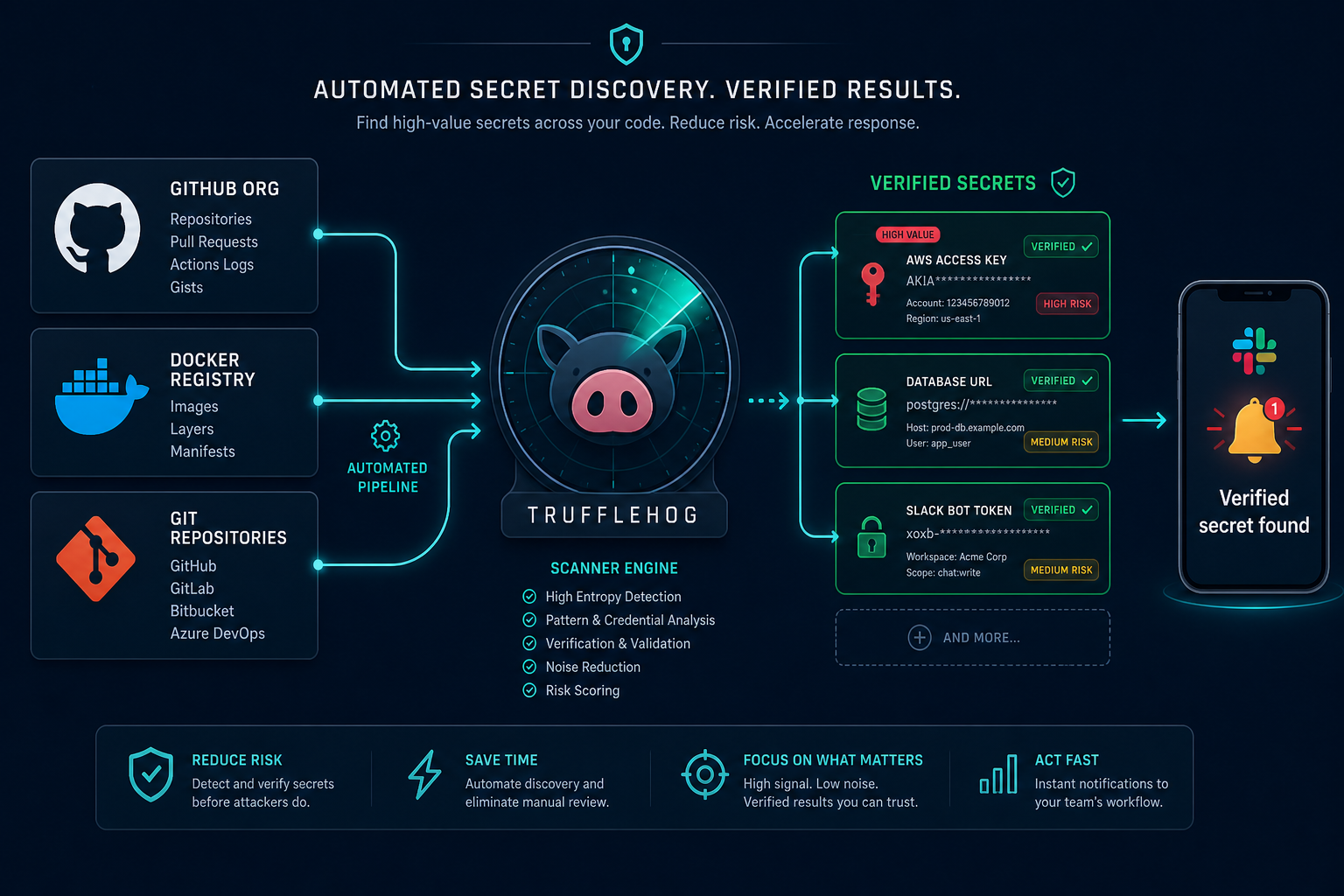
- Automate the boring part: cron or CI scans orgs/images on a schedule, JSON out, Slack/Discord/Telegram in when
Verified == true. - Triage verified noise: live does not always mean impact - low-privilege and staging keys need a fast kill filter.
- Report, do not abuse. A live AWS key or GitHub token is a finding. Logging into customer data is out of scope and can get you banned.
Why verified secrets pay (and regex dumps do not)
Bug bounty programs pay for impact. A revoked Stripe key from 2019 is not impact. A live AWS access key that can list S3 buckets, or a GitHub PAT that can read private repos in scope, is.
TruffleHog's edge is the verification step. It classifies 800+ credential types and, for most of them, tries a safe login/check against the provider API. That turns "maybe a secret" into "this key still works right now." Pair that with responsible testing limits from our bug bounty playbook and you stop drowning in false positives.
I treat secret hunting as recon with a payout filter: collect assets that are in scope, scan them quietly, keep only verified hits, then write a report that shows proof without overreaching. Same mindset as the rest of our security tools stack - less noise, more signal.
TruffleHog vs Gitleaks vs GitHub Secret Scanning
People ask which scanner to "pick." Wrong question. These three tools solve overlapping problems at different layers. For bounty hunting you care about live impact across many sources. For product teams you care about stopping leaks before merge and catching what still slips into the default branch.
| Capability | TruffleHog | Gitleaks | GitHub Secret Scanning |
|---|---|---|---|
| Live verification | Yes (provider API checks) | No (regex / entropy) | Partner keys only (push protection / alerts) |
| Best at | Verified hits across git, Docker, cloud, CI | Fast git history + pre-commit gates | Native GitHub coverage with zero setup |
| Sources | Git, GitHub/GitLab, Docker, S3/GCS, CI, filesystem, more | Git repos / diffs | GitHub repos (and some GitHub surfaces) |
| Noise profile | Low when --results=verified | Higher without tuning rules | Low for partners; misses custom formats |
| Bounty hunter fit | Primary scanner for paid secret finds | Great complement on cloned repos | Useful signal if the target already enabled it |
| Org / product fit | Scheduled hunting + revalidation | Pre-commit and CI fail-fast | Baseline for every GitHub org |
My default stack: TruffleHog for verified multi-source hunting, Gitleaks (or a pre-commit hook) when I want a cheap local gate on a clone, and GitHub Secret Scanning as free platform backstop on the target side. Do not treat GitHub's scanner as coverage for Docker layers, old tags, or non-partner token formats.
Install TruffleHog in two minutes
Pick whatever fits your machine. I use Homebrew on macOS and Docker when I want a clean runner for automation.
# macOS
brew install trufflehog

# or install script
curl -sSfL https://raw.githubusercontent.com/trufflesecurity/trufflehog/main/scripts/install.sh \
  | sh -s -- -b /usr/local/bin

# or Docker (no local install)
docker run --rm -it trufflesecurity/trufflehog:latest --help
For GitHub org scans you will want a token with read access to the public (or private, if authorized) repos you are allowed to test. Export it as GITHUB_TOKEN and never commit it. Yes, that irony is not lost on me.
Scan individual GitHub repos
Start here when a program lists specific GitHub URLs, or when recon finds a company repo that is clearly in scope. Full git history matters - secrets get "deleted" in a later commit and still sit in the old blobs.
# Local clone or remote URL - verified only
trufflehog git https://github.com/example-org/in-scope-app.git --results=verified

# JSON for automation
trufflehog git https://github.com/example-org/in-scope-app.git \
  --results=verified --json

# GitHub source: also cover issue + PR comments (people paste keys there constantly)
trufflehog github --repo=https://github.com/example-org/in-scope-app \
  --issue-comments --pr-comments --results=verified
That last command is where a lot of "easy" bounties hide. Devs debug in a PR comment, paste an AKIA... key or a Slack bot token, then "fix" the comment without rotating the credential. TruffleHog still sees it.
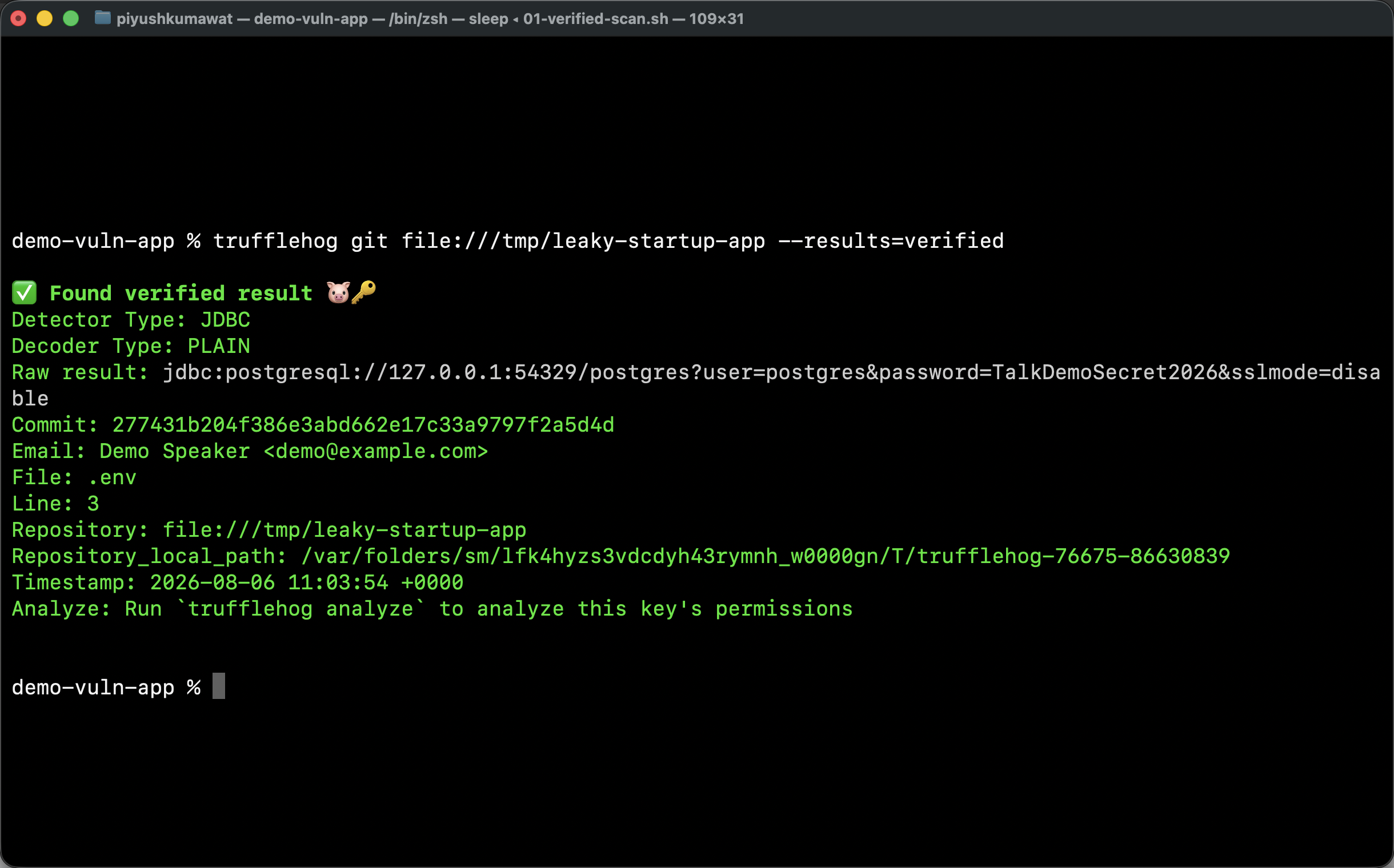
Here is what a real verified hit looks like on a leaky staging repo - TruffleHog found a JDBC Postgres URL in .env, checked it against the live database, and only printed the finding because the credential still worked:
Scan a whole GitHub org
When the program's scope is "all of org X on GitHub," do not clone repo by repo by hand. Point TruffleHog at the org and let it walk the inventory.
# Every repo in the org - verified secrets only
trufflehog github --org=example-org --token="$GITHUB_TOKEN" --results=verified

# Skip archived noise
trufflehog github --org=example-org --exclude-archived --results=verified

# Narrow to a glob when the program only allows certain repos
trufflehog github --org=example-org \
  --include-repos="example-org/public-*" --results=verified
Org scans are where automation starts paying rent. Run them on a schedule against targets you already confirmed are in scope. New repos get created. Forks get pushed. Someone merges a bad .env on a Friday night. Your job is to be awake when that happens - or to have a bot that is.
Scan Docker images (this one is underrated)
Containers are just layered filesystems with a reputation for "we cleaned the repo, so we are safe." Wrong. Keys get baked into ENV, copied into build contexts, or left in intermediate layers even after a later RUN rm.
# Remote registry image
trufflehog docker --image example-org/api:latest --results=verified

# Image already on your Docker daemon
trufflehog docker --image docker://example-org/api:latest --results=verified

# Saved tarball from a program's artifact drop
trufflehog docker --image file://./api-image.tar --results=verified

# Multiple images in one pass
trufflehog docker \
  --image example-org/api:latest \
  --image example-org/worker:latest \
  --results=verified
In bug bounty recon, pull public images tied to the target brand, staging tags, and old version tags. Old tags are gold. Nobody rotates secrets in v1.2.0-rc1 from two years ago.
Other places TruffleHog is quietly excellent
GitHub and Docker cover most of the demos below, but the same binary punches above its weight elsewhere when those sources are in scope:
- Filesystem / cloned dumps:
trufflehog filesystem ./loot --results=verifiedafter you pull a public backup, CI artifact, or exposed.git. - GitLab orgs: same idea as GitHub - org-wide scan with a token when GitLab is listed in scope.
- S3 / GCS: when a program allows cloud storage testing, or when you already proved a bucket is theirs and public.
- CI systems: CircleCI, Travis CI - build logs are a classic place people echo secrets "just for debugging."
- Postman / Jenkins / Elasticsearch: great when the target exposes those consoles or hands you workspace exports in a private program.
- Stdin / pipes: feed TruffleHog the output of other recon tools without writing a custom detector.
# Local path after cloning or downloading artifacts
trufflehog filesystem ./target-dump --results=verified --json

# Example S3 (only if authorized / in scope)
trufflehog s3 --bucket=example-public-assets --results=verified,unknown
Where secrets hide beyond main
If you only scan the tip of main, you are hunting with one eye closed. Most paid finds I see are not sitting in the current README. They are in places people thought they cleaned up.
- Deleted commits / rewritten history: removing a line in a later commit does not erase the blob. Full git history scans still catch it.
- PR and issue comments: paste-debug culture. Enable
--issue-commentsand--pr-commentson GitHub scans. - GitHub Actions logs and artifacts:
echo $SECRET"just once," workflow dumps, and downloaded CI artifacts. - Docker image layers: secrets copied in early layers survive a later
RUN rm. Scan the image, not only the Dockerfile in git. docker history/ old tags:-rc,dev,backup,staging, and year-old version tags rarely get rotated.- Forks and mirrors: a secret fixed upstream can still live in a public fork that never rebased.
Practical habit: for every in-scope GitHub org, also inventory public images and a sample of non-latest tags. For every interesting repo, run history + comment coverage, not just a shallow clone of HEAD.
Automation: sit back, get pinged on verified secrets
This is the part people actually care about. You do not want to babysit terminal output. You want a loop:
- Maintain an allowlist of in-scope GitHub orgs / repos / Docker images.
- Run TruffleHog on a schedule (cron, GitHub Actions self-runner, or a cheap VPS).
- Emit JSON, keep only verified findings, dedupe by detector + redacted secret hash.
- Push a short message to Slack, Discord, or Telegram.
- Triaging human (you) opens the finding, confirms scope, writes the report.
A minimal bash sketch (replace names, keep ethics):
#!/usr/bin/env bash
set -euo pipefail

ORG="in-scope-org"   # must be allowed by the program
OUT="/tmp/th-findings.jsonl"
STATE="/var/lib/secret-hunt/seen.txt"
mkdir -p "$(dirname "$STATE")"
touch "$STATE"

trufflehog github --org="$ORG" --token="$GITHUB_TOKEN" \
  --results=verified --json > "$OUT"

while IFS= read -r line; do
  [[ -z "$line" ]] && continue
  det=$(echo "$line" | jq -r '.DetectorName // .DetectorType // "unknown"')
  red=$(echo "$line" | jq -r '.Raw // .RawV2 // empty' | sha256sum | awk '{print $1}')
  id="$det:$red"
  grep -qxF "$id" "$STATE" && continue
  echo "$id" >> "$STATE"

  # Never paste the full secret into Slack. Metadata only.
  msg="Verified secret: $det on $ORG (see local JSON for details)"
  curl -sS -X POST -H 'Content-type: application/json' \
    --data "{\"text\":\"$msg\"}" "$SLACK_WEBHOOK_URL"
done < "$OUT"
Two hard rules for the automation layer:
- Do not broadcast raw secrets into chat. Notify on detector type, repo, commit, and a local path. Secrets stay on the scanner host until you need them for the report.
- Dedupe aggressively. Without a seen-set, the same live key will wake you up every night.
When you are ready to write the finding, use a clean structure - impact, proof of validity (redacted), how you found it, and a fix. Our security report templates are a solid starting point.
Deduping findings at scale
Automation without dedupe is just a louder pager. Once you scan the same org nightly, the same live key will verify again and again until someone rotates it. Your notifier needs memory.
- Hash the secret, never store it in chat state. Use
sha256(Raw)(orRawV2) plus detector name as the finding ID. - Track lifecycle:
new,already_reported,revoked,ignored_no_impact. Onlynewshould wake you up. - Ignore revoked repeats. If last week's key now fails verification, mark it revoked and stop alerting. Revalidation is useful; re-alerting is not.
- Collapse duplicates across sources. The same AWS key in git history and an old Docker tag is one report, two evidence paths.
- Cap alert volume. Batch quiet hours, rate-limit Slack messages, and keep a daily digest for low-severity verified hits.
A tiny state file works for a personal hunter setup. Once you are watching many orgs and images, move that state into a small DB (finding hash, first seen, last verified, report URL). That is the difference between a cron script and a secrets pipeline you can trust.
Pre-commit / CI vs scheduled hunting
Same scanner, different jobs. Mixing them up wastes time.
- Pre-commit / local hooks: stop a developer from committing a key in the next few seconds. Fast, offline-friendly regex tools (or TruffleHog as a hook) win here.
- CI on every PR: catch what slipped past the laptop. Fail the build on high-confidence secrets before merge.
- Scheduled hunting (orgs, history, Docker tags): find what already leaked - old commits, public images, new repos that appeared overnight. This is the bounty hunter loop, and it is also what security teams need for continuous coverage.
Hunters live in the scheduled lane: allowlisted targets, verified-only results, notifications, human triage. Product orgs should run all three lanes. If you only scan on PR, you never revisit yesterday's public Docker tag. If you only hunt on a schedule, you never stop the next leak at the keyboard. A practical org setup is pre-commit + CI gates, then a recurring TruffleHog job across repos and images with verified findings routed to Slack or a ticket queue - the same shape as a secrets scheduler, just with clearer ownership.
False positives and "verified but useless"
Verified == true means the credential still authenticates. It does not automatically mean bounty-worthy impact. Triage fast or your queue dies.
- Low-privilege tokens: a GitHub PAT that can only read public metadata, or a Slack token with almost no scopes, may verify and still be Informational.
- Staging / sandbox keys: live against a non-prod tenant with no customer data and no bridge to production. Still report if in scope, but set expectations.
- Expired-looking but still accepted: some providers keep long-lived keys that look old in filenames (
old_key,backup.env) and still work. Age is not a kill signal - privileges are. - Shared demo credentials: public docs and tutorial keys that intentionally verify. Check whether the value is a known sample before writing a Critical.
- Wrong-asset leaks: a verified key that clearly belongs to a third party outside program scope. Stop. Do not expand testing.
Fast triage order: confirm scope, check detector + identity/metadata only, estimate blast radius, then decide report / downgrade / ignore. If you cannot show a realistic impact path in five minutes of safe checks, park it and move on. Your time is the scarce resource, not another verified line in JSON.
Rate limits and OPSEC
Secret hunting gets people burned in boring ways: API bans, noisy verification logs, and scope accidents. Stay quiet.
- GitHub API throttling: org-wide scans with comments enabled chew through rate limits. Use a token, exclude archived repos when you can, and space scheduled jobs so you are not hammering the same org every hour.
- Verification noise: provider APIs may log auth checks. Prefer verified mode on focused allowlists, not "scan the internet." Keep concurrency modest.
- Quiet scan settings: verified-only output, JSON to disk, no raw secrets in chat, no parallel shotgun against every tag you can spell.
- Identity hygiene: dedicated hunting token, minimal scopes, rotate it, and never reuse your personal PAT that can push to your own repos.
- Do not burn yourself: no credential stuffing, no data exfil "to prove impact," no scanning assets outside written scope. Minimal proof beats a dramatic screenshot that gets you banned.
If a program forbids active verification, turn it off and report discovery with strong context instead. A clean process is part of the finding quality.
From verified key to bounty (without getting banned)
Verification proves the credential is live. It does not give you a free pass to explore production data. For most programs the safe path looks like this:
- Confirm scope - is this org/repo/image explicitly allowed? If not, stop.
- Minimal proof - enough to show the key works (identity call, account ARN, token scopes). Stop before reading customer PII or modifying anything.
- Rotate guidance - tell them exactly what to revoke and how to prevent the next leak (pre-commit hook, GitHub secret scanning, remove secrets from image layers).
- Attach evidence - commit hash, file path, image digest, redacted screenshot. Programs love reproducible reports.
If you are newer to this workflow, stack it next to a structured learning path like the penetration testing roadmap. Secret hunting is one recon skill among many - it just happens to convert to cash faster when automation is done right.
FAQ
Is TruffleHog better than gitleaks for bug bounties?
Short answer: use both for different jobs. See the comparison table above. For live multi-source hunting I lead with TruffleHog verified mode. For fast git gates I still like gitleaks. GitHub Secret Scanning is the free backstop on GitHub-hosted code, not a replacement for Docker or history-wide hunting.
Will verification tip off the target?
Sometimes providers log auth checks. Keep volume low, stick to in-scope assets, and prefer the lightest identity/metadata calls. If a program forbids active verification, stop at discovery and report with strong contextual evidence instead.
Can I scan private repos?
Only with explicit authorization - private bug bounty invites, employee programs, or written permission. Public org/repo/image scanning is where most public program work lives.
What should I put in the Slack message?
Detector name, source (repo/image), commit or digest, and a pointer to local JSON. Never the raw secret. Your future self (and your workspace admins) will thank you.
Where do most paid findings come from?
In my experience: old Docker tags, PR/issue comments, deleted-but-still-in-history commits, and "temporary" keys that nobody rotated. Fresh main-branch scans matter, but history and artifacts pay more often.
Wrap
Secret hunting stops being a grind when verification and automation do the filtering for you. Point TruffleHog at the GitHub orgs, repos, and Docker images you are allowed to test. Keep only verified results. Get a quiet notification. Write a tight report.
Treat the commands above as the lab sheet - then go build the notifier that wakes you up only when a credential still works.