
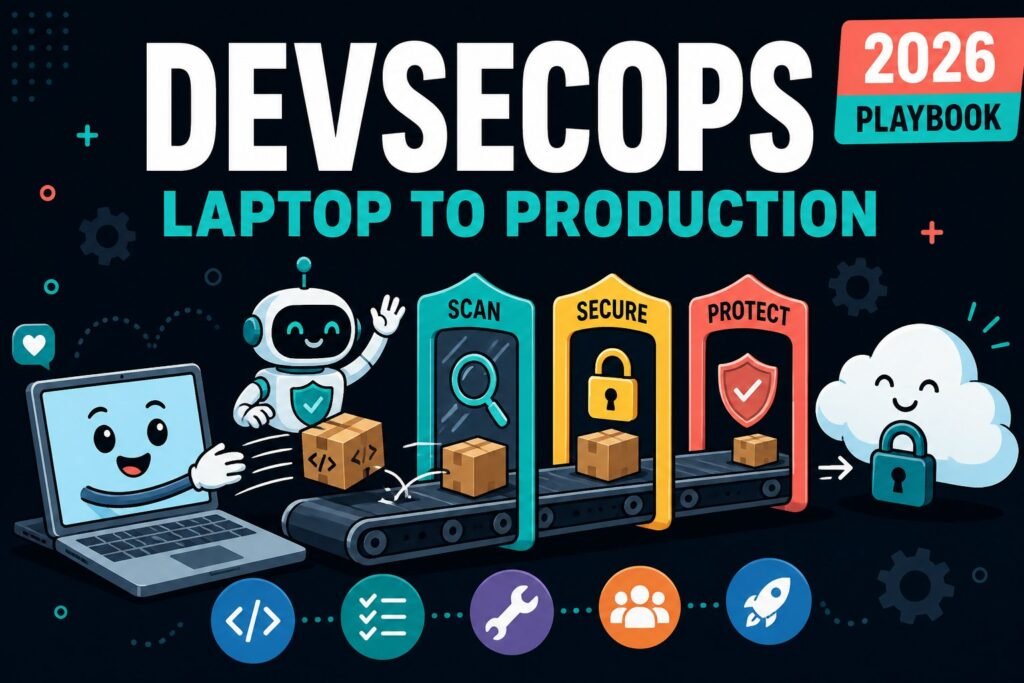
How software travels from a developer's editor to a live server - and where security checks sit along the way. Every tool explained in one sentence.
First, the normal cycle
Before we add anything about security, look at how a software team already works. Nothing here is special or new - this is just the loop that repeats, week after week, forever.
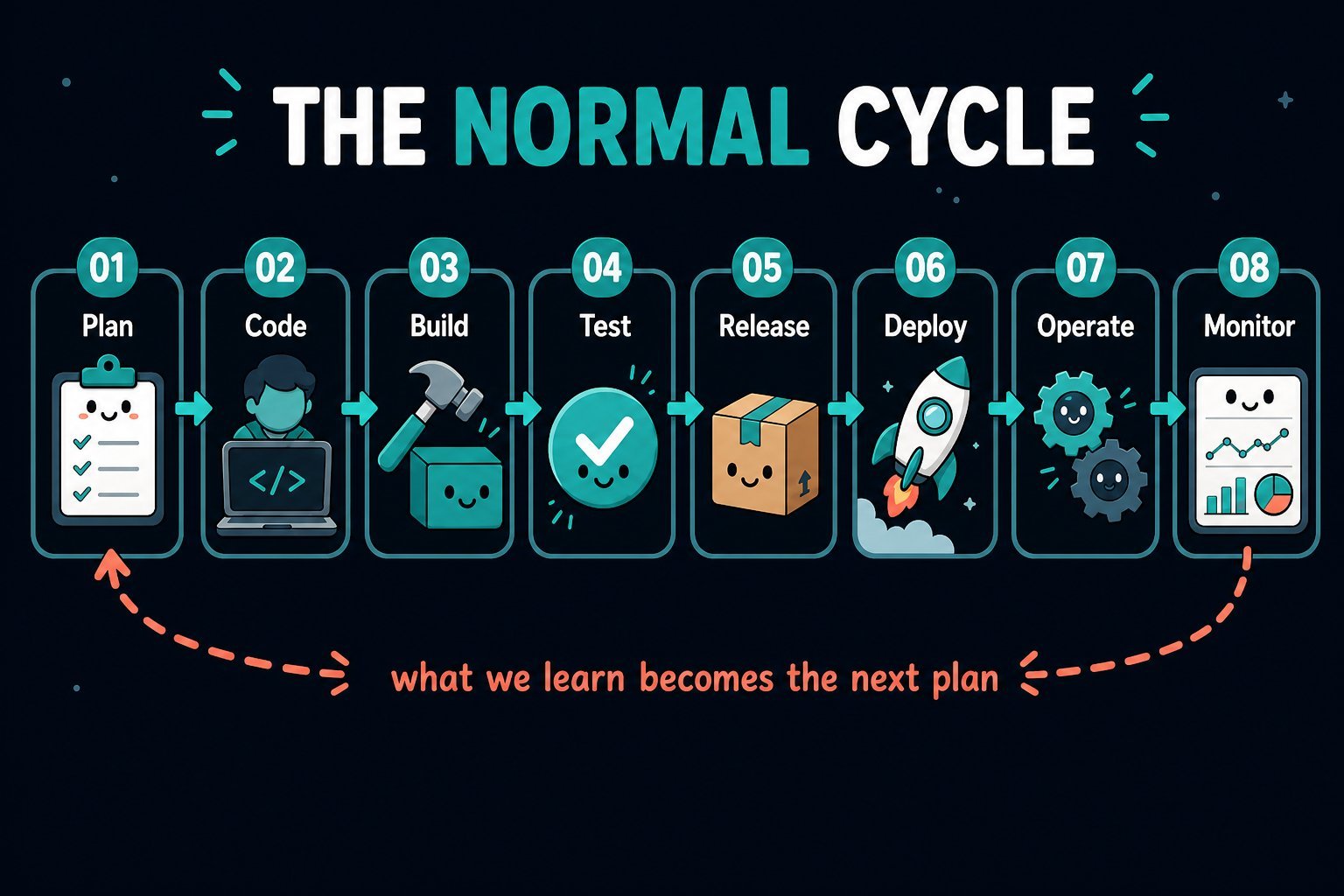
In words:
- Plan - decide what to build. Tickets, designs, priorities.
- Code - a developer writes it on their own machine, in an editor called an IDE (VS Code, IntelliJ, and so on).
- Build - turn that human-readable code into something a computer can actually run (a binary, a JAR, a container image).
- Test - automated checks confirm it still does what it should.
- Release - package the finished thing, give it a version number, put it in a shelf called a registry.
- Deploy - copy it onto real servers where real users reach it.
- Operate - keep it running: restarts, scaling, backups.
- Monitor - watch graphs and logs, notice problems, learn.
The chain from Build onwards is usually automated. That automation is called a pipeline: a robot that wakes up whenever a developer pushes code and runs the same steps in the same order every time. That word matters, because a pipeline is exactly where security fits in.
The old way, and why it hurt
For a long time, security was one big review right before going live. A separate team took the finished application, tested it for a few weeks, and sent back a long list of problems. Everyone hated it - not because the findings were wrong, but because they arrived too late to fix cheaply.
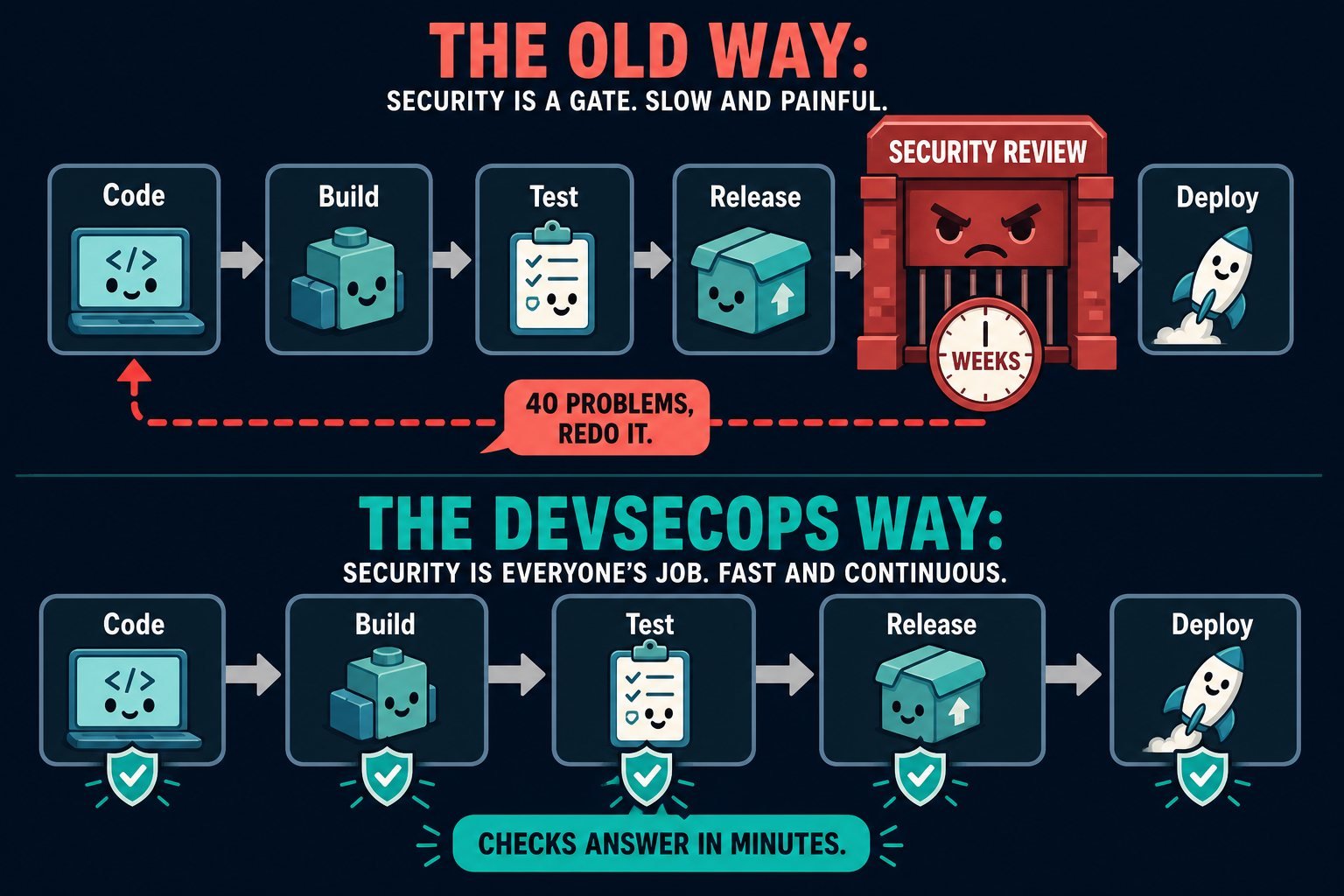
Moving those checks earlier has a nickname: shift left. Picture the pipeline drawn left to right - you are pushing security towards the left-hand side, closer to the person typing the code. That is the whole idea behind DevSecOps: Development, Security and Operations working as one flow instead of three departments.
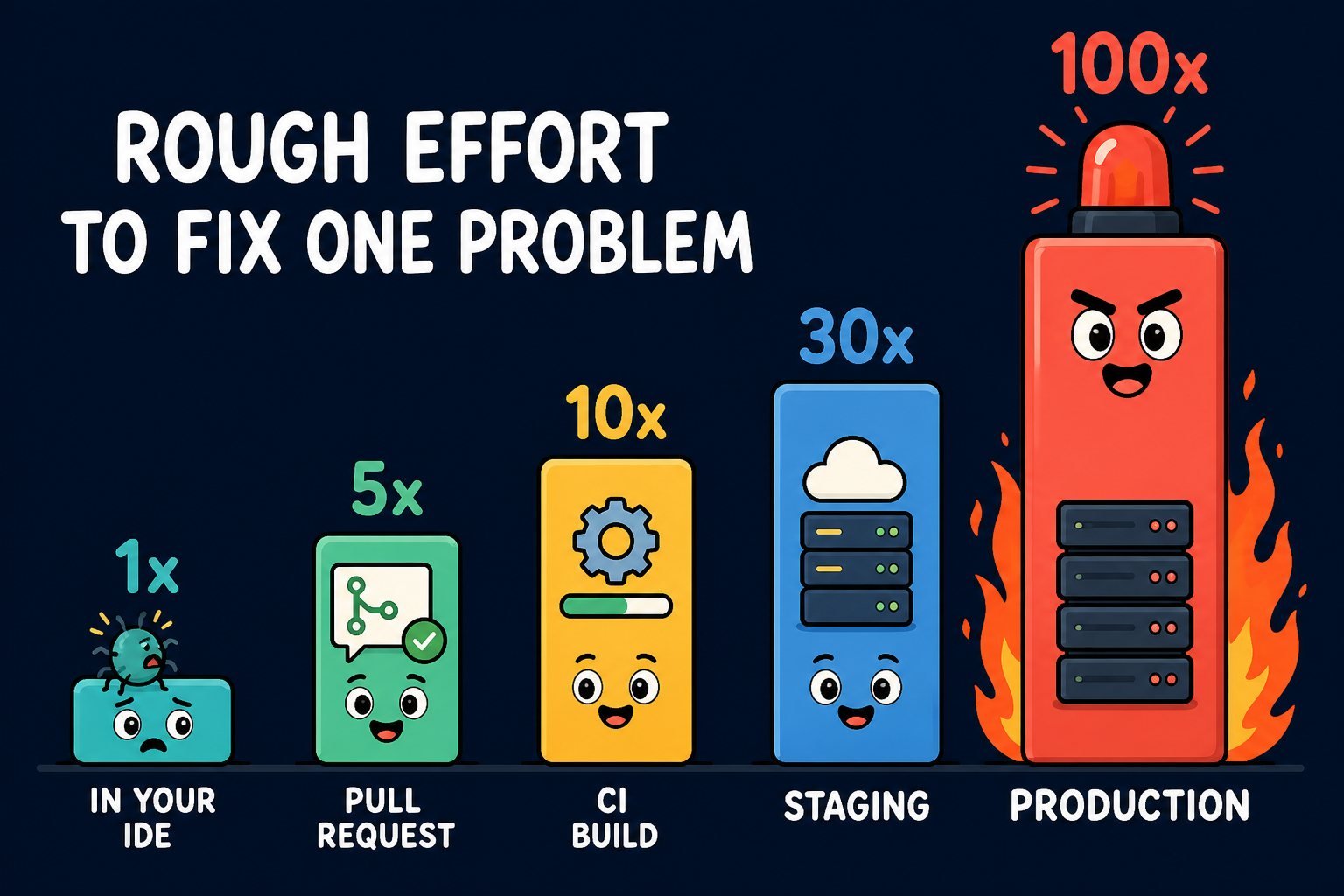
Why does earlier matter so much? Because the cost of a fix grows the further it travels.
The full journey, station by station
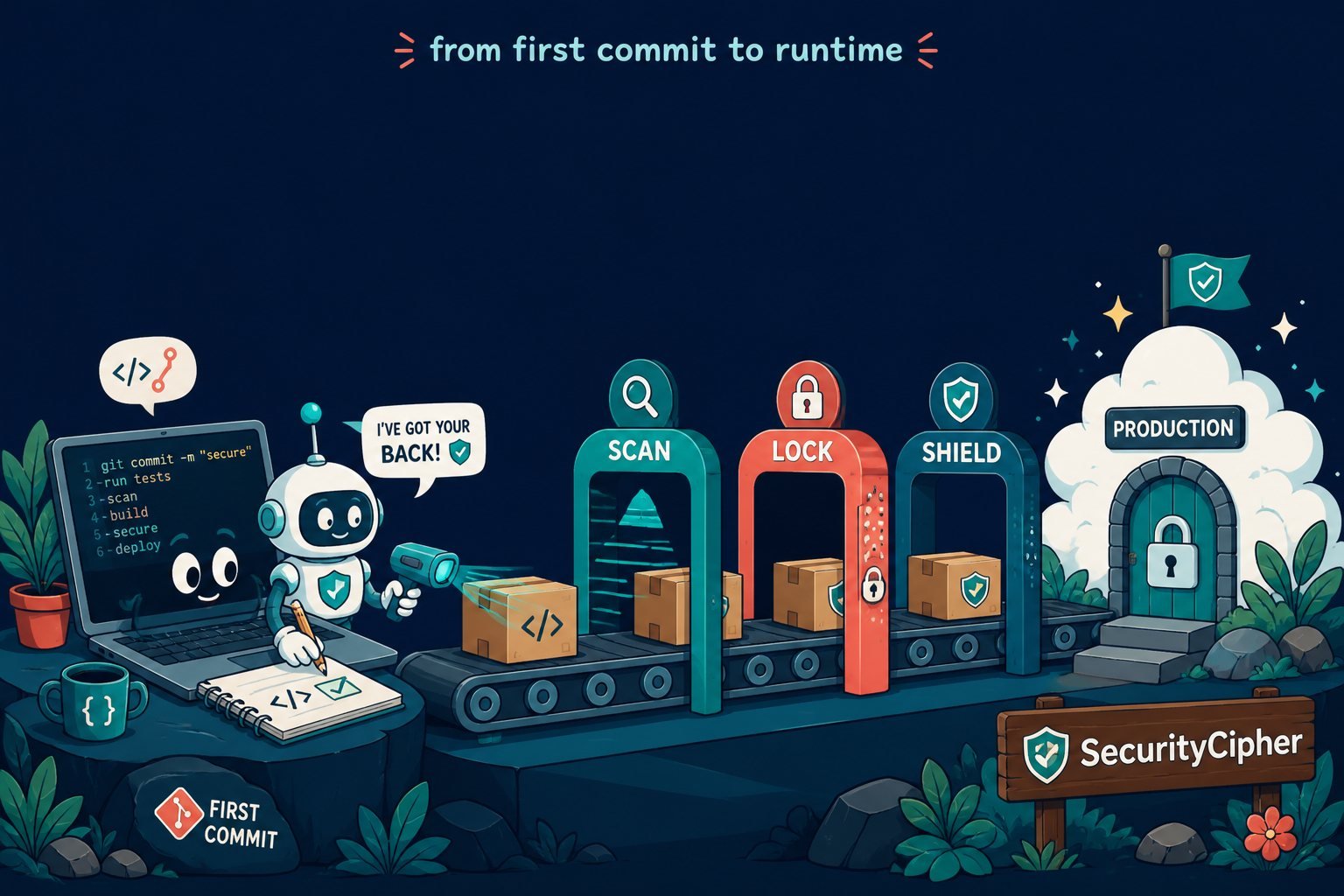
Here is the same trip drawn as six stations. Your code enters at the left and reaches real users at the right. At every station a few checks run. If any check goes red, the journey stops and comes back to you - nothing moves forward on its own.
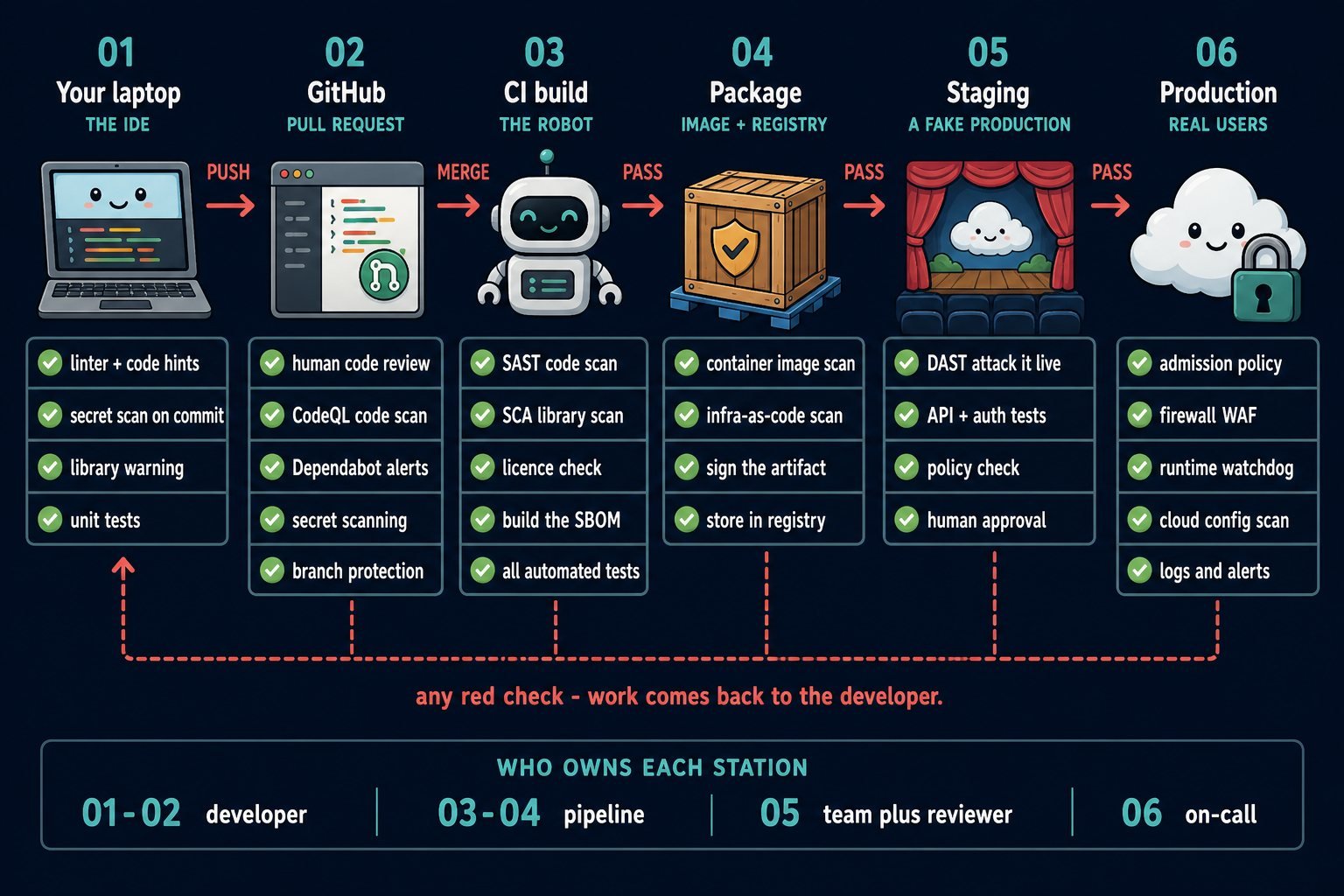
Now the same six stations, slowly.
01. Your laptop - the IDE
This is where a developer types. The IDE is just a very smart text editor. Because nothing has left the machine yet, this is the cheapest possible place to catch a mistake - you fix it before anyone else ever sees it.
What goes wrong here: Someone pastes a real database password into a file to "test quickly", then commits it. Or they add a library from the internet without knowing it has a publicly known flaw.
Tools that help
- SonarQube for IDE (was SonarLint) / ESLint - Linter - Underlines risky or sloppy code as you type, like a spell-checker for programming.
- Snyk / Sonar IDE plugin - SCA - Tells you, inside the editor, that the library you just imported has a known vulnerability - and which version fixes it.
- Gitleaks / TruffleHog - Secrets - Reads your changes looking for things shaped like passwords, API keys and tokens.
- pre-commit hooks - Guard - A small script Git runs before it accepts your commit. If a scan fails, the commit is simply refused.
- .env + a secret manager - Habit - Real passwords live outside the code, in a vault. The code only holds the name of the secret, never its value.
02. GitHub - where code becomes a team decision
The developer pushes their work to GitHub. Nothing goes live yet. They open a pull request: a formal proposal saying "here are my changes, please review them". This is the single most important checkpoint in the whole journey, because it is the last moment before code becomes official.
What goes wrong here: Code merged with no review. Or a leaked key that was already committed, now sitting in the history where anyone with repo access can read it.
Tools that help
- Pull request review - Human - A teammate reads the change and must approve it. Still the best security tool that exists.
- Branch protection - Rule - Stops anyone writing directly to the main branch, or merging while any check is red. Switch off "allow administrators to bypass" or it is only a rule for everybody else.
- CODEOWNERS - Rule - A file that says "changes to the payment folder need the payments team". Those reviewers are requested automatically, and their approval can be made compulsory in the branch rules.
- CodeQL - SAST - GitHub's own code scanner. It treats your code like a database and queries it for known dangerous patterns.
- Dependabot - SCA - Watches every library you use. When a flaw is published, it opens a pull request that upgrades you.
- Secret scanning - Secrets - Recognises real credential formats. Push protection rejects the push before the secret ever lands.
- GitHub Actions - CI - The robot that runs all of the above on every push, and reports pass or fail on the pull request page.
There is a whole section on GitHub below, because it does more than most people realise.
03. CI build - the robot that never gets tired
CI means Continuous Integration: a server that automatically compiles and checks the code every single time it changes. This is where the deeper, slower scans run - the ones you would not want to wait for in your editor.
What goes wrong here: The build works, so everyone assumes it is safe. But nobody scanned the 400 open-source packages that got pulled in as dependencies-of-dependencies.
Tools that help
- SonarQube / Semgrep - SAST - Reads all your source code without running it, hunting for insecure patterns: SQL injection, weak encryption, unchecked input.
- Snyk Open Source / OWASP Dependency-Check - SCA - Lists every third-party library you depend on and compares it against public vulnerability databases (CVEs).
- Licence scanner (FOSSA) - Legal - Checks that no library carries a licence your company is not allowed to ship. A legal risk, not a hacking one.
- Syft / Trivy - SBOM - Writes the ingredients list for your software - every component and version - in a standard format (CycloneDX or SPDX). When the next big flaw lands, this answers "are we affected?" in seconds.
- HashiCorp Vault / AWS Secrets Manager - Secrets - Hands out passwords to the build at the moment it needs them, instead of storing them in the pipeline configuration.
- Quality gate - Gate - The rule that turns findings into a decision: "fail this build if there is any critical issue". Without a gate, a scanner is just a report nobody reads.
04. Package - the box you actually ship
The build output gets wrapped into a shippable box, almost always a container image: your application plus a miniature operating system around it. That box goes onto a shelf called a registry. The recipe for the servers themselves - written as files, not clicked in a console - is called infrastructure as code.
What goes wrong here: Your code is spotless, but the base image inside the box is three years old and full of unpatched holes. Or a Terraform file quietly opens a storage bucket to the entire internet.
Tools that help
- Trivy / Grype / Docker Scout - Image scan - Opens the container box and checks what is inside it - the operating-system packages and your application libraries - for known flaws.
- Checkov / KICS / Trivy config - IaC scan - Reads Terraform, CloudFormation and Kubernetes files and flags dangerous settings before they are created - public buckets, open ports, no encryption.
- Cosign (Sigstore) - Signing - Puts a tamper-proof seal on the box, so production can verify it is the exact thing your pipeline built and not a swapped copy.
- Harbor / ECR / Artifactory - Registry - The shelf itself. Good ones re-scan stored images every day, because new vulnerabilities are discovered after you ship.
- Minimal base images - Habit - Start from a tiny image (distroless, Alpine). Less software inside the box means fewer things that can be attacked.
05. Staging - a rehearsal on a fake production
Staging is a copy of production with fake data. Everything up to now examined your code while it sat still. Here, for the first time, the application is actually running - so you can behave like an attacker and see what happens.
What goes wrong here: Each part looks fine alone, but together they leak. A login page that returns a different error for "wrong password" and "no such user" tells an attacker which accounts exist.
Tools that help
- ZAP (was OWASP ZAP) - DAST - Pokes the live application from outside - odd inputs, broken sessions, injection attempts - and reports what breaks. It sees no code, only behaviour.
- Nuclei - Scanner - Fires thousands of small community-written checks for well-known misconfigurations and exposed pages.
- API security tests - Testing - Confirms that user A genuinely cannot read user B's data by editing an ID in the URL. It is the number one item on the OWASP API Security Top 10.
- OPA / Kyverno - Policy - Company rules written as code: "no container may run as root". Checked here, enforced in production.
- Penetration test - Human - A skilled person attacking on purpose. Slow and expensive, so save it for big releases - but nothing replaces it.
- Approval gate - Gate - A named human clicks "yes, ship it". The pipeline waits. Sometimes the right control is simply a pause.
06. Production - real users, real consequences
The box is deployed and traffic arrives. Security does not end at deployment - it changes shape. Before, you were asking "is this code safe?". Now you are asking "is something bad happening right now?"
What goes wrong here: The thing you shipped last month was safe last month. A brand-new vulnerability is announced today in a library you use, and nobody notices for three weeks.
Tools that help
- OPA Gatekeeper / Kyverno - Admission - The bouncer at the cluster door. It refuses to start any container that breaks a policy - and, with signature checking wired in, any container that is not signed - even if a human tried to force it.
- WAF (Cloudflare, AWS WAF) - Firewall - Sits in front of your app and blocks obviously malicious requests before they reach it.
- Falco / Tetragon - Runtime - Watches what your running containers actually do. If your web app suddenly starts a shell or reads
/etc/shadow, it screams. - Wiz / Prowler / CSPM - Cloud - Continuously inspects your cloud account settings for anything left open, over-permissioned, or drifted from the approved configuration.
- Splunk / Elastic (SIEM) - Logs - Collects logs from everywhere into one place and raises an alarm on suspicious patterns - like 500 failed logins in a minute.
- Secret rotation - Secrets - Passwords and keys are replaced automatically on a schedule, so a stolen one stops working quickly.
- Patching + Dependabot - Upkeep - Back to station 02. A new flaw becomes a pull request, and the whole journey runs again. This is the loop closing.
The one sentence version. Security tools are just extra tests. A unit test asks "does this work?" A security test asks "can this be abused?" Both run in the same pipeline, both go red the same way, and both are cheapest to fix at the station where they run.
So what exactly does GitHub do?
People often describe GitHub as "where the code lives". That is the smallest part of it. GitHub is really three things stacked together: a history book, a review process, and a robot - plus a set of security features built into all three.
Start with the history book. Git records every change ever made, who made it, when, and why. Nothing is overwritten - as long as force-push and history rewriting are blocked, which is one of the things branch protection is for. That alone answers the question every investigation begins with: who changed this, and when?
Then the review process. Instead of editing the official code directly, you work on a copy called a branch and then open a pull request. Here is what happens the moment you do:
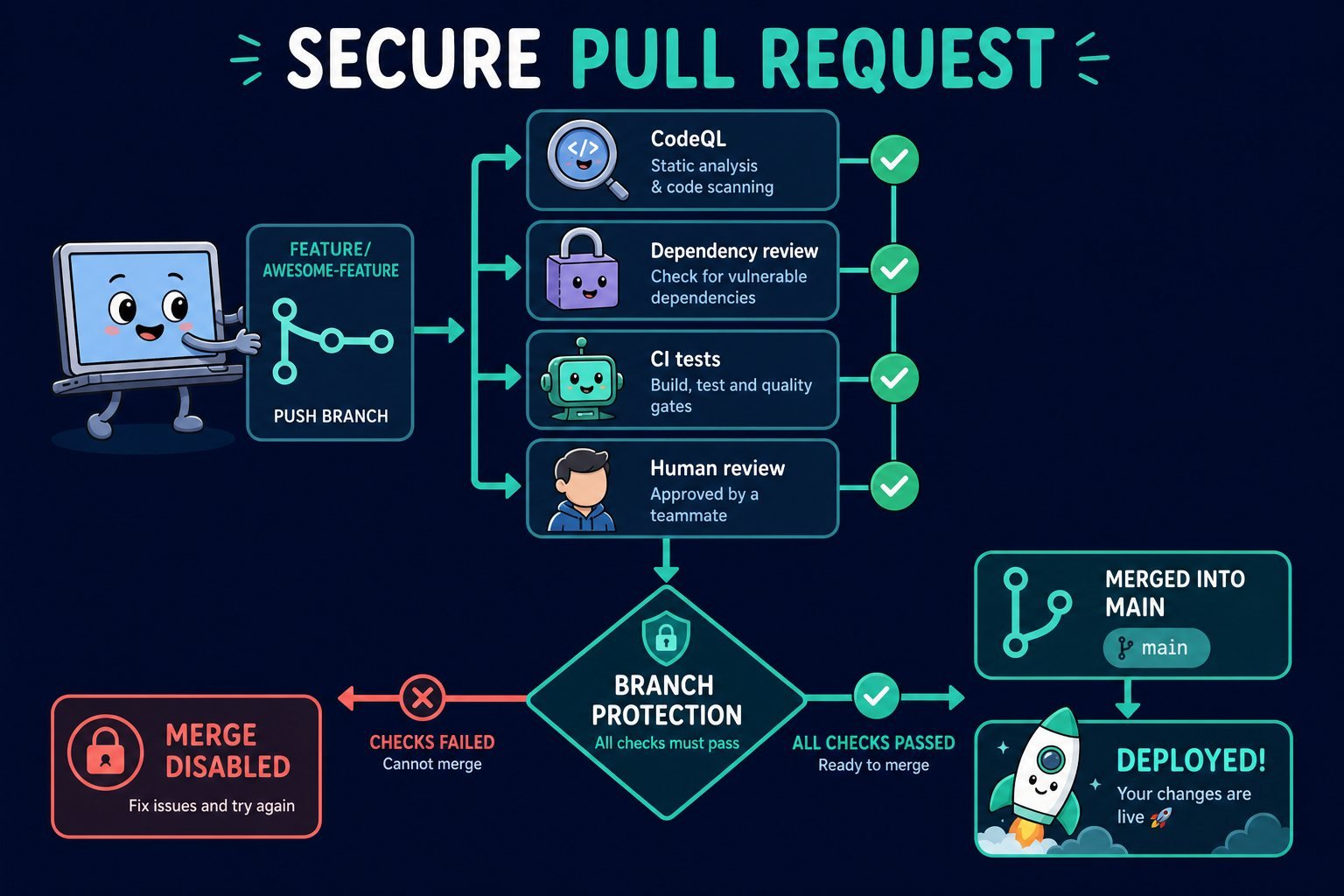
And the robot: GitHub Actions. You write a small file in your repository describing steps to run, and GitHub runs them on a fresh machine every time something happens - a push, a pull request, a nightly schedule. Almost every tool named in this guide is invoked from a file like that. Actions is the engine, the scanners are the passengers.
The security features layered on top:
- Secret scanning - Knows what a real AWS key or Stripe token looks like. With push protection on, the push is rejected before the secret enters the history - and GitHub can tell the provider to revoke it.
- Dependency graph - A live map of every library your project pulls in, including the ones your libraries pull in. This is what makes "are we affected?" answerable.
- Dependabot - Two jobs: alerts you about vulnerable libraries, and opens the upgrade pull request for you.
- CodeQL scanning - Runs on the pull request and leaves comments on the exact lines it is worried about, in the review, where you are already looking.
- Environments - Marks "production" as special: required reviewers, wait timers, and secrets only that environment can read.
- OIDC to your cloud - Lets a pipeline borrow short-lived cloud credentials for one run instead of storing a permanent key. Nothing long-lived to steal.
- Signed commits - Cryptographic proof that a commit really came from the person it claims to. Anyone can type your name into Git; not anyone can sign as you.
- Audit log - For an organisation: permission changes, settings and deleted branches are all recorded, and kept for a fixed period. The first thing anyone reads after an incident.
One practical note before you go hunting for these buttons: on public repositories all of the above is free. On private ones, CodeQL scanning needs the paid GitHub Code Security add-on, secret scanning and push protection need GitHub Secret Protection, and Environments with required reviewers need a paid plan. The feature is not missing - it is behind a licence.
GitLab, Bitbucket and Azure DevOps all offer close equivalents of every item above. The names differ; the ideas do not.
The whole toolbox on one page
You will hear these names in meetings. Here is what each one is for, in one line, and where it runs. You do not need all of them - most teams pick one per row of the type column.
| Tool | Type | What it does, plainly | Station |
|---|---|---|---|
| SonarQube for IDE | Linter | Flags risky code while you type (was SonarLint) | 01 IDE |
| Gitleaks | Secrets | Catches passwords and keys before they are committed | 01 IDE |
| pre-commit | Guard | Refuses a commit if any local check fails | 01 IDE |
| CodeQL | SAST | Queries your source code for dangerous patterns | 02 GitHub |
| Dependabot | SCA | Alerts on vulnerable libraries and opens the upgrade PR | 02 GitHub |
| Secret scanning | Secrets | Spots known credential formats; push protection blocks them | 02 GitHub |
| Branch protection | Gate | No direct writes to main, no merging while red | 02 GitHub |
| GitHub Actions | CI | Runs every other tool automatically on each push | 02-06 |
| SonarQube | SAST | Full code scan with a pass/fail quality gate | 03 CI |
| Semgrep | SAST | Fast pattern-matching scanner with custom rules | 03 CI |
| Snyk | SCA | Matches your libraries against known vulnerabilities | 03 CI |
| Dependency-Check | SCA | Free OWASP alternative to the above | 03 CI |
| Syft / Trivy | SBOM | Writes the ingredients list, as CycloneDX or SPDX | 03 CI |
| FOSSA | Licence | Warns when a library's licence is not allowed | 03 CI |
| Vault | Secrets | Stores and hands out passwords on demand | 03-06 |
| Trivy / Grype | Image scan | Checks the OS packages and app libraries inside the image | 04 Package |
| Checkov / KICS | IaC scan | Finds unsafe cloud settings in Terraform and Kubernetes files | 04 Package |
| Cosign | Signing | Seals the artifact so tampering is detectable | 04 Package |
| Harbor / ECR | Registry | Stores artifacts and re-scans them daily | 04 Package |
| ZAP | DAST | Attacks the running app from outside (was OWASP ZAP) | 05 Staging |
| Burp Suite Pro | DAST | The same, with a human driving it | 05 Staging |
| Nuclei | Scanner | Thousands of quick checks for known misconfigurations | 05 Staging |
| OPA / Kyverno | Policy | Company rules as code, enforced automatically | 05-06 |
| Gatekeeper | Admission | Refuses to run containers that break policy | 06 Production |
| AWS WAF / Cloudflare | Firewall | Blocks malicious traffic before it reaches the app | 06 Production |
| Falco | Runtime | Alerts when a running container behaves strangely | 06 Production |
| Wiz / Prowler | CSPM | Scans cloud account settings for exposure | 06 Production |
| Splunk / Elastic | SIEM | Collects all logs and alerts on suspicious patterns | 06 Production |
Jargon decoder
Every acronym in this guide, and a few more you will hear.
- SAST - Static Application Security Testing. Reading the code without running it. Like proofreading a recipe.
- DAST - Dynamic Application Security Testing. Attacking the app while it runs. Like tasting the cooked dish.
- IAST - Interactive Application Security Testing. A mix of both: an agent sits inside the running app and watches the code as it executes.
- SCA - Software Composition Analysis. Checking the borrowed code - the open-source libraries you did not write.
- SBOM - Software Bill of Materials. The ingredients list: every component and version inside what you shipped.
- CVE - Common Vulnerabilities and Exposures. A public ID for one specific known vulnerability, like
CVE-2021-44228. The world's shared reference number. - CVSS - Common Vulnerability Scoring System. A 0-10 score for how severe a CVE is; 7.0 and above counts as High. Severity is not the same as urgency for your system.
- IaC - Infrastructure as Code. Describing servers and networks in files (Terraform, Kubernetes YAML) instead of clicking in a console.
- CI / CD - Continuous Integration and Continuous Delivery. The automated build-test chain, and the automated path to release.
- Pipeline - The ordered list of steps that automation runs on every change.
- Gate - A step that can stop the pipeline. A scan without a gate is only a suggestion.
- Artifact - The finished, packaged output of a build - the box you deploy.
- Registry - The shelf where artifacts are stored and versioned.
- Shift left - Moving checks earlier in the timeline, closer to the developer.
- WAF - Web Application Firewall. A filter in front of your app that blocks obviously hostile requests.
- RASP - Runtime Application Self-Protection. Defence built into the app itself, able to block an attack mid-request.
- CSPM - Cloud Security Posture Management. Continuously checking your cloud account for risky settings.
- SIEM - Security Information and Event Management. One place where all logs land and alarms are raised.
- Admission controller - The doorman of a Kubernetes cluster. It can refuse a container before it ever starts.
- Least privilege - Give every person and program the smallest access that still lets them do the job.
- Supply chain - Everything that goes into your software but was not written by you: libraries, base images, build tools, actions.
- Threat model - A short conversation, before coding, about who might attack this feature and how. The cheapest security activity there is.
If you remember only five things
- DevSecOps did not add a new stage. It put small, fast checks inside the stages you already had.
- The earlier a problem is caught, the cheaper it is - which is why the IDE and the pull request matter more than the final review.
- Every tool answers one of four questions: is my code safe (SAST), is borrowed code safe (SCA), is the running app safe (DAST), is the place it runs safe (IaC, CSPM, runtime).
- A scanner with no gate changes nothing. The decision to fail the build is the actual control.
- Nothing here is one-time. New vulnerabilities appear in code you already shipped, so the loop keeps running - forever.
All tools named here are examples, not recommendations, and are grouped by what they do rather than by vendor. Every category has good open-source and commercial options; pick one per category, wire it into a gate, and add the next one only once the first is trusted.