
Please, be aware that this project is no longer maintained. Please, consider use our ScoutSuite tool.
Azucar is a multi-threaded plugin-based tool to help you assess the security of your Azure Cloud environment.
The script will not change or modify any assets deployed in an Azure subscription.
As the script uses the .NET ADAL library for authenticating a user and calling REST APIs, it only supports Windows OS.
- Return a number of attributes on computers, users, groups, contacts, events, etc... from Azure Active Directory.
- Search for High Level Accounts in a specific Azure Tenant, including Azure Active Directory, classic administrators, and Directory Roles (RBAC).
- Multi-Threading support.
- Plugin Support.
- The following assets are supported by Azucar:
- Azure SQL Databases, including MySQL and PostgreSQL databases,
- Azure Active Directory,
- Storage Accounts,
- Classic Virtual Machines,
- Virtual Machines V2,
- Security Status,
- Security Policies,
- Role Assignments (RBAC),
- Missing Security Patches,
- Missing Security Baseline,
- Web Application Firewall,
- Network Security Groups,
- Classic Endpointsy,
- Azure Security Alerts,
- Azure KeyVault.
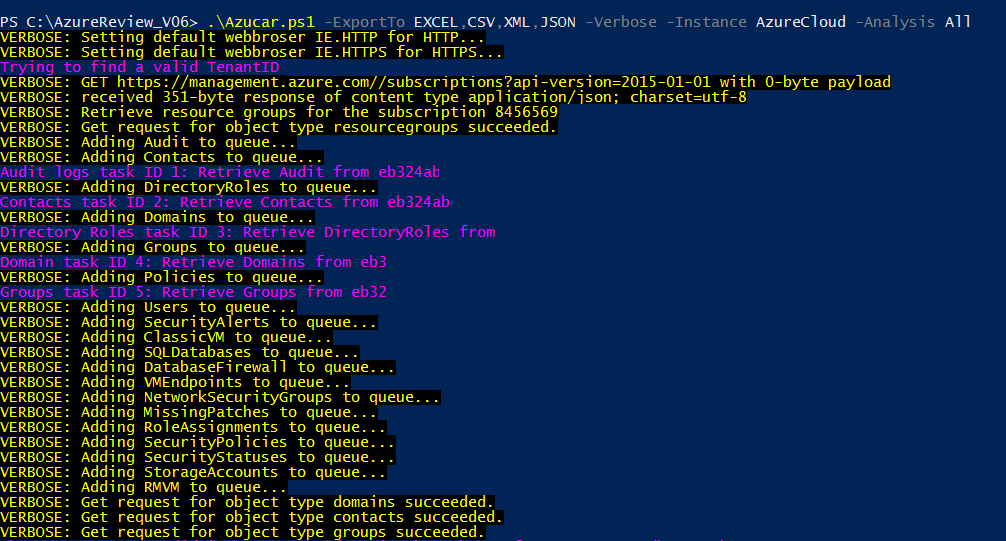
Support for exporting data to popular formats like CSV, XML or JSON.
The following screenshot shows an example report in JSON format:

Although there is already support for a variety of file formats, you could export data to Excel 2010/2013/2016. At the time of writing Azucar supports style modification, chart creation, company logo, and a range of languages.

An example of report generated by Azucar can be downloaded from Azucar_Report_20170308.xlsx.
Azucar works straight out of the box with PowerShell version 3.x and .NET4.5. To check a Windows PowerShell version, open a console and run the command $PsVersionTable:
PS C:\Users\silverhack> $psversiontable

Name                           Value
----                           -----
PSVersion                      5.1.14393.693
PSEdition                      Desktop
PSCompatibleVersions           {1.0, 2.0, 3.0, 4.0...}
BuildVersion                   10.0.14393.693
CLRVersion                     4.0.30319.42000
WSManStackVersion              3.0
PSRemotingProtocolVersion      2.3
SerializationVersion           1.1.0.1
You should use an account with at least read-permission on the assets you want to access. More information about Role-Based Access Control in Azure can be found by clicking here.
You can either download the latest zip by clicking this link or download Azucar by cloning the repository:
git clone https://github.com/nccgroup/azucar.git
Once you have unzipped the zip file, you can use the PowerShell V3 Unblock-File cmdlet to unblock files:
Get-ChildItem -Recurse c:\Azucar_V10 | Unblock-File
The plugin mechanism introduced in Azucar provides an easy method for PowerShell developers to dynamically add new functionality, so if you want to extend Azucar you can do so by writing your own plugin(s) in PowerShell.
To use your custom plugin, add it to the Plugins\Custom folder. For those not familiar with plugins, it's basically self-contained PowerShell code that is passed as a scriptblock class. The variable names and return values stay the same throughout all plugins, so they can be generically loaded.
The following sample shows the basic structure of a Azucar PowerShell plugin:
#Sample skeleton PowerShell plugin code
[cmdletbinding()]
    Param (
            [Parameter(HelpMessage="Background Runspace ID")]
            [int]
            $bgRunspaceID,

            [Parameter(HelpMessage="Not used in this version")]
            [HashTable]
            $SyncServer,

            [Parameter(HelpMessage="Azure Object with valuable data")]
            [Object]
            $AzureObject,

            [Parameter(HelpMessage="Object to return data")]
            [Object]
            $ReturnPluginObject,

            [Parameter(HelpMessage="Verbosity Options")]
            [System.Collections.Hashtable]
            $Verbosity,

            [Parameter(Mandatory=$false, HelpMessage="Save message in log file")]
	        [Bool] $WriteLog

        )
    Begin{
        #Import Azure API
        $LocalPath = $AzureObject.LocalPath
        $API = $AzureObject.AzureAPI
        $Utils = $AzureObject.Utils
        . $API
        . $Utils

        #Import Localized data
        $LocalizedDataParams = $AzureObject.LocalizedDataParams
        Import-LocalizedData @LocalizedDataParams;
    }
    Process{
        #Do things here
        $ReturnValue = [PSCustomObject]@{Name='myCustomType';Expression={"NCCGroup Labs"}}

    }
    End{
        if($ReturnValue){
            #Work with SyncHash
            $SyncServer.$($PluginName)=$ReturnValue
            $ReturnValue.PSObject.TypeNames.Insert(0,'AzureRM.NCCGroup.myDecoratedObject')
            #Create custom object for store data
            $MyVar = New-Object -TypeName PSCustomObject
            $MyVar | Add-Member -type NoteProperty -name Section -value $Section
            $MyVar | Add-Member -type NoteProperty -name Data -value $ReturnValue
            #Add data to object
            if($MyVar){
                $ReturnPluginObject | Add-Member -type NoteProperty -name Example -value $MyVar
            }
        }
        else{
            Write-AzucarMessage -WriteLog $WriteLog -Message ($message.AzureADGeneralQueryEmptyMessage -f "My Super Plugin", $AzureObject.TenantID) `
                                -Plugin $PluginName -Verbosity $Verbosity -IsWarning
        }
    }
Once you have your plugin prepared and located into the Plugins\Custom directory, it should be ready to be loaded by using the -Custom flag as shown below:
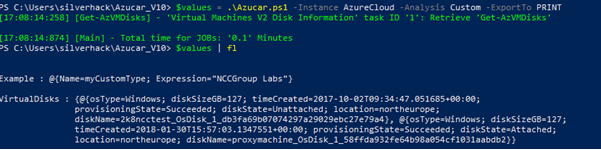
I already created various plugins within the Plugins\Custom folder which you can use to get you started.
To get a list of basic options and switches use:
get-help .\azucar.ps1To get a list of examples use:
get-help .\azucar.ps1 -ExamplesTo get a list of all options and examples with detailed info use:
get-help .\azucar.ps1 -DetailedDue to the amount of work we will not always be able to respond quickly to new issues, but eventually you will get a response and if needed a fix.