SecurityCipher
Home Blog About Us

Learn Paths, courses, and reference docs

  • ๐Ÿš€ Start Here Beginner path through the site
  • ๐Ÿ—บ๏ธ Penetration Testing Roadmap Structured path to become a pentester
  • ๐ŸŽ“ Free Security Courses Current free Udemy coupon listings
  • ๐Ÿ“„ Secure Code Explain Vulnerable vs secure code side by side
  • ๐ŸŽฏ Penetration Testing Tricks Field notes for real engagements
  • ๐Ÿ“– Vulnerability Explain How common vulns actually work

Checklists Interactive reviews and LLM risks

  • โœ… Security Checklists Hub All interactive security checklists
  • ๐Ÿ“‹ Writeup Checklists Steps derived from real writeups
  • ๐Ÿง  LLM AI Security Checklist Controls for LLM apps
  • ๐Ÿค– OWASP LLM Top 10 LLM Top 10 risks mapped out
  • ๐Ÿงฐ Burp Suite Guide Step-by-step Burp tutorials
  • ๐Ÿ“˜ Payload Field Manual Safe-first probes and signals

Practice Browser labs, games, and explorers

  • ๐Ÿ”ฌ Interactive Labs SQL injection, AI, architecture review
  • ๐ŸŽฎ Security Games Phishing, JWT, WAF, and more
  • ๐Ÿš— On-Call Drive Neon-city arcade security missions
  • โ€ข Shift Zero SOC desk: phish, OTP, malware, tickets
  • โ“ Application Security Quiz Web, secure coding, and cloud quizzes
  • ๐Ÿ—บ๏ธ OWASP Top 10 Explorer Clickable risk map with signals
  • ๐Ÿ”€ Interactive Attack Paths Recon-to-impact chains

Tools & Career Databases, jobs, and community

  • ๐Ÿ› ๏ธ Security Tools Curated recon, SAST, and bounty tools
  • ๐Ÿ”Ž CVE Lookup Multi-source CVE intelligence
  • ๐Ÿ’ฐ Bug Bounty Programs Live public scopes to search
  • ๐Ÿ’ผ Cybersecurity Jobs Roles from company career pages
  • ๐Ÿง‘โ€๐Ÿ’ป Security Researchers Community profiles and submissions
  • ๐ŸŽค Security Conferences Upcoming and past events
Browse all Security resources hub Freelance Security โ†’
My Resume
Freelance SecurityFreelance
New Security Researchers Join the directory - submit your profile for review Submit profile โ†’
← Security Tools View on GitHub

Cherrybomb

Stops API attacks by auditing an OpenAPI spec and validating the API against it.

cherry_bomb_v1.0

Stop half-done API specifications

Maintained by blst security

docs

Discord Shield

๐Ÿ’ฃ What is Cherrybomb?

Cherrybomb is an CLI tool written in Rust that helps prevent incorrect code implementation early in development. It works by validating and testing your API using an OpenAPI file. Its main goal is to reduce security errors and ensure your API functions as intended.

๐Ÿ”จ How does it work?

Cherrybomb makes sure your API is working correctly. It checks your API's spec file (OpenAPI Specification) for good practices and makes sure it follows the OAS rules. Then, it tests your API for common issues and vulnerabilities. If any problems are found, Cherrybomb gives you a detailed report with the exact location of the problem so you can fix it easily.

๐Ÿพ Get Started

Installation

Linux/MacOS:

DEPRECATED FOR NOW

The script requires sudo permissions to move the cherrybomb bin into /usr/local/bin/.

(If you want to view the shell script(or even help to improving it - /scripts/install.sh)

Containerized version

You can get Cherrybomb through its containerized version which is hosted on AWS ECR, and requires an API key that you can get on that address(the loading is a bit slow) - DEPRECATED FOR NOW

docker run --mount type=bind,source=[PATH TO OAS],destination=/home public.ecr.aws/blst-security/cherrybomb:latest cherrybomb -f /home/[OAS NAME] --api-key=[API-KEY]

Get it from crates.io

cargo install cherrybomb

If you don't have cargo installed, you can install it from here

Building from Sources

You can also build Cherrybomb from sources by cloning this repo, and building it using cargo.


git clone https://github.com/blst-security/cherrybomb && cd cherrybomb

The main branch's Cargo.toml file uses cherrybomb-engine and cherrybomb-oas from crates.io.

if you want build those from source too, you can change the following files:

(remove the version number and replace with the path to the local repo)

cherrybomb/Cargo.toml:
cherrybomb-engine = version => { path = "cherrybomb-engine" }
cherrybomb/cherrybomb-engine/Cargo.toml:
cherrybomb-oas = version => { path = "../cherrybomb-oas" }
cargo build --release
sudo mv ./target/release/cherrybomb /usr/local/bin # or any other directory in your PATH

Profile

Profiles allow you to choose the type of check you want to use.

- info: only generates param and endpoint tables
- normal:  both active and passive
- intrusive: active and intrusive [in development]
- passive: only passive tests
- full: all the options

Config

With a configuration file, you can easily edit, view, Cherrybomb's options. The config file allows you to set the running profile, location of the oas file, the verbosity and ignore the TLS error.

Config also allows you to override the server's URL with an array of servers, and add security to the request [in development].

Notice that CLI arguments parameter will override config options if both are set.

You can also add or remove checks from a profile using passive/active-include/exclude. [in development]

cherrybomb --config  <CONFIG_FILE>

Structure of config file:

{
"file" : "open-api.json",
"verbosity" : "normal, 
"profile" : " "Normal",
"passive_include" : ["check1, checks2"],
"active_include": ["check3, check4"],
"servers_override" , ["http://server/"],
"security":  [{
    "auth_type": "Basic",
    "auth_value" : token_value,
    "auth_scope" : scope_name
    }],
"ignore_tls_errors" : true, 
"no_color" : false,
}

Usage

After installing, verify it's working by running

cherrybomb --version

OpenAPI specification

cherrybomb --file <PATH> --profile passive

Passive Output example:
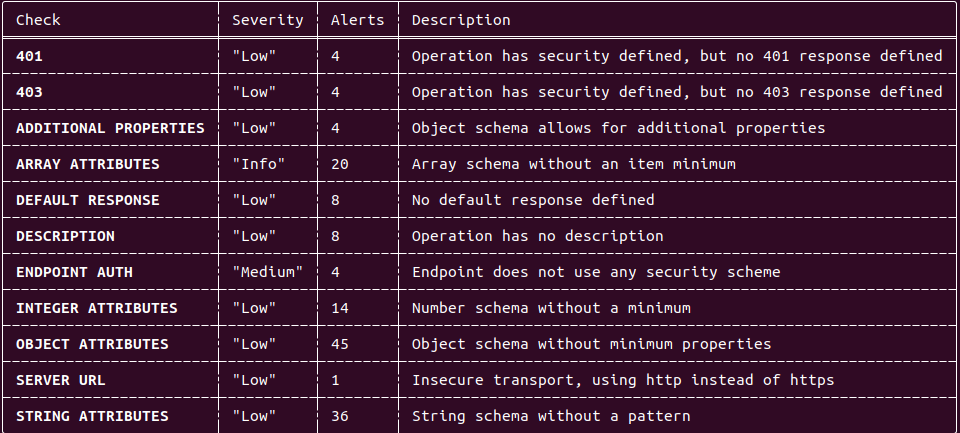
passive_output

Generate Info Table

cherrybomb --file <PATH> --profile info

Parameter table output:
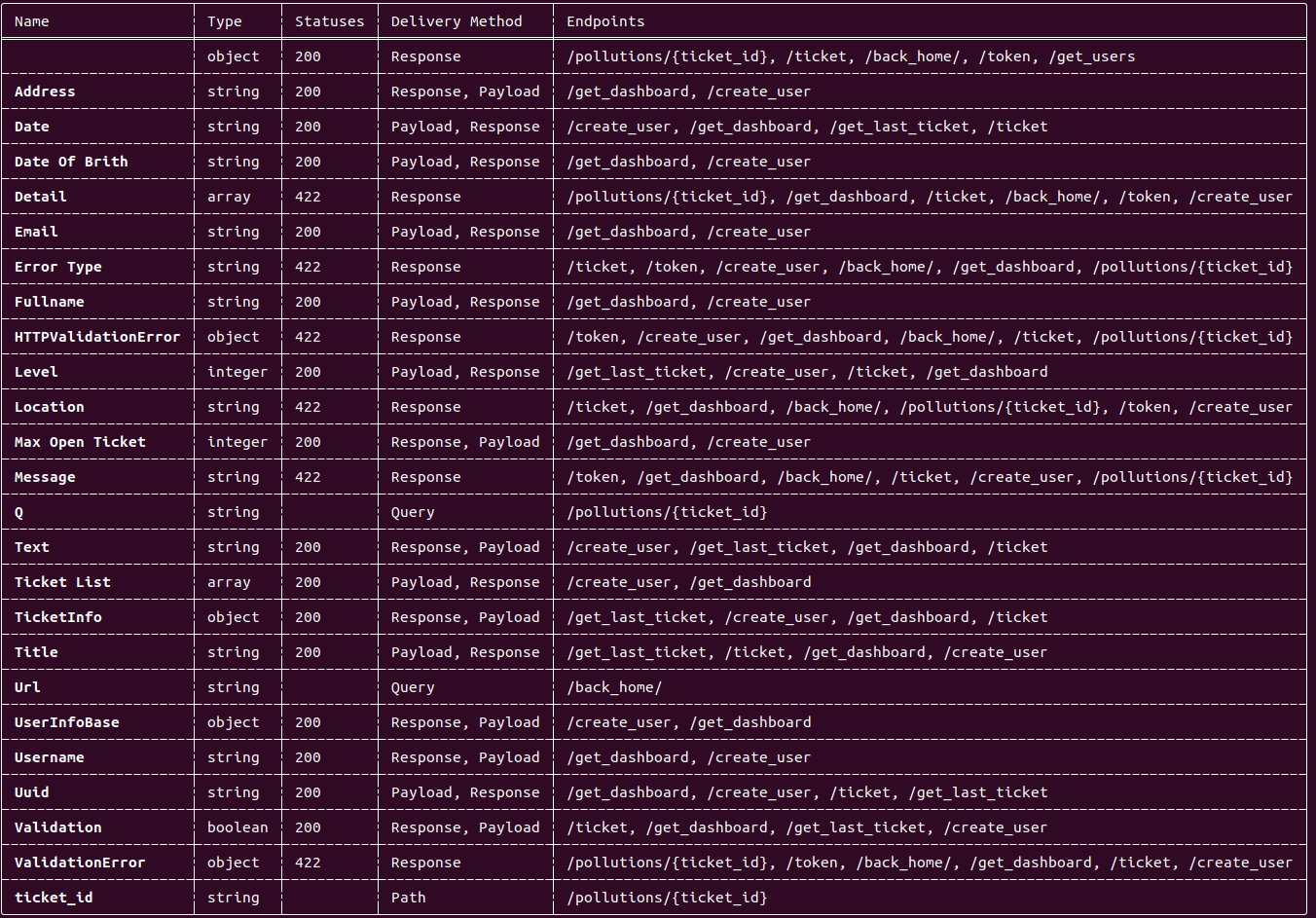
parameter_output

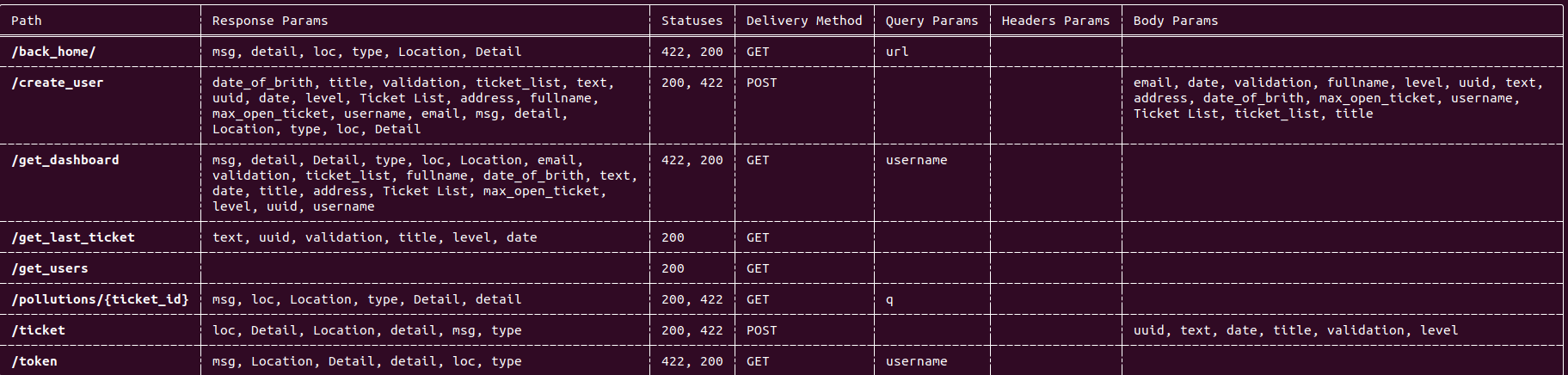
Endpoint table output:

endpoint_output

๐Ÿป Integration

DEPRECATED FOR NOW - WILL BE REPLACED SOON

You can embed it into your CI pipeline, and If you plan on doing that I would recommend that you go to our website, sign up, go through the CI pipeline integration wizard, and copy the groovy/GitHub actions snippet built for you.

Example:
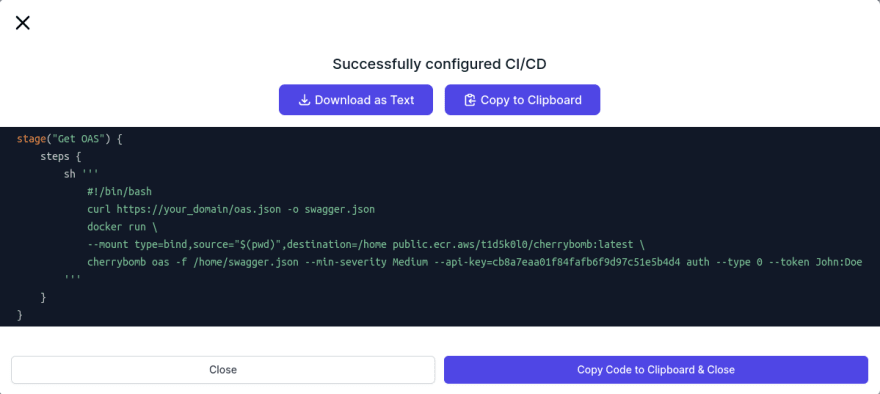
CI pipeline builder output

๐Ÿ’ช Support

Get help

If you have any questions you can ask us on our discord server.

You are also welcome to open an Issue here on GitHub.

Press Escape to close the search panel.

Donate

Buy me a Coffee

Penetration Testing Services

penetration Testing Services

Web Application Security Quiz

Web Application Security Quiz

Daily Bug Bounty Writeups - Twitter

Daily Bug Bounty Writeups

Download our Latest Android Application

Guide for Penetration Testing

Daily Bug Bounty Writeups - Telegram

Daily Bug Bounty Writeups

Author

Piyush
Senior Product Security Engineer

Ethical Hacker || Penetration Tester || Gamer || Blogger || Product Security Engineer || AI Security

READ ARTICLE

Donate

Buy me a Coffee

Recent Posts

  • AI-Generated Code Security Bugs: A Vibe Coding Case Study
    AI-Generated Code Security Bugs: A Vibe Coding Case Study
    October 7, 2026/
    0 Comments
  • Cloud Misconfig Bounty Hunting in 2026: Open Buckets, Firebase, and Secrets
    Cloud Misconfig Bounty Hunting in 2026: Open Buckets, Firebase, and Secrets
    September 8, 2026/
    0 Comments
  • DevSecOps From Laptop to Production: A Practical Security Pipeline Guide
    DevSecOps From Laptop to Production: A Practical Security Pipeline Guide
    August 27, 2026/
    0 Comments

Follow Us

SecurityCipher

Practical security guides, vulnerability deep-dives, and hands-on resources for bug bounty hunters and penetration testers.

Useful Links

  • Security Checklists
  • Cybersecurity Jobs
  • Blogs
  • About
  • Contact
ยฉ 2026 Security Cipher. All rights reserved. Privacy Policy ยท Terms & Conditions