

Vulscan is a module which enhances nmap to a vulnerability scanner. The nmap option -sV enables version detection per service which is used to determine potential flaws according to the identified product. The data is looked up in an offline version of VulDB.
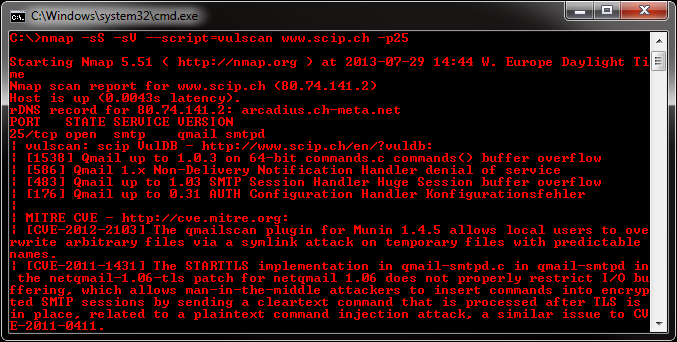
Please install the files into the following folder of your Nmap installation:
Nmap\scripts\vulscan\*
Clone the GitHub repository like this:
git clone https://github.com/scipag/vulscan scipag_vulscan
ln -s `pwd`/scipag_vulscan /usr/share/nmap/scripts/vulscan
You have to run the following minimal command to initiate a simple vulnerability scan:
nmap -sV --script=vulscan/vulscan.nse www.example.com
There are the following pre-installed databases available at the moment:
- scipvuldb.csv - https://vuldb.com
- cve.csv - https://cve.mitre.org
- securityfocus.csv - https://www.securityfocus.com/bid/
- xforce.csv - https://exchange.xforce.ibmcloud.com/
- expliotdb.csv - https://www.exploit-db.com
- openvas.csv - http://www.openvas.org
- securitytracker.csv - https://www.securitytracker.com (end-of-life)
- osvdb.csv - http://www.osvdb.org (end-of-life)
You may execute vulscan with the following argument to use a single database:
--script-args vulscandb=your_own_database
It is also possible to create and reference your own databases. This requires to create a database file, which has the following structure:
<id>;<title>
Just execute vulscan like you would by refering to one of the pre-delivered databases. Feel free to share your own database and vulnerability connection with me, to add it to the official repository.
The vulnerability databases are updated and assembled on a regularly basis. To support the latest disclosed vulnerabilities, keep your local vulnerability databases up-to-date.
To automatically update the databases, simply set execution permissions to the update.sh file and run it:
chmod 744 update.sh
./update.sh
If you want to manually update your databases, go to the following web site and download these files:
- https://www.computec.ch/projekte/vulscan/download/cve.csv
- https://www.computec.ch/projekte/vulscan/download/exploitdb.csv
- https://www.computec.ch/projekte/vulscan/download/openvas.csv
- https://www.computec.ch/projekte/vulscan/download/osvdb.csv
- https://www.computec.ch/projekte/vulscan/download/scipvuldb.csv
- https://www.computec.ch/projekte/vulscan/download/securityfocus.csv
- https://www.computec.ch/projekte/vulscan/download/securitytracker.csv
- https://www.computec.ch/projekte/vulscan/download/xforce.csv
Copy the files into your vulscan folder:
/vulscan/
If the version detection was able to identify the software version and the vulnerability database is providing such details, also this data is matched.
Disabling this feature might introduce false-positive but might also eliminate false-negatives and increase performance slighty. If you want to disable additional version matching, use the following argument:
--script-args vulscanversiondetection=0
Version detection of vulscan is only as good as Nmap version detection and the vulnerability database entries are. Some databases do not provide conclusive version information, which may lead to a lot of false-positives (as can be seen for Apache servers).
The script is trying to identify the best matches only. If no positive match could been found, the best possible match (with might be a false-positive) is put on display.
If you want to show all matches, which might introduce a lot of false-positives but might be useful for further investigation, use the following argument:
--script-args vulscanshowall=1
The interactive mode helps you to override version detection results for every port. Use the following argument to enable the interactive mode:
--script-args vulscaninteractive=1
All matching results are printed one by line. The default layout for this is:
[{id}] {title}\n
It is possible to use another pre-defined report structure with the following argument:
--script-args vulscanoutput=details
--script-args vulscanoutput=listid
--script-args vulscanoutput=listlink
--script-args vulscanoutput=listtitle
You may enforce your own report structure by using the following argument (some examples):
--script-args vulscanoutput='{link}\n{title}\n\n'
--script-args vulscanoutput='ID: {id} - Title: {title} ({matches})\n'
--script-args vulscanoutput='{id} | {product} | {version}\n'
Supported are the following elements for a dynamic report template:
- {id} - ID of the vulnerability
- {title} - Title of the vulnerability
- {matches} - Count of matches
- {product} - Matched product string(s)
- {version} - Matched version string(s)
- {link} - Link to the vulnerability database entry
- \n - Newline
- \t - Tab
Every default database comes with an url and a link, which is used during the scanning and might be accessed as {link} within the customized report template. To use custom database links, use the following argument:
--script-args "vulscandblink=http://example.org/{id}"
Keep in mind that this kind of derivative vulnerability scanning heavily relies on the confidence of the version detection of nmap, the amount of documented vulnerabilities and the accuracy of pattern matching. The existence of potential flaws is not verified with additional scanning nor exploiting techniques.