
New Security Researchers Join 10.8K+ verified researchers — submit your profile for review Submit profile →
SecurityCipher
Home Blog Labs Checklists Writeups

Learn Roadmaps, courses & vulnerability guides

  • 🗺️ Penetration Testing Roadmap Structured offensive security path
  • 🎓 Free Security Courses Verified courses and coupon drops
  • 🎯 Penetration Testing Tricks Field notes & real bypasses
  • 📄 Secure Code Explain Vulnerable vs secure code comparison
  • 📖 Vulnerability Explain Root causes, PoCs, and remediation
  • 🚀 Start Here Beginner walkthrough of all resources

Practice Hands-on browser labs, games & SOC simulator

  • 🔬 Interactive Labs SQL injection, AI, AWS cloud review
  • 🎮 Security Games Phishing, JWT, WAF, and more
  • 🛡️ Shift Zero SOC desk: phish, OTP, malware, tickets
  • 🚗 On-Call Drive Neon-city arcade security missions
  • ❓ Application Security Quiz Web, secure coding, and cloud quizzes
  • ⚡ Threat Explorer Interactive AI & vuln attack flows

Checklists & Tools 1,760+ testing controls, utilities & standards

  • ✅ Security Checklists Hub Web, cloud, mobile, API, and infra
  • 🛠️ Security Tools Curated recon, SAST, and bounty tools
  • 📋 Writeup Checklists Methodologies derived from real writeups
  • 🤖 OWASP LLM Top 10 Interactive risk matrix for AI apps
  • 🔎 CVE Lookup Multi-source CVE search & threat intel
  • 📘 Payload Field Manual Safe-first probes, signals, and cheats

Career & Community Live scopes, verified researchers & jobs

  • 💰 Bug Bounty Programs Searchable directory of active scopes
  • 💼 Cybersecurity Jobs Verified roles from company career sites
  • 🧑‍💻 Security Researchers Community profiles and submissions
  • 🎤 Security Conferences Upcoming global infosec events
  • 🧮 CVSS Severity Calculator Accurate CVSS 3.1 & 4.0 calculator
  • 🧭 Career Roadmaps AppSec, Cloud, and SOC career paths
Browse All Resources 1,760+ Checklists • 18K+ Writeups • 15+ Interactive Labs Freelance Security →
About
Freelance SecurityFreelance
← Security Tools View on GitHub

gost

Flexible tunneling and proxy tool supporting many protocols for pivoting.

GO Simple Tunnel

GO语言实现的安全隧道

[!IMPORTANT] 本项目已进入维护阶段,不再增加新的功能。 本仓库(ginuerzh/gost)已被 go-gost/gost 取代,所有新功能都在新仓库中开发,请以 go-gost/gost 为准。GOST v3 文档见 https://gost.run,GOST v2 文档见 https://v2.gost.run。

GoDoc Go Report Card codecov GitHub release Docker gost

English README

特性

  • 多端口监听
  • 可设置转发代理,支持多级转发(代理链)
  • 支持标准HTTP/HTTPS/HTTP2/SOCKS4(A)/SOCKS5代理协议
  • Web代理支持探测防御
  • 支持多种隧道类型
  • SOCKS5代理支持TLS协商加密
  • Tunnel UDP over TCP
  • TCP/UDP透明代理
  • 本地/远程TCP/UDP端口转发
  • 支持Shadowsocks(TCP/UDP)协议
  • 支持SNI代理
  • 权限控制
  • 负载均衡
  • 路由控制
  • DNS解析和代理
  • TUN/TAP设备

Wiki站点: v2.gost.run

Telegram讨论群: https://t.me/gogost

Google讨论组: https://groups.google.com/d/forum/go-gost

GOST v3: https://gost.run

安装

二进制文件

https://github.com/ginuerzh/gost/releases

源码编译

git clone https://github.com/ginuerzh/gost.git
cd gost/cmd/gost
go build

Docker

docker run --rm ginuerzh/gost -V

Homebrew

brew install gost

Ubuntu商店

sudo snap install core
sudo snap install gost
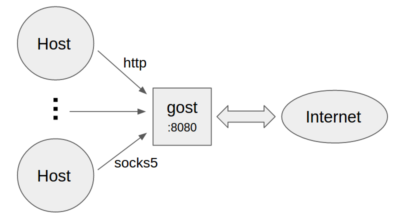
快速上手

不设置转发代理

gost

  • 作为标准HTTP/SOCKS5代理
gost -L=:8080
  • 设置代理认证信息
gost -L=admin:123456@localhost:8080
  • 多端口监听
gost -L=http2://:443 -L=socks5://:1080 -L=ss://aes-128-cfb:123456@:8338
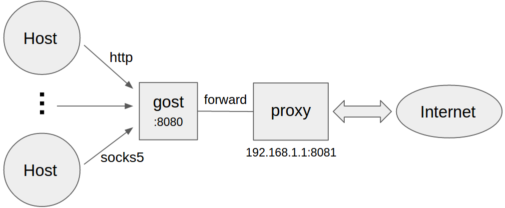
设置转发代理

gost

gost -L=:8080 -F=192.168.1.1:8081
  • 转发代理认证
gost -L=:8080 -F=http://admin:123456@192.168.1.1:8081
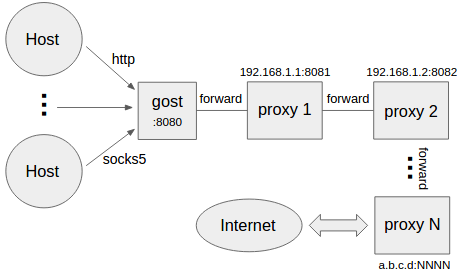
设置多级转发代理(代理链)

gost

gost -L=:8080 -F=quic://192.168.1.1:6121 -F=socks5+wss://192.168.1.2:1080 -F=http2://192.168.1.3:443 ... -F=a.b.c.d:NNNN

gost按照-F设置的顺序通过代理链将请求最终转发给a.b.c.d:NNNN处理,每一个转发代理可以是任意HTTP/HTTPS/HTTP2/SOCKS4/SOCKS5/Shadowsocks类型代理。

本地端口转发(TCP)

gost -L=tcp://:2222/192.168.1.1:22 [-F=...]

将本地TCP端口2222上的数据(通过代理链)转发到192.168.1.1:22上。当代理链末端(最后一个-F参数)为SSH转发通道类型时,gost会直接使用SSH的本地端口转发功能:

gost -L=tcp://:2222/192.168.1.1:22 -F forward+ssh://:2222

本地端口转发(UDP)

gost -L=udp://:5353/192.168.1.1:53?ttl=60 [-F=...]

将本地UDP端口5353上的数据(通过代理链)转发到192.168.1.1:53上。 每条转发通道都有超时时间,当超过此时间,且在此时间段内无任何数据交互,则此通道将关闭。可以通过ttl参数来设置超时时间,默认值为60秒。

注: 转发UDP数据时,如果有代理链,则代理链的末端(最后一个-F参数)必须是gost SOCKS5类型代理,gost会使用UDP over TCP方式进行转发。

远程端口转发(TCP)

gost -L=rtcp://:2222/192.168.1.1:22 [-F=... -F=socks5://172.24.10.1:1080]

将172.24.10.1:2222上的数据(通过代理链)转发到192.168.1.1:22上。当代理链末端(最后一个-F参数)为SSH转发通道类型时,gost会直接使用SSH的远程端口转发功能:

gost -L=rtcp://:2222/192.168.1.1:22 -F forward+ssh://:2222

远程端口转发(UDP)

gost -L=rudp://:5353/192.168.1.1:53?ttl=60 [-F=... -F=socks5://172.24.10.1:1080]

将172.24.10.1:5353上的数据(通过代理链)转发到192.168.1.1:53上。 每条转发通道都有超时时间,当超过此时间,且在此时间段内无任何数据交互,则此通道将关闭。可以通过ttl参数来设置超时时间,默认值为60秒。

注: 转发UDP数据时,如果有代理链,则代理链的末端(最后一个-F参数)必须是GOST SOCKS5类型代理,gost会使用UDP-over-TCP方式进行转发。

HTTP2

gost的HTTP2支持两种模式:

  • 作为标准的HTTP2代理,并向下兼容HTTPS代理。
  • 作为通道传输其他协议。
代理模式

服务端:

gost -L=http2://:443

客户端:

gost -L=:8080 -F=http2://server_ip:443
通道模式

服务端:

gost -L=h2://:443

客户端:

gost -L=:8080 -F=h2://server_ip:443

QUIC

gost对QUIC的支持是基于quic-go库。

服务端:

gost -L=quic://:6121

客户端:

gost -L=:8080 -F=quic://server_ip:6121

注: QUIC模式只能作为代理链的第一个节点。

KCP

gost对KCP的支持是基于kcp-go和kcptun库。

服务端:

gost -L=kcp://:8388

客户端:

gost -L=:8080 -F=kcp://server_ip:8388

gost会自动加载当前工作目录中的kcp.json(如果存在)配置文件,或者可以手动通过参数指定配置文件路径:

gost -L=kcp://:8388?c=/path/to/conf/file

注: KCP模式只能作为代理链的第一个节点。

SSH

gost的SSH支持两种模式:

  • 作为转发通道,配合本地/远程TCP端口转发使用。
  • 作为通道传输其他协议。
转发模式

服务端:

gost -L=forward+ssh://:2222

客户端:

gost -L=rtcp://:1222/:22 -F=forward+ssh://server_ip:2222
通道模式

服务端:

gost -L=ssh://:2222

客户端:

gost -L=:8080 -F=ssh://server_ip:2222?ping=60

可以通过ping参数设置心跳包发送周期,单位为秒。默认不发送心跳包。

透明代理

基于iptables的透明代理。

gost -L=redirect://:12345 -F=http2://server_ip:443

obfs4

此功能由@isofew贡献。

服务端:

gost -L=obfs4://:443

当服务端运行后会在控制台打印出连接地址供客户端使用:

obfs4://:443/?cert=4UbQjIfjJEQHPOs8vs5sagrSXx1gfrDCGdVh2hpIPSKH0nklv1e4f29r7jb91VIrq4q5Jw&iat-mode=0

客户端:

gost -L=:8888 -F='obfs4://server_ip:443?cert=4UbQjIfjJEQHPOs8vs5sagrSXx1gfrDCGdVh2hpIPSKH0nklv1e4f29r7jb91VIrq4q5Jw&iat-mode=0'

加密机制

HTTP

对于HTTP可以使用TLS加密整个通讯过程,即HTTPS代理:

服务端:

gost -L=https://:443

客户端:

gost -L=:8080 -F=http+tls://server_ip:443

HTTP2

gost的HTTP2代理模式仅支持使用TLS加密的HTTP2协议,不支持明文HTTP2传输。

gost的HTTP2通道模式支持加密(h2)和明文(h2c)两种模式。

SOCKS5

gost支持标准SOCKS5协议的no-auth(0x00)和user/pass(0x02)方法,并在此基础上扩展了两个:tls(0x80)和tls-auth(0x82),用于数据加密。

服务端:

gost -L=socks5://:1080

客户端:

gost -L=:8080 -F=socks5://server_ip:1080

如果两端都是gost(如上)则数据传输会被加密(协商使用tls或tls-auth方法),否则使用标准SOCKS5进行通讯(no-auth或user/pass方法)。

Shadowsocks

gost对shadowsocks的支持是基于shadowsocks-go库。

服务端:

gost -L=ss://chacha20:123456@:8338

客户端:

gost -L=:8080 -F=ss://chacha20:123456@server_ip:8338
Shadowsocks UDP relay

目前仅服务端支持UDP Relay。

服务端:

gost -L=ssu://chacha20:123456@:8338

TLS

gost内置了TLS证书,如果需要使用其他TLS证书,有两种方法:

  • 在gost运行目录放置cert.pem(公钥)和key.pem(私钥)两个文件即可,gost会自动加载运行目录下的cert.pem和key.pem文件。
  • 使用参数指定证书文件路径:
gost -L="http2://:443?cert=/path/to/my/cert/file&key=/path/to/my/key/file"

对于客户端可以通过secure参数开启服务器证书和域名校验:

gost -L=:8080 -F="http2://server_domain_name:443?secure=true"

对于客户端可以指定CA证书进行证书锁定(Certificate Pinning):

gost -L=:8080 -F="http2://:443?ca=ca.pem"

证书锁定功能由@sheerun贡献

Press Escape to close the search panel.

Donate

Buy me a Coffee

Penetration Testing Services

penetration Testing Services

Web Application Security Quiz

Web Application Security Quiz

Daily Bug Bounty Writeups - Twitter

Daily Bug Bounty Writeups

Download our Latest Android Application

Guide for Penetration Testing

Daily Bug Bounty Writeups - Telegram

Daily Bug Bounty Writeups

Author

Piyush
Senior Product Security Engineer

Ethical Hacker || Penetration Tester || Gamer || Blogger || Product Security Engineer || AI Security

READ ARTICLE

Donate

Buy me a Coffee

Recent Posts

  • Inside Java2Shell (CVE-2026-114938)
    Inside Java2Shell (CVE-2026-114938)
    November 18, 2026/
    0 Comments
  • Why GTA 5 Was a Hacker’s Playground — And The Exact Security Architecture GTA 6 Needs
    Why GTA 5 Was a Hacker’s Playground — And The Exact Security Architecture GTA 6 Needs
    November 18, 2026/
    0 Comments
  • Securing the AI Supply Chain: A Hands-On AI-BOM Playbook for Pickle RCE, Poisoned Datasets, and CI Gates
    Securing the AI Supply Chain: A Hands-On AI-BOM Playbook for Pickle RCE, Poisoned Datasets, and CI Gates
    November 17, 2026/
    0 Comments

Follow Us

SECURITY DISPATCH

Subscribe to SecurityCipher

Get the latest bug bounty writeups, offensive security tooling, and zero-day analyses delivered to your inbox.

Subscription Form

SecurityCipher

Practical security guides, vulnerability deep-dives, and hands-on resources for bug bounty hunters and penetration testers.

Useful Links

  • Security Checklists
  • Cybersecurity Jobs
  • Blogs
  • Docs
  • About
  • Contact

Free Resources

  • Interactive Security Labs
  • Security Tools Directory
  • Pentest Roadmap
  • OWASP LLM Top 10
  • Bug Bounty Writeups
  • Bug Bounty Programs
© 2026 Security Cipher. All rights reserved. Privacy Policy · Terms & Conditions · DMCA ·
PRIVACY & DATA CONTROLS

Privacy & Cookie Preferences

We use essential cookies to maintain secure sessions and analyze anonymized telemetry to optimize our research and interactive labs.

Manage anytime via our Privacy Policy or footer settings.

Security Researchers
OPEN DIRECTORY Verified Network

Are you a security researcher or bug hunter?

Join our open directory of verified pentesters, showcase your achievements, and get recognized!

Submit Researcher Profile →