
Most web bugs hit one victim at a time. Web cache poisoning is different, and that is exactly why it is worth learning. You send a single crafted request, the CDN or reverse proxy in front of the site stores your malicious response, and then it serves that response to every person who visits the page - until the cache expires. One request, thousands of victims, zero interaction on their part. That is the whole appeal, and it is why a clean cache poisoning finding often lands in the high-to-critical range on bug bounty programs.
The catch is that it is easy to get wrong and, done carelessly, you can poison the cache for real users - which is off-limits in bounty work. This post is the practical version: how caches decide what to store, how to find the inputs they ignore, how to confirm a poisoning safely with a cache buster, and how to turn it into real impact (XSS, redirects, denial of service). Straight methodology, copy-paste steps, and a checklist at the end.
The short version (TL;DR)
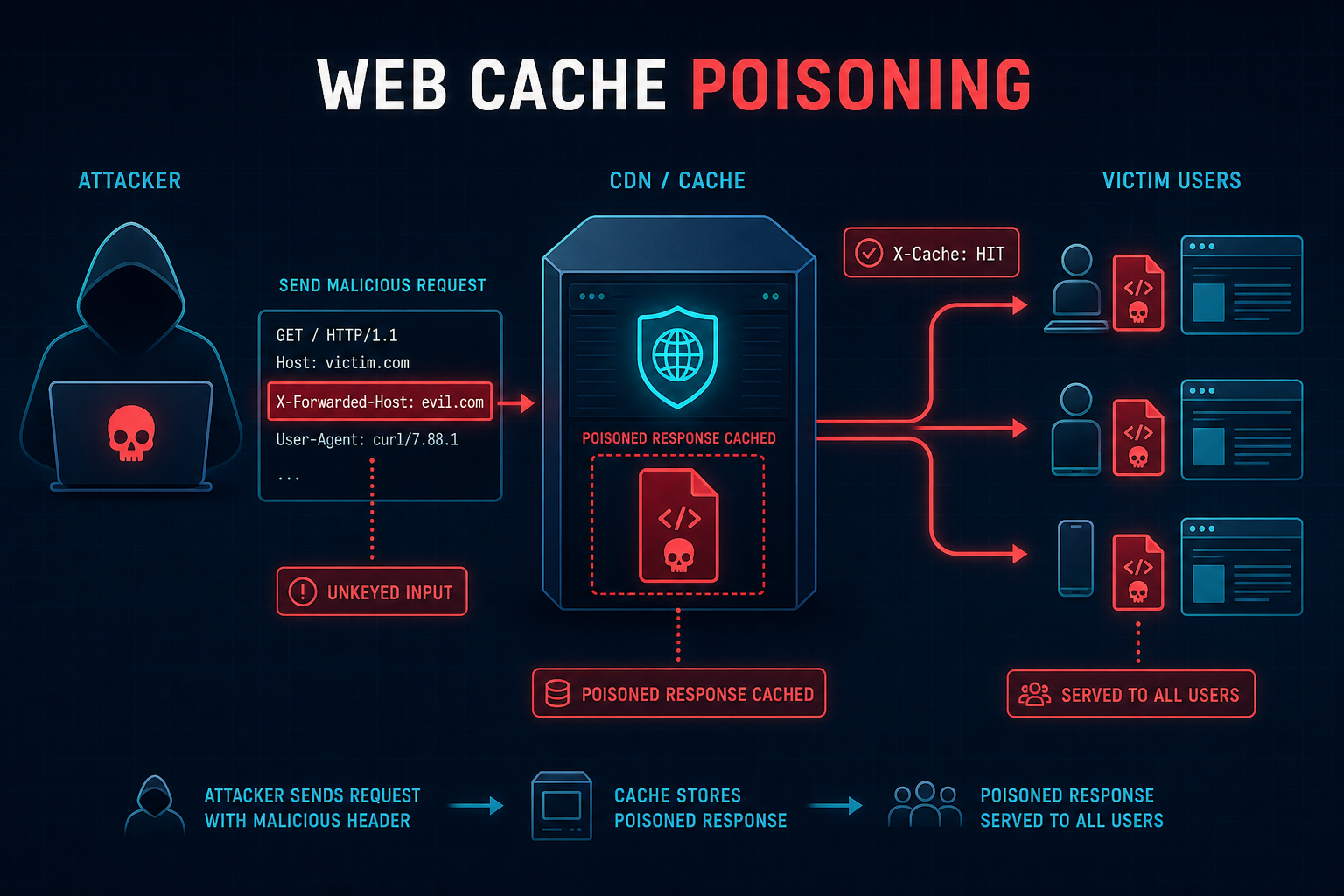
- Web cache poisoning abuses inputs the cache ignores when building its cache key (unkeyed inputs) but the origin still uses in the response.
- Find it by adding a cache buster, then fuzzing headers like
X-Forwarded-Hostwith Param Miner to see which ones change the response. - Confirm the response is cacheable by watching the
X-Cache/CF-Cache-Status/Ageheaders flip frommisstohit. - Turn a reflected unkeyed input into impact: stored XSS, open redirect, script/import hijack, or a cache-poisoning denial of service (CPDoS).
- Cache poisoning (serve attacker content to victims) is not the same as cache deception (trick the cache into storing a victim's private page). Both are worth testing.
- Always use a unique cache buster while testing so you never poison the entry real users get. This is a hard rule in bug bounty.
First, how caches actually decide what to store
A CDN or reverse proxy (Cloudflare, Akamai, Fastly, Varnish, nginx) sits between users and the origin server. When a response is cacheable, the cache saves a copy and hands it to the next person who asks for "the same thing." The important question is: what does "the same thing" mean?
The cache builds a cache key from a subset of the request - usually the method, host, path, and sometimes the query string and a few Vary headers. Two requests with the same cache key are treated as identical, and the cached response is served for both. Everything the cache leaves out of that key is an unkeyed input. The origin might still read those unkeyed inputs and reflect them into the response - and that is the entire vulnerability.
- Keyed input - part of the cache key. Change it and you get a different cache entry (e.g. the URL path).
- Unkeyed input - ignored by the key but used by the origin (e.g.
X-Forwarded-Host). Change it and the cache still thinks it is "the same" request.
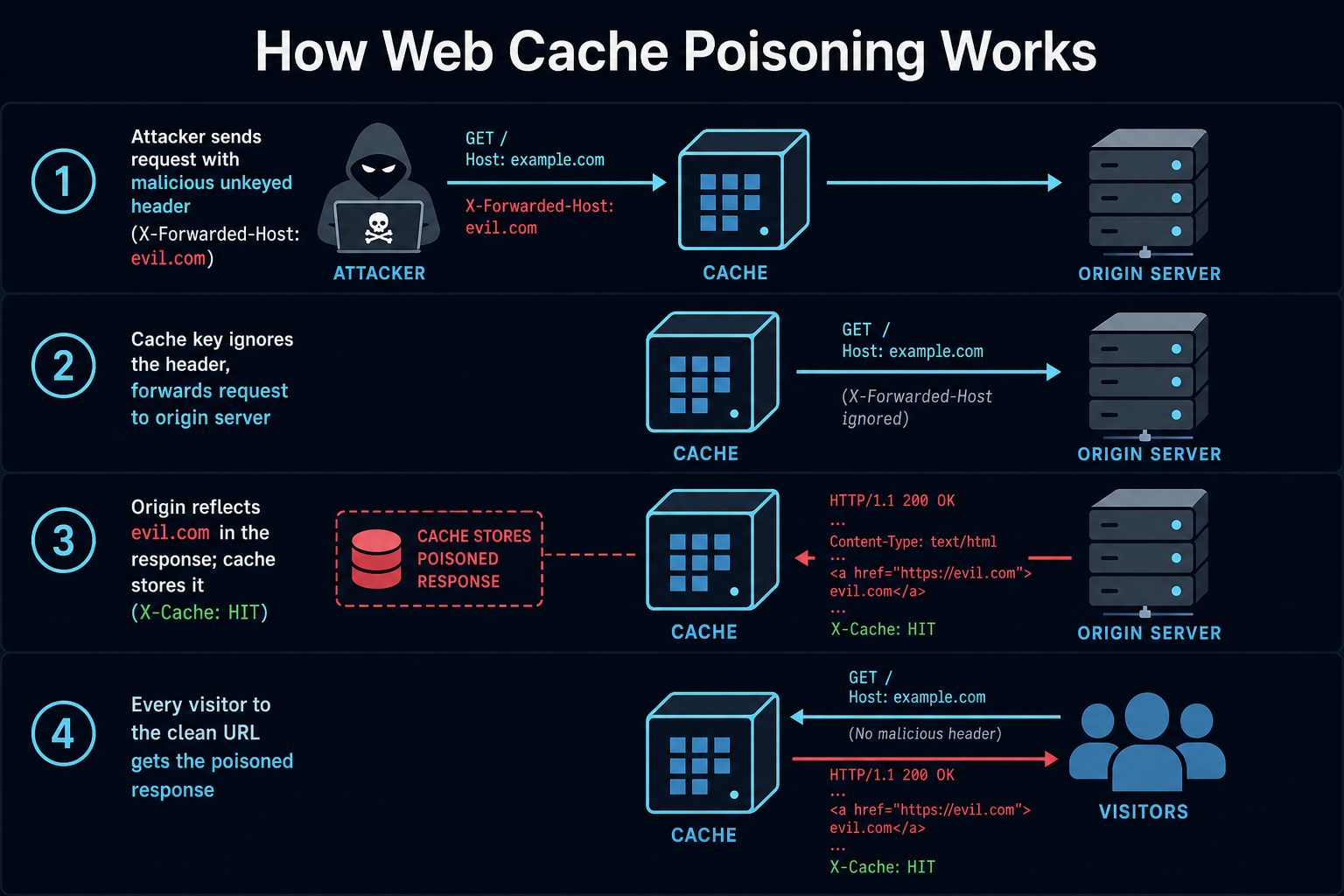
So the attack is: find an unkeyed input that the origin reflects into a cacheable response, inject something malicious through it, get that response cached, and let the cache serve it to everyone requesting the clean URL.
The unkeyed inputs that keep paying out
CDNs and proxies add their own headers to describe the request - the original host, scheme, client IP, protocol - and the origin often trusts those to build URLs, redirects, and links. Because they are seen as infrastructure metadata, they are frequently left out of the cache key. These are your first targets:
| Header | What the origin does with it |
|---|---|
X-Forwarded-Host | Builds absolute URLs, redirects, Open Graph tags, and script src attributes. The classic poisoning vector. |
X-Forwarded-Scheme / X-Forwarded-Proto | Decides http vs https; can force an insecure redirect or a redirect loop. |
X-Host / X-Forwarded-Server | Framework-specific host overrides that mirror X-Forwarded-Host. |
X-Original-URL / X-Rewrite-URL | Overrides the request path on some reverse proxies; can change which content is served under a cached path. |
Accept-Language / Accept-Encoding | Selects localized or encoded content the cache may not vary on, poisoning the default entry. |
| Unkeyed query params / cookies | If the cache keys only on the path, a reflected param or cookie value becomes injectable. |
X-Forwarded-Host is the one you will find most often, because so many frameworks use the "host" header to generate absolute links and never imagine it could be attacker-controlled behind a CDN.
The practical hunting playbook
This is the order to work in. The golden rule runs through all of it: never test without a cache buster, so your probes only ever affect your own cache entry, not the one real visitors receive.
Step 1: Confirm the page is cached
No cache, no poisoning. Send the request twice and read the response headers. You are looking for cache indicators and, importantly, a value that flips from miss to hit on the second request:
X-Cache: missthenX-Cache: hitCF-Cache-Status: HIT(Cloudflare),X-Served-By/X-Cache-Hits(Fastly),X-Varnish- An
Ageheader that increases on repeat requests Cache-Control: publicwith a non-zeromax-age
Step 2: Add a cache buster (do this before anything else)
A cache buster is a unique value you add to a keyed part of the request - usually a junk query parameter - so the cache treats every probe as a brand-new entry that only you will fetch. This is what keeps your testing off real users.
# Baseline with a unique cache buster in a keyed param
GET /en/index.html?cb=sc31337 HTTP/1.1
Host: www.example.com

# Look at the response headers:
#   X-Cache: miss   (first hit)
#   X-Cache: hit    (send again - now it is cached for ?cb=sc31337 only)
One subtlety worth knowing: if query strings are not part of the cache key on your target, a query-string cache buster will not isolate you and Param Miner's defaults can produce false negatives - or worse, poison the shared entry. In that case buster via an unkeyed-but-safe path segment or a genuinely keyed component. When in doubt, verify your buster actually forces a miss before you fuzz.
Step 3: Find unkeyed inputs with Param Miner
Param Miner is the Burp extension James Kettle built for exactly this (he is the researcher who put web cache poisoning on the map). Right-click a request, choose Param Miner > Guess headers, and enable its "add cache buster" option. It throws its large built-in wordlist of header names at the target with a canary value and reports any header whose value changes the response. Those are your unkeyed candidates.
# In Burp:
# 1. Right-click request -> Extensions -> Param Miner -> Guess headers
# 2. Tick "Add static/dynamic cache buster"
# 3. Watch Output / Issues for lines like:
#    "Identified the following secret input: X-Forwarded-Host"
Step 4: Prove reflection, then prove it caches
Take a flagged header into Repeater. Send it with a unique marker value (still with your cache buster) and search the response body for that marker. If X-Forwarded-Host: sc-canary.example comes back reflected in a script src, a link href, or a redirect Location, you have an injection point.
# Injection probe (own cache entry via ?cb=)
GET /?cb=sc31337 HTTP/1.1
Host: www.example.com
X-Forwarded-Host: sc-canary.example

# Response contains:
#   <script src="https://sc-canary.example/resources/main.js"></script>
# The unkeyed header is reflected into an external script import.
Now confirm it caches: send the poisoning request twice in quick succession with the same buster, and watch X-Cache go from miss to hit while your injected value stays in the response. That hit-on-the-second-request, with your payload still present, is your proof of concept - captured entirely inside your own cache-busted entry.
Turning it into real impact
A reflected unkeyed input is the finding; the severity comes from what you do with it. The common escalations:
- Stored XSS via imported script. If the origin builds a script
srcfromX-Forwarded-Host, point it at a host you control that serves malicious JS. When cached, every visitor runs your script -alert(document.cookie)for the PoC, account takeover in reality. - Open redirect / phishing. If the header lands in a
Locationredirect or a canonical link, you can redirect all cached-page visitors to an attacker domain. - Cache-poisoning DoS (CPDoS). Inject an oversized header, a bad
X-Forwarded-Schemethat breaks the page, or a malformed value that makes the origin return an error - then get the error cached. Everyone hitting that URL now gets a broken page. No code execution needed, still a real outage. - Credential / resource hijack. Reflected values in
<link>,<base>, or import maps can redirect where the browser loads assets from.
For the report, demonstrate impact inside your cache-busted entry (for example, show the poisoned script import served on a hit), explain that removing the buster would poison the live homepage, and stop there. Do not actually poison the real entry that users receive.
2026 variants worth testing
- HTTP/2 and HTTP/3 header smuggling. Caches and origins can parse headers differently over newer protocols. Discrepancies let you smuggle a value the cache does not see but the origin does - a fresh source of unkeyed inputs.
- Fat GET requests. Some frameworks read parameters from a GET request body. The cache keys on the URL and ignores the body, so a body param becomes unkeyed and injectable.
- Parameter cloaking. Cache and origin disagree on parameter delimiters (
;vs&), so the cache keys on one value while the origin uses another. - Cache key normalization gaps. Differences in how the cache and origin handle case, encoding, or trailing characters in the path can hand you an unkeyed surface.
Cache poisoning vs cache deception (do not confuse them)
They sound alike and both abuse caches, but the direction is opposite:
- Web cache poisoning - you inject content and the cache serves your malicious response to other users.
- Web cache deception - you trick the cache into storing a victim's private, authenticated response so you can read it. Classic trick: request
/account/profile/nonexistent.css. The app returns the victim's profile, but the cache sees a.cssextension, assumes it is a static file, and caches it - now you fetch the same URL and read their data.
When you are already poking at cache behavior, test both. Deception is often even easier to find on apps that cache by file extension.
Copy-paste cache poisoning checklist
- Confirmed the target page is cached (
X-Cache/CF-Cache-Status/Ageflip to hit). - Added a unique cache buster to a keyed input before any fuzzing.
- Verified the buster actually forces a cache miss (so you are isolated from real users).
- Ran Param Miner "Guess headers" with cache buster enabled to find unkeyed inputs.
- Tested the usual suspects:
X-Forwarded-Host,X-Forwarded-Scheme,X-Host,X-Original-URL. - Confirmed the unkeyed input is reflected in the response (script src, link, redirect, meta).
- Proved it caches: payload still present on a second-request
hit. - Escalated to real impact (XSS import, open redirect, or CPDoS) inside the busted entry.
- Also tested cache deception (static-looking path on an authenticated page).
- Wrote the report without poisoning the live cache entry real users receive.
How to fix it (for developers)
- Do not reflect untrusted request data - especially
HostandX-Forwarded-*- into responses. Build absolute URLs from a configured, trusted base, not from request headers. - Only accept
X-Forwarded-*from your own proxy via an IP allow-list; strip these headers at the edge for requests coming from clients. - Key the cache on everything that changes the response. If the origin varies output by a header, include it in the cache key or a correct
Varyheader. - Never cache authenticated or dynamic responses. Mark them
Cache-Control: private, no-storeto kill cache deception. - Do not cache error responses, or cache them very briefly, to blunt CPDoS.
- Normalize the URL and cache key consistently between the cache and the origin so there are no parsing gaps to exploit.
FAQ
What is web cache poisoning in one line?
It is an attack where you manipulate an input the cache ignores but the origin reflects, so the cache stores your malicious response and serves it to every user who requests that URL.
What tool do I need?
Burp Suite plus the free Param Miner extension covers most of the work: it discovers unkeyed headers and can add cache busters automatically. You confirm and escalate by hand in Repeater.
How do I test without harming real users?
Always add a unique cache buster to a keyed part of the request so your probes create their own cache entry. Verify it forces a miss before fuzzing. Demonstrate impact within that busted entry and never poison the clean URL that visitors hit.
How is it different from cache deception?
Poisoning serves your content to victims; deception stores a victim's private content where you can read it. Poisoning needs a reflected unkeyed input; deception needs the cache to store an authenticated response it should not.
How much is a cache poisoning bug worth?
It scales with reach and impact. A reflected header with no escalation may be low, but stored XSS served to every visitor of a popular page, or a persistent CPDoS on a key route, is commonly rated high to critical because a single request affects the whole user base.
Bottom line
Web cache poisoning rewards patience over payloads. Learn to read cache headers, always work behind a cache buster, let Param Miner surface the unkeyed inputs, and confirm both the reflection and the caching before you claim anything. The bugs are still out there in 2026 because caches and origins keep disagreeing about what matters in a request - and every one of those disagreements is a place a single request can reach every user. Test cleanly, prove impact inside your own entry, and report it without touching the live cache.