

Give me your company name and 24 hours. That is usually all it takes to go from knowing nothing about a startup to reading its customers' invoices, holding its AWS keys, and quietly sitting inside its admin panel. Not because the founders are careless - because a small team shipping fast leaves a very specific trail, and attackers know exactly where to look.
This is not a horror story to scare you. It is the actual playbook I run as an authorized penetration tester, written from the attacker's chair so you can see your own startup the way someone with bad intentions does. Every phase below comes with the real tools, the real commands, and - more importantly - what you should change tonight so the same 24 hours ends in a boring "nothing found" report instead.
If you want to turn this into a repeatable skill rather than a one-off read, pair it with our penetration testing roadmap and the web application security checklist. Both map directly onto the phases you are about to see.
First, the boring but non-negotiable part
Everything here is for testing systems you own or are explicitly authorized to test - your own startup, a client under a signed scope, or a bug bounty program that lists the assets in scope. Running these tools against a company without written permission is a crime in most countries, full stop. Use this to defend, or to hack legally with a contract. Nothing in between.
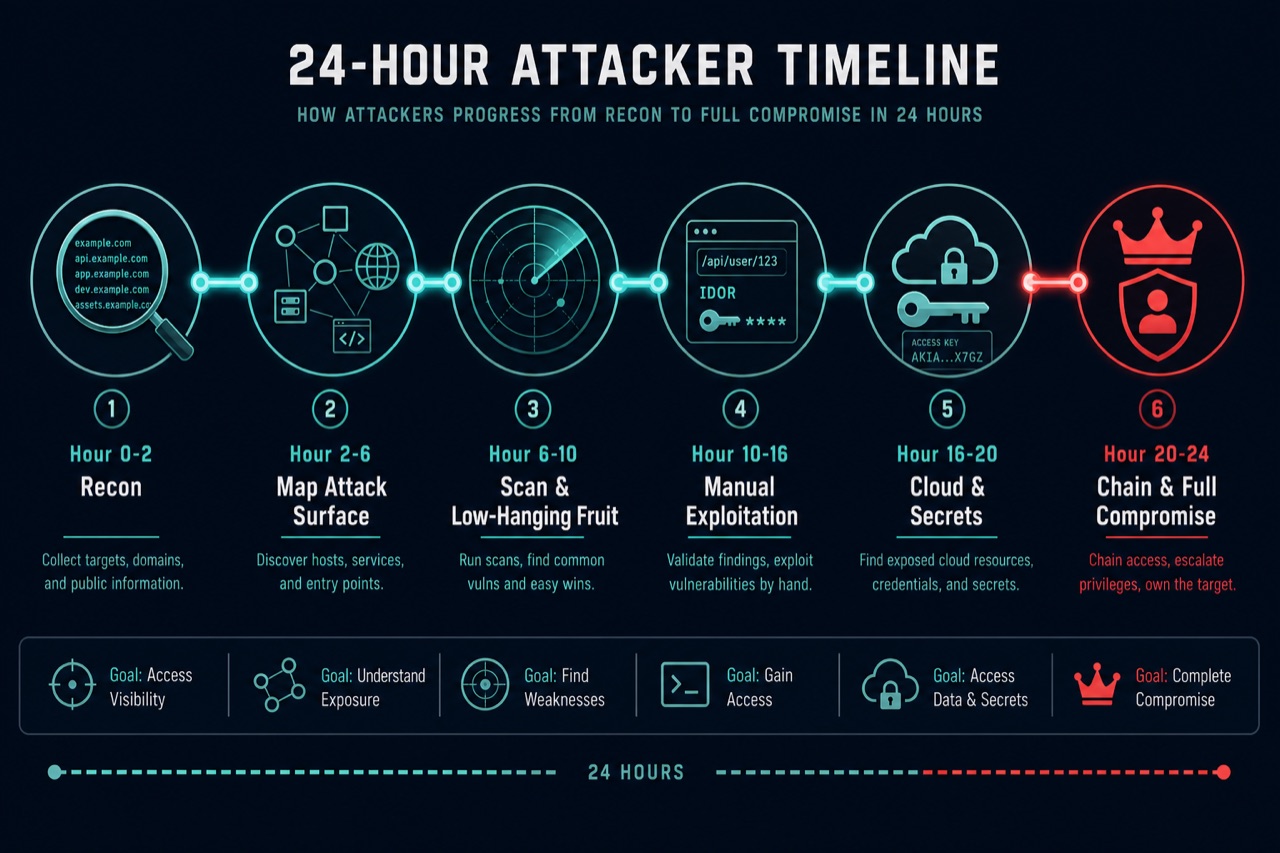
The 24-hour clock (TL;DR)
- Hour 0-2 - Recon: Find every domain, subdomain, and forgotten box your startup exposes.
- Hour 2-6 - Map the attack surface: Turn hosts into endpoints, APIs, login flows, and JavaScript that leaks secrets.
- Hour 6-10 - Scan and grab low-hanging fruit: Exposed
.envfiles, open.git, default logins, subdomain takeovers. - Hour 10-16 - Manual exploitation: IDOR, broken auth, and injection - where the real damage lives.
- Hour 16-20 - Cloud, secrets, and SSRF: Turn one bug into AWS keys and database access.
- Hour 20-24 - Chain and report: Combine small issues into full compromise, then write it up.
Notice the shape: hours of quiet, patient collection at the start, and only a couple of hours of actual "hacking" at the end. That ratio is the whole secret. Let us walk the clock.
Hour 0-2: Recon - mapping everything you forgot you own
I start with one input: your root domain. From there the goal is a complete list of everything that answers to your name on the internet. Startups are leaky here because someone spun up staging., dev-admin., or grafana. for a demo two years ago and never took it down.
# Passive subdomain discovery from many sources
subfinder -d acme-startup.com -all -silent -o subs.txt
echo acme-startup.com | assetfinder --subs-only >> subs.txt

# Certificate transparency often exposes internal names
curl -s "https://crt.sh/?q=%25.acme-startup.com&output=json" \
  | jq -r '.[].name_value' | sed 's/\*\.//g' >> subs.txt

# Dedupe, then find which hosts are actually alive
sort -u subs.txt | httpx -silent -sc -title -td -o live.txt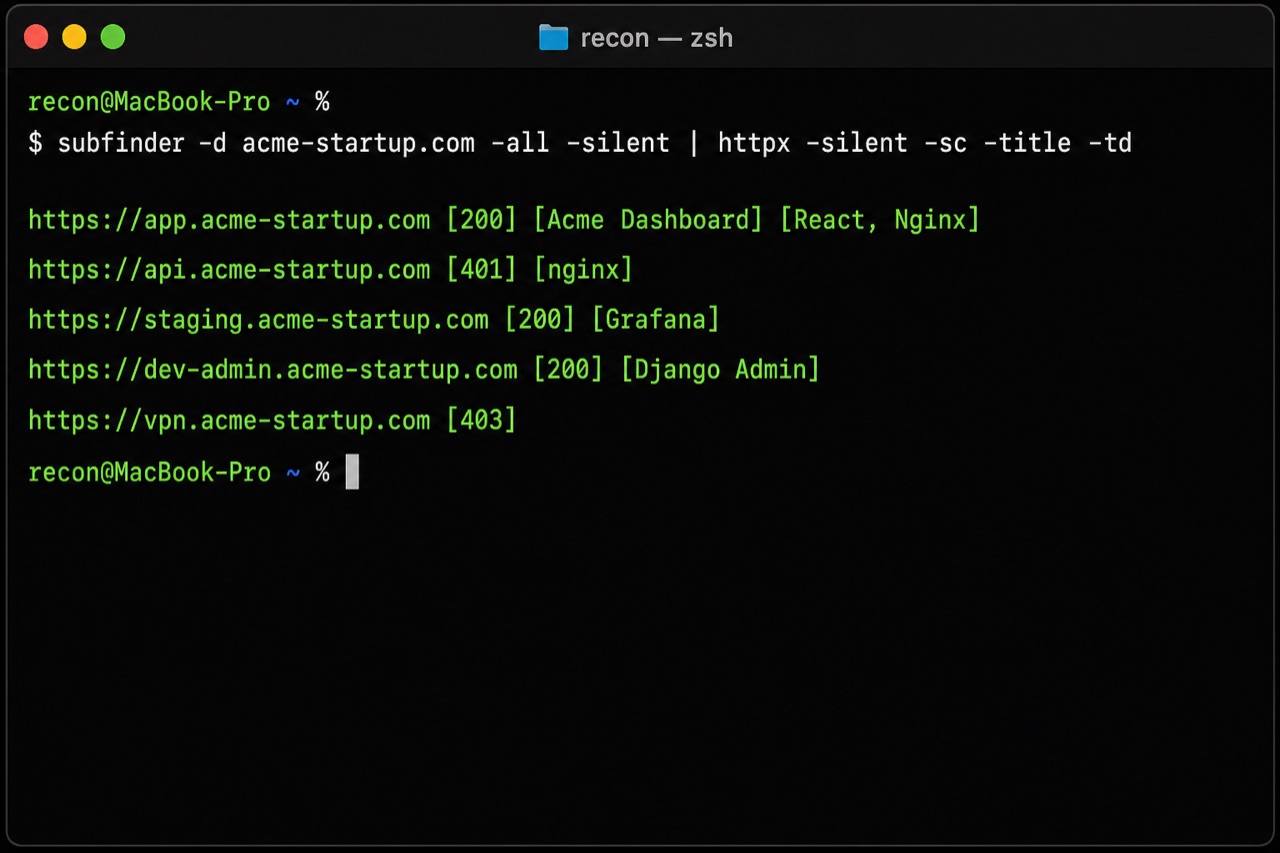
Look at that output. app. is expected. But staging.acme-startup.com running Grafana and dev-admin.acme-startup.com serving a Django admin are the interesting ones - internal tools that were never meant to face the public internet. Nine times out of ten, staging runs older code, weaker auth, and real production data someone copied in "just to test."
For the full tooling breakdown, our subdomain enumeration guide goes deeper. The workflow above is the 90 percent version.
How to defend this hour: Keep an asset inventory and actually delete dead subdomains and their DNS records. Put staging, dev, and internal dashboards behind a VPN or SSO, never on a public URL. Audit your own certificate transparency logs (crt.sh) once a month - if you can see it, so can I.
Hour 2-6: Mapping the attack surface
Now I turn hosts into a real attack surface: every URL, parameter, API route, and login flow. Historical URL archives are gold because they remember endpoints you deleted from the UI but never took off the server.
# Pull historical + crawled URLs, then keep the ones with parameters
cat live.txt | gau | uro | anew urls.txt
katana -list live.txt -jc -silent | anew urls.txt
grep '=' urls.txt > params.txt

# Crawl JavaScript bundles - SPAs leak internal routes and keys here
katana -u https://app.acme-startup.com -jc -silent \
  | grep '\.js$' | sort -u > js.txt

# Grep the JS for the good stuff
cat js.txt | while read u; do curl -s "$u"; done \
  | grep -Eio '(api[_-]?key|secret|token|/api/v[0-9]|graphql|s3\.amazonaws)'
Modern startups build React or Vue single-page apps, and those bundles are a treasure map. They frequently ship hardcoded API keys, internal admin routes, feature flags, and the full list of backend endpoints - including the ones the current UI never calls. I have found entire hidden admin APIs just by reading one main.chunk.js.
While the tools run, I open the app in Burp and just use it like a curious customer. Sign up, poke every button, watch the requests. This is where I learn how auth works, what an object ID looks like, and which API version is live.
How to defend this hour: Do not ship secrets to the browser - anything in your frontend bundle is public. Move keys server-side, scope them tightly, and rotate anything that ever touched client code. Remove dead endpoints instead of just hiding the button. Add authentication checks on every API route, not just the ones the UI exposes.
Hour 6-10: Scanning and the embarrassing easy wins
Before any clever manual work, I run wide, cheap checks. Not to submit scanner output as findings - to build a to-do list. This is where startups get caught by the same handful of mistakes over and over.
nuclei -l live.txt -severity medium,high,critical -silent

# Manually confirm the classics scanners love to flag
curl -s https://dev.acme-startup.com/.env          # leaked environment file
curl -s https://acme-startup.com/.git/config       # exposed source repo
curl -s https://api.acme-startup.com/swagger.json  # full API blueprint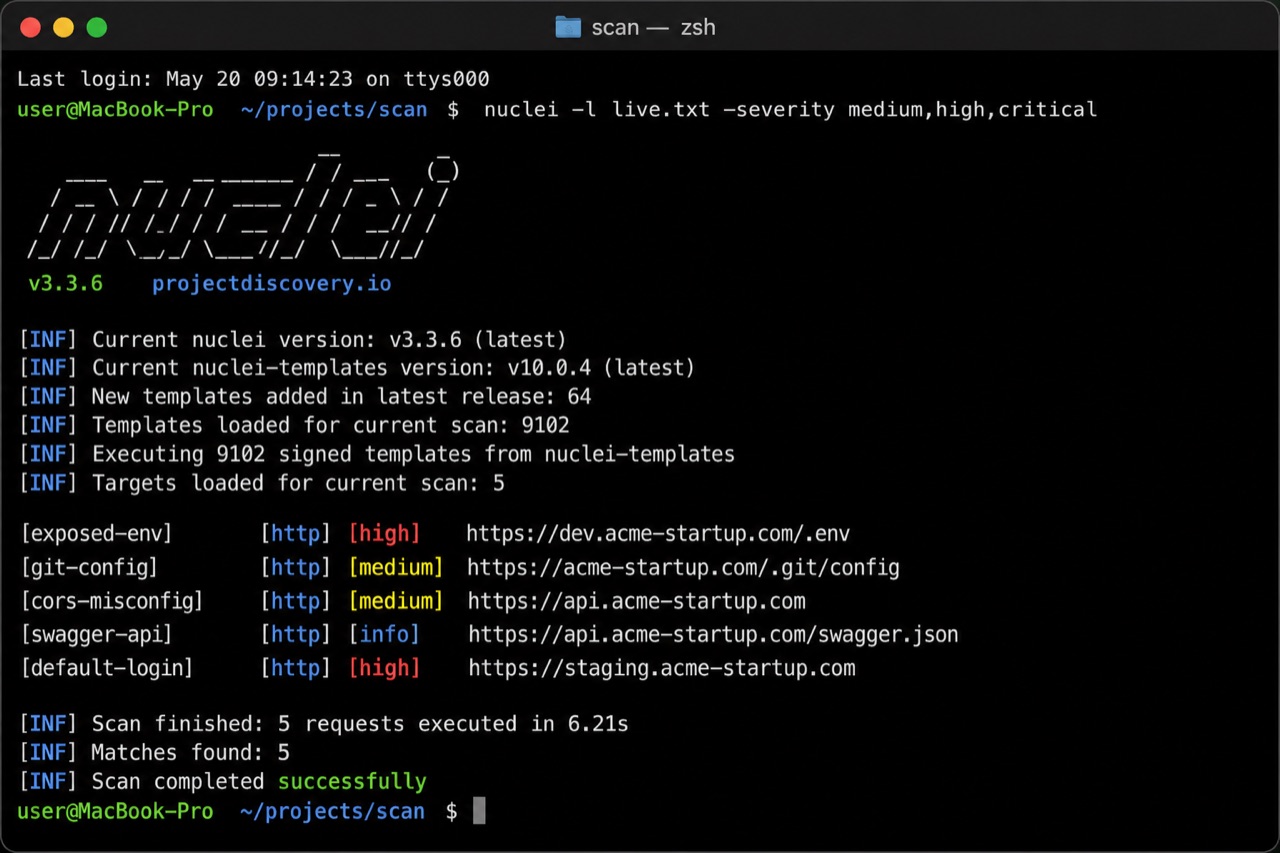
Let me be blunt about how bad each of these is. An exposed .env hands over database passwords and API keys directly. An open .git/config means I can often reconstruct your entire source code with a tool like git-dumper. A public swagger.json gives me every endpoint and parameter, saving me hours. A default login on a staging box is game over before I have done anything creative.
I also run a quick subdomain takeover check, because dangling DNS records are common when startups churn through SaaS tools:
nuclei -l live.txt -t takeovers/ -silent
subzy run --targets live.txt --concurrency 50
How to defend this hour: Block dotfiles at the web server (.env, .git, .bak) - one nginx location block stops the worst of it. Never deploy from a working git checkout into the web root. Keep API docs behind auth in production. Change every default credential before a box is reachable. Add these exact checks to your CI so a scanner never beats you to them.
Hour 10-16: Manual exploitation - where the real damage lives
This is the block that actually owns a company, and no scanner does it for you. The number one bug I find in startup apps is broken access control - specifically IDOR, where the server trusts an ID the client sends without checking who is asking.
The test is stupidly simple. I sign up two accounts. Account A loads one of its own objects. I capture that request, change the ID to one belonging to account B, and replay it. If I get B's data back, you have an IDOR.
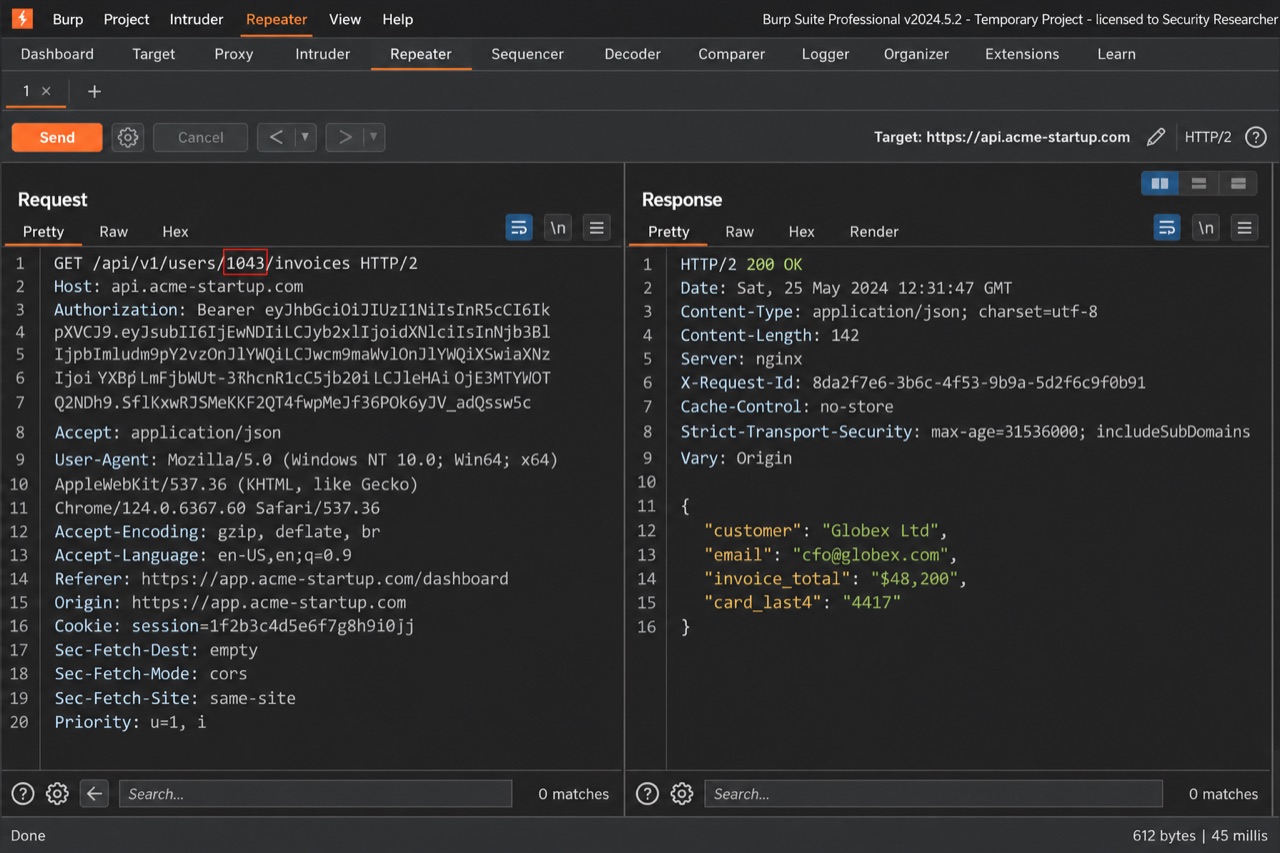
In the screenshot, my account was user 1042. I changed the path to /api/v1/users/1043/invoices and the API cheerfully returned another customer's billing PDF - name, email, invoice total, and the last four of a card. Now imagine looping that from 1 to 100000. That is not one bug; that is your entire customer database. Burp's Autorize extension automates this replay across every request as you browse.
For the deep version - UUIDs, GraphQL node IDs, IDs hidden in POST bodies - see our IDOR hunting playbook. Alongside IDOR I test the auth flows: password reset token reuse, OAuth redirect tricks, and 2FA bypasses (our 2FA bypass tricks covers the patterns that still ship in 2026), plus injection where user input hits a query or template - the SQL injection explainer and GraphQL security guide are the field references I keep open.
How to defend this hour: Enforce authorization on the server for every object, on every request - check that the logged-in user actually owns the thing they asked for. Do not rely on unguessable IDs; UUIDs are not an access control. Use parameterized queries everywhere. Test auth with two low-privilege accounts as part of your own QA. This one habit prevents the majority of real startup breaches.
Hour 16-20: Cloud, secrets, and SSRF
By now I usually have a foothold. This block is about turning it into keys to the whole kingdom. The two fastest routes are leaked secrets and server-side request forgery (SSRF) against cloud metadata.
SSRF hides in any feature that fetches a URL for you: "import from link," webhook testers, PDF generators, avatar-from-URL uploads, link previews. If I can make your server request a URL I control, I can usually make it request the cloud metadata endpoint too - and on a misconfigured instance that hands back temporary AWS credentials.
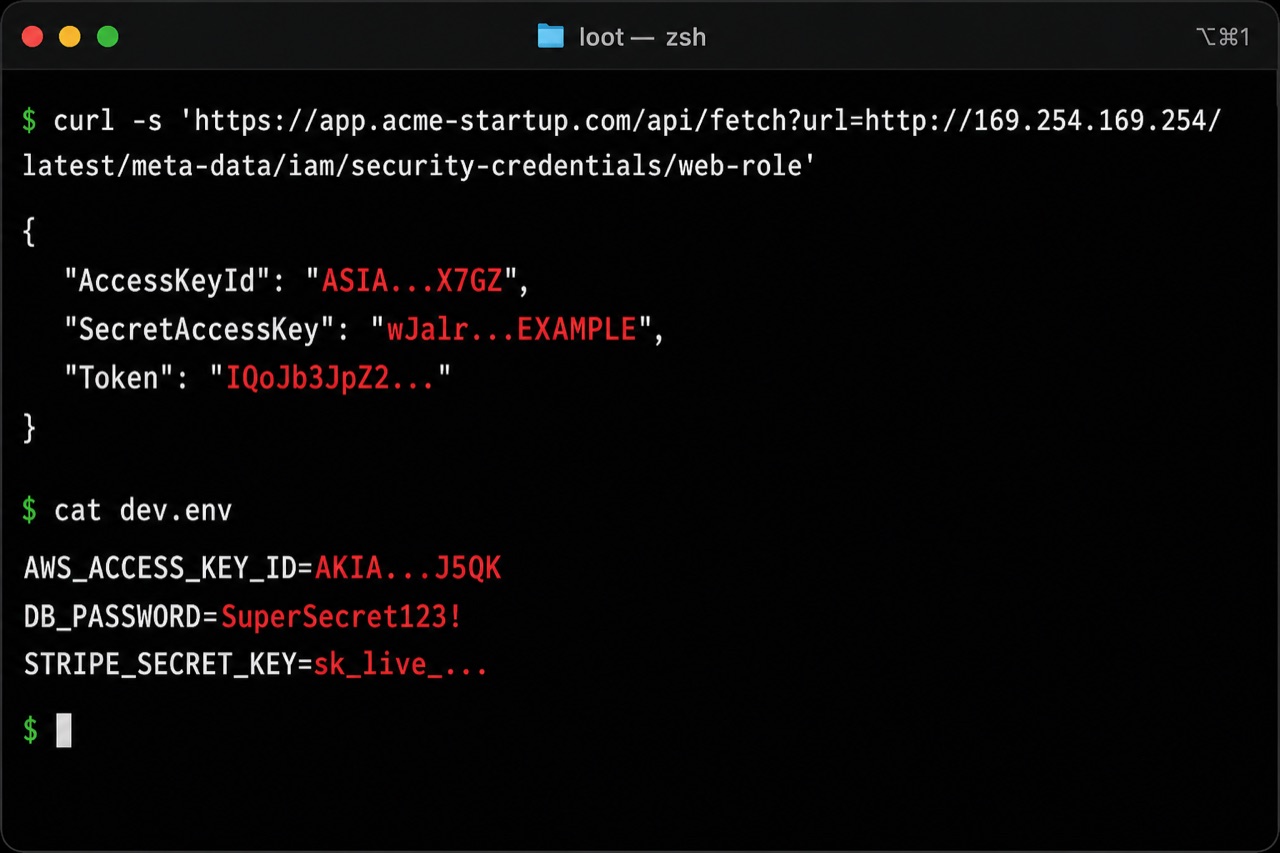
With those temporary credentials I can list S3 buckets, read databases, or pivot deeper into the account depending on how tightly the role is scoped. And that leaked dev.env from earlier? It just handed me the production database password and a live Stripe secret key. Our SSRF explainer breaks down the cloud metadata chain step by step.
How to defend this hour: Enforce IMDSv2 (or your cloud's equivalent) so metadata requires a signed token, and give every instance the absolute minimum IAM permissions. Validate and allowlist any URL your server fetches - block private IP ranges and 169.254.169.254. Never commit real secrets; use a secret manager and short-lived credentials. Scan your repos with a tool like trufflehog or gitleaks before an attacker does.
Hour 20-24: Chaining small bugs into total compromise
The scary reports are never one big bug. They are three small ones stacked. This is the part that separates a checklist scanner from an actual attacker, and it is where a "medium" and a "low" quietly become a "critical."
A realistic chain from everything above: the exposed staging Grafana (recon) runs old code with a known CVE, which gives me a foothold. The SSRF (hour 16) gets me AWS keys. The IDOR (hour 12) lets me enumerate every customer. Individually a triager might shrug. Together they are "attacker read your entire customer base and can bill their cards." That is the difference between a $200 bug and a company-ending incident.
The last hours go to the least glamorous, most valuable step: writing it up. A finding nobody can reproduce gets ignored. So every issue gets an impact-first title, numbered repro steps with two labeled accounts, the concrete blast radius, and a one-paragraph fix. Programs and internal teams pay for clarity, not drama - and screenshots get redacted so I never leak real user data.
The founder's 24-hour defense checklist
If you only do six things this week, do these. Each one directly kills a phase above.
- Kill the ghosts: Inventory your subdomains and delete dead ones. Put staging, dev, and internal tools behind SSO or a VPN.
- Block the dotfiles: Deny
.env,.git, and backups at the web server and never deploy from a git checkout. - Fix access control: Server-side ownership checks on every object and every API route. Test with two accounts.
- Lock down cloud: IMDSv2, least-privilege IAM roles, and URL allowlists on any fetch feature.
- Get secrets out of code: Use a secret manager, rotate anything exposed, and scan repos and JS bundles for keys.
- Run this on yourself: Walk these phases against your own startup quarterly, or run a bug bounty program so someone friendly finds it first.
The 24-hour toolkit
- Recon: subfinder, assetfinder, httpx, dnsx, crt.sh
- Mapping: katana, gau, waybackurls, uro, Burp Suite
- Scanning: nuclei, subzy, naabu (sparingly)
- Exploitation: Burp (+ Autorize), sqlmap, dalfox
- Secrets and cloud: trufflehog, gitleaks, git-dumper, awscli
Browse the full, current list on our security tools database, and if you want to fold AI into the boring collection steps without turning your reports into spam, read the AI bug bounty workflow.
FAQ
Can someone really hack a startup in 24 hours?
Often faster. Most damage comes from a small set of predictable mistakes - exposed staging, leaked secrets, and broken access control. A well-secured startup can absorb the same 24 hours and hand the attacker nothing. The timeline is about the attacker's effort, not a guarantee they succeed.
What is the single most important thing to fix first?
Broken access control (IDOR). It needs no special access, it is trivial to exploit, and it usually exposes your entire customer base. Enforce server-side ownership checks on every request and you close the most common startup breach.
We are a tiny team with no security budget. Where do we start?
Start free: run subfinder and httpx against your own domain, block dotfiles at the web server, put staging behind auth, and test your app with two accounts. That afternoon of work removes most of the easy wins an attacker relies on.
Should a startup run a bug bounty program?
Once the obvious issues in this guide are fixed, yes. A bounty (or even a simple security.txt and a report inbox) means a friendly researcher finds the next bug before a criminal does. Do not open one while your .env is still public - fix the basics first.
Wrap-up
The uncomfortable truth is that hacking a typical startup is rarely about genius exploits. It is about patience, a good asset list, and knowing that fast-moving teams leave the same doors unlocked. The good news is the fix list is just as predictable. Run this playbook against yourself before someone else does, close the six items on the defense checklist, and the next attacker who gives themselves 24 hours goes home with nothing. When you are ready to go deeper, the pentest roadmap, web app checklist, and daily bug bounty writeups are the trail forward.