
This Vulnerability Explain post covers Security Misconfiguration, a broad OWASP Top 10 category that catches all the ways insecure defaults and sloppy settings leave a system exposed. It is rarely glamorous, but it is one of the most common ways attackers get an easy foothold. Let's walk through it.
What is Security Misconfiguration?
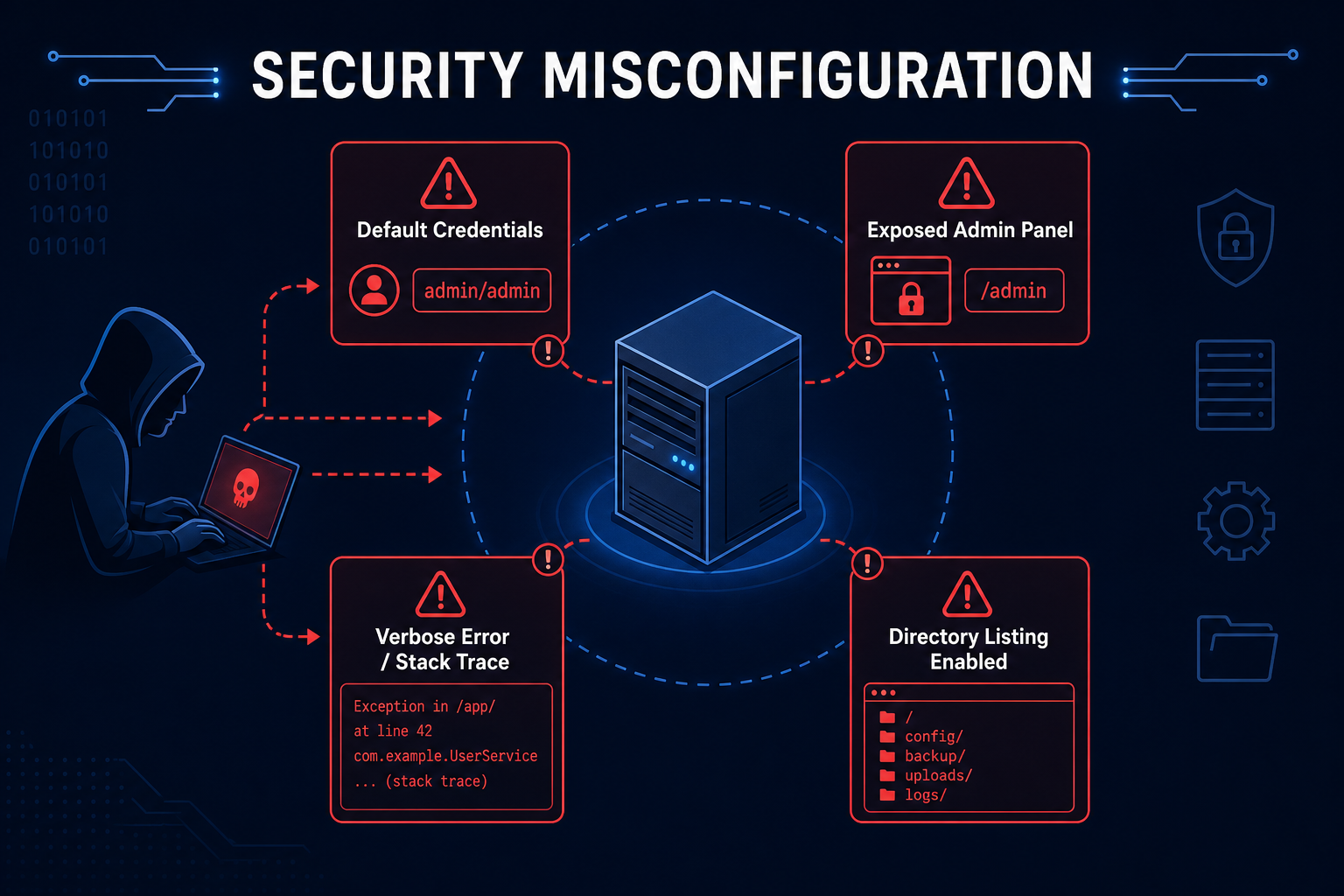
Security Misconfiguration covers insecure default settings, incomplete or ad hoc configurations, exposed administrative interfaces, verbose error messages, unnecessary features, and missing security headers - anywhere the system is not hardened.
It is less a single bug and more a collection of oversights: a default admin password left in place, a debug console exposed in production, directory listing enabled, stack traces shown to users, or a cloud storage bucket left public. Each gives an attacker information or access they should never have.
How does Security Misconfiguration work?
Security misconfiguration gives attackers a foothold through common oversights:
- Insecure Defaults
- Default accounts, passwords, or sample apps are left enabled.
- Exposed Interfaces
- Admin panels, dashboards, or debug endpoints are reachable from the internet.
- Verbose Errors
- Detailed stack traces and version banners reveal internals to attackers.
- Missing Hardening
- Security headers are absent, directory listing is on, or unused features remain enabled.
- Exploitation
- Attackers use this exposure to log in, gather intelligence, or pivot to deeper attacks.
Misconfiguration is death by a thousand defaults. Hardening every layer and removing what you do not need shrinks the attack surface dramatically.
Tools and Techniques for Security Misconfiguration Testing
Testing combines configuration review with scanning for exposed services and defaults.
Manual Testing Methodologies
- Default Credential Checks - Try known default usernames and passwords on exposed interfaces.
- Content Discovery - Look for admin panels, backups, .git folders, and debug endpoints.
- Error Triggering - Provoke errors to see whether stack traces or versions leak.
- Header and Listing Review - Check for missing security headers and enabled directory listing.
Automated Scanning Tools
- Nuclei - Extensive templates for defaults, exposures, and misconfigurations.
- Nessus - Comprehensive configuration and vulnerability scanning.
- OWASP Nettacker - Automated misconfiguration and exposure discovery.
- ffuf - Finds exposed files and admin paths through content discovery.
Security Misconfiguration Protection Mechanisms
Best Practices for Secure Coding
- Harden by Default
- Description: Change defaults, remove sample content, and disable unused features.
- Benefits: Removes the easy wins attackers rely on.
- Implementation Tip: Treat secure configuration as code, reviewed and version controlled.
- Suppress Verbose Errors
- Description: Show generic errors to users and log details internally.
- Benefits: Stops information leakage.
- Implementation Tip: Disable debug mode in production.
- Apply Security Headers
- Description: Set CSP, HSTS, X-Content-Type-Options, and related headers.
- Benefits: Closes a range of client-side and transport gaps.
- Implementation Tip: Bake headers into the standard server configuration.
Best Practices for Organizations
- Configuration Management
- Use infrastructure as code with hardened baselines.
- Detect drift from approved configurations automatically.
- Minimal Footprint
- Remove unused services, ports, and accounts.
- Segment and restrict access to management interfaces.
- Continuous Scanning
- Scan environments regularly for exposures and defaults.
- Patch and re-harden after changes.
Top Security Misconfiguration payloads used by Security Researchers
As a security researcher, knowing the most common payloads helps you detect and prevent these attacks. Use this knowledge ethically and only on systems you are authorized to test. Some sample payloads are shown below.
// Common exposed paths to probe
/admin
/actuator
/.git/config
/server-status
/phpinfo.php
// Default credentials to test
admin:admin
admin:password
root:root
tomcat:tomcat// Directory listing check
GET /uploads/ (returns a file listing if enabled)// Recommended security headers
Strict-Transport-Security: max-age=63072000; includeSubDomains
X-Content-Type-Options: nosniff
Content-Security-Policy: default-src 'self'Real-World Example: Exposed Actuator Endpoint
A Spring Boot service shipped to production with its actuator management endpoints exposed and unauthenticated, a common default oversight.
An attacker browsed to /actuator/env and /actuator/heapdump, reading environment variables and a memory dump that contained database credentials and API keys - no exploit required, just an exposed management interface.
The fix restricted actuator endpoints, required authentication, and removed sensitive exposure. Security misconfiguration is rarely flashy, but it is everywhere - harden every layer and expose nothing you do not have to.
Vulnerable and secure code of Security Misconfiguration
The following example shows the contrast between vulnerable and secure code for Security Misconfiguration. It helps you see how the flaw creeps into real code and the changes that shut it down.
🥺 Vulnerable Code:
# Vulnerable: insecure defaults shipped to production
# application.properties
management.endpoints.web.exposure.include=*   # all actuator endpoints public
spring.security.user.password=admin           # default password
server.error.include-stacktrace=always        # stack traces shown to users
# Directory listing left enabled, no security headers set- Management endpoints, default credentials, and stack traces are all exposed.
- Attackers can read secrets and internals with no real exploitation needed.
😎 Secure Code:
# Secure: hardened configuration
# application.properties
management.endpoints.web.exposure.include=health,info   # minimal exposure
management.endpoint.health.show-details=never
server.error.include-stacktrace=never                   # generic errors only
spring.profiles.active=prod                             # debug off
# Strong, unique credentials from a secret manager (never defaults)
# Add security headers (HSTS, CSP, X-Content-Type-Options) at the edge- Only safe endpoints are exposed and details are hidden from users.
- Defaults are replaced with managed secrets and debug output is disabled.
Conclusion
Security Misconfiguration is the unglamorous bug that hands attackers easy wins: default passwords, exposed panels, verbose errors, missing headers. Harden every layer by default, manage configuration as reviewed code, suppress verbose errors, apply security headers, and remove anything you do not need. A small, well-hardened footprint is one of the cheapest, highest-value defenses you can build.