
This Vulnerability Explain post covers Unrestricted File Upload. Upload features are everywhere - profile pictures, documents, attachments - and when they fail to validate what is uploaded, attackers can plant web shells and take over the server. Let's look at how it happens and how to lock it down.
What is Unrestricted File Upload?
Unrestricted File Upload is a flaw where an application lets users upload files without properly validating their type, content, name, or storage location. The dangerous outcome is uploading an executable script that the server later runs.
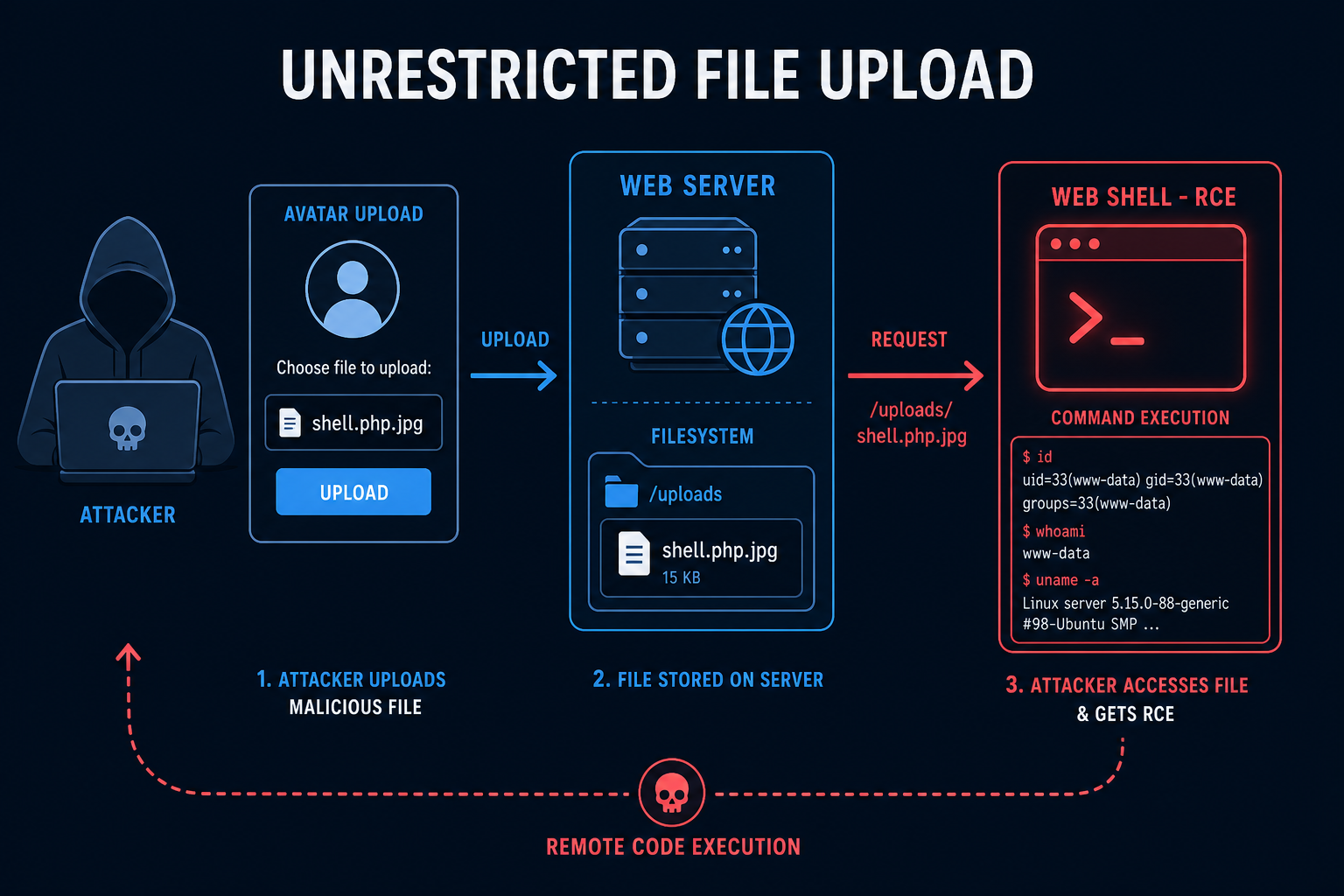
Picture an avatar upload that only checks the file extension in the name. An attacker uploads shell.php disguised as an image, or bypasses the check, and the file lands in a web-accessible directory. Requesting it executes the attacker's code on the server.
How does Unrestricted File Upload work?
An unrestricted upload becomes server compromise through these steps:
- Weak Validation
- The app validates only the extension or the client-supplied content type, both easily forged.
- Malicious File Uploaded
- The attacker uploads a script (for example a PHP or JSP web shell), possibly with a disguised name.
- Stored in an Executable Location
- The file is saved in a directory the web server will execute or serve.
- File Is Executed
- The attacker requests the uploaded file, and the server runs it.
- Full Compromise
- The web shell gives command execution, leading to data theft and lateral movement.
The danger is not the upload itself but letting untrusted files be executed or served from a trusted context. Validate the content and neutralize where it is stored.
Tools and Techniques for Unrestricted File Upload Testing
Testing focuses on bypassing type checks and confirming whether uploaded files can execute.
Manual Testing Methodologies
- Extension Bypass - Try double extensions (shell.php.jpg), uncommon executable extensions, and case tricks.
- Content-Type Forgery - Change the declared MIME type while uploading a script.
- Magic Byte Tricks - Prepend valid image headers to a script to pass content sniffing.
- Path and Overwrite Tests - Attempt path traversal in the filename or overwriting existing files.
Automated Scanning Tools
- Fuxploider - Automates file upload vulnerability discovery and bypasses.
- Burp Suite Scanner - Helps test upload handling and bypasses.
- Nuclei - Templates check for exposed or executable uploads.
- OWASP ZAP - Assists with upload manipulation testing.
Unrestricted File Upload Protection Mechanisms
Best Practices for Secure Coding
- Validate Content, Not Just Names
- Description: Verify the actual file content and type, not the extension or client MIME.
- Benefits: Disguised scripts are rejected.
- Implementation Tip: Use server-side type detection and an allowlist of permitted types.
- Store Outside the Web Root
- Description: Keep uploads where the server will not execute them, and serve via a controlled handler.
- Benefits: Even a malicious file cannot run.
- Implementation Tip: Disable script execution in the upload directory.
- Rename and Constrain
- Description: Generate random filenames, strip paths, and enforce size limits.
- Benefits: Stops traversal, overwrites, and guessable URLs.
- Implementation Tip: Never trust the user-supplied filename.
Best Practices for Organizations
- Dedicated Storage
- Serve user files from a separate domain or object storage.
- Avoid mixing uploads with application code.
- Malware Scanning
- Scan uploads for malware where appropriate.
- Sandbox processing of uploaded content.
- Testing
- Add upload bypass tests to security reviews.
- Verify execution is impossible in the upload path.
Top Unrestricted File Upload payloads used by Security Researchers
As a security researcher, knowing the most common payloads helps you detect and prevent these attacks. Use this knowledge ethically and only on systems you are authorized to test. Some sample payloads are shown below.
// Double extension bypass
shell.php.jpg
shell.jpg.php
// Content-Type forgery (multipart)
Content-Disposition: form-data; name="file"; filename="shell.php"
Content-Type: image/jpeg
<?php system($_GET['cmd']); ?>// Magic bytes + script (polyglot)
GIF89a;
<?php system($_GET['cmd']); ?>// Path traversal in filename
filename="../../var/www/html/shell.php"Real-World Example: Web Shell via Avatar Upload
A profile page let users upload an avatar and only checked that the filename ended in an image extension, saving files under the web-accessible /uploads directory.
An attacker uploaded shell.php.jpg, then used a small quirk in how the server mapped extensions to execute it as PHP. Requesting the file ran a web shell, giving the attacker command execution on the host.
The fix validated real content type, stored uploads outside the web root with execution disabled, and renamed files to random identifiers. File uploads are safe only when the server treats every uploaded byte as untrusted and never lets it run.
Vulnerable and secure code of Unrestricted File Upload
The following example shows the contrast between vulnerable and secure code for Unrestricted File Upload. It helps you see how the flaw creeps into real code and the changes that shut it down.
🥺 Vulnerable Code:
<?php
// Vulnerable: trusts the filename extension and saves to web root
$name = $_FILES['avatar']['name'];
$ext = pathinfo($name, PATHINFO_EXTENSION);
if (in_array(strtolower($ext), ["jpg", "png", "gif"])) {
    // shell.php.jpg or content-type tricks can still slip through
    move_uploaded_file($_FILES['avatar']['tmp_name'], "uploads/" . $name);
}
?>- Only the extension is checked, and the file is stored in a web-accessible folder.
- A disguised script can be uploaded and then executed by the server.
😎 Secure Code:
<?php
// Secure: verify real content, rename, store outside web root
$tmp = $_FILES['avatar']['tmp_name'];
$finfo = finfo_open(FILEINFO_MIME_TYPE);
$mime = finfo_file($finfo, $tmp);
$allowed = ["image/jpeg" => "jpg", "image/png" => "png", "image/gif" => "gif"];
if (!isset($allowed[$mime])) {
    http_response_code(400);
    exit("Invalid file type");
}
$name = bin2hex(random_bytes(16)) . "." . $allowed[$mime];
// /var/uploads is outside the web root and has script execution disabled
move_uploaded_file($tmp, "/var/uploads/" . $name);
?>- The real MIME type is detected server-side and matched against an allowlist.
- Files get random names and are stored outside the web root where they cannot execute.
Conclusion
Unrestricted File Upload is a direct route from a routine feature to full server compromise. Validate real file content rather than names or client MIME types, store uploads outside the web root with execution disabled, rename files to random identifiers, and enforce size and type limits. Treat every uploaded file as hostile until proven otherwise, and never let it run.