
Welcome to another Vulnerability Explain breakdown. Today we look at Server-Side Template Injection (SSTI), a flaw that turns a friendly templating engine into a path to full server compromise. It is common in apps that build pages, emails, or reports from templates, and it often escalates straight to remote code execution. Let's see how it works and how to keep it out.
What is SSTI?
SSTI happens when user input is embedded directly into a server-side template that is then evaluated by the templating engine. Instead of being treated as plain data, the input is parsed as template syntax, so an attacker can inject expressions the engine will execute.
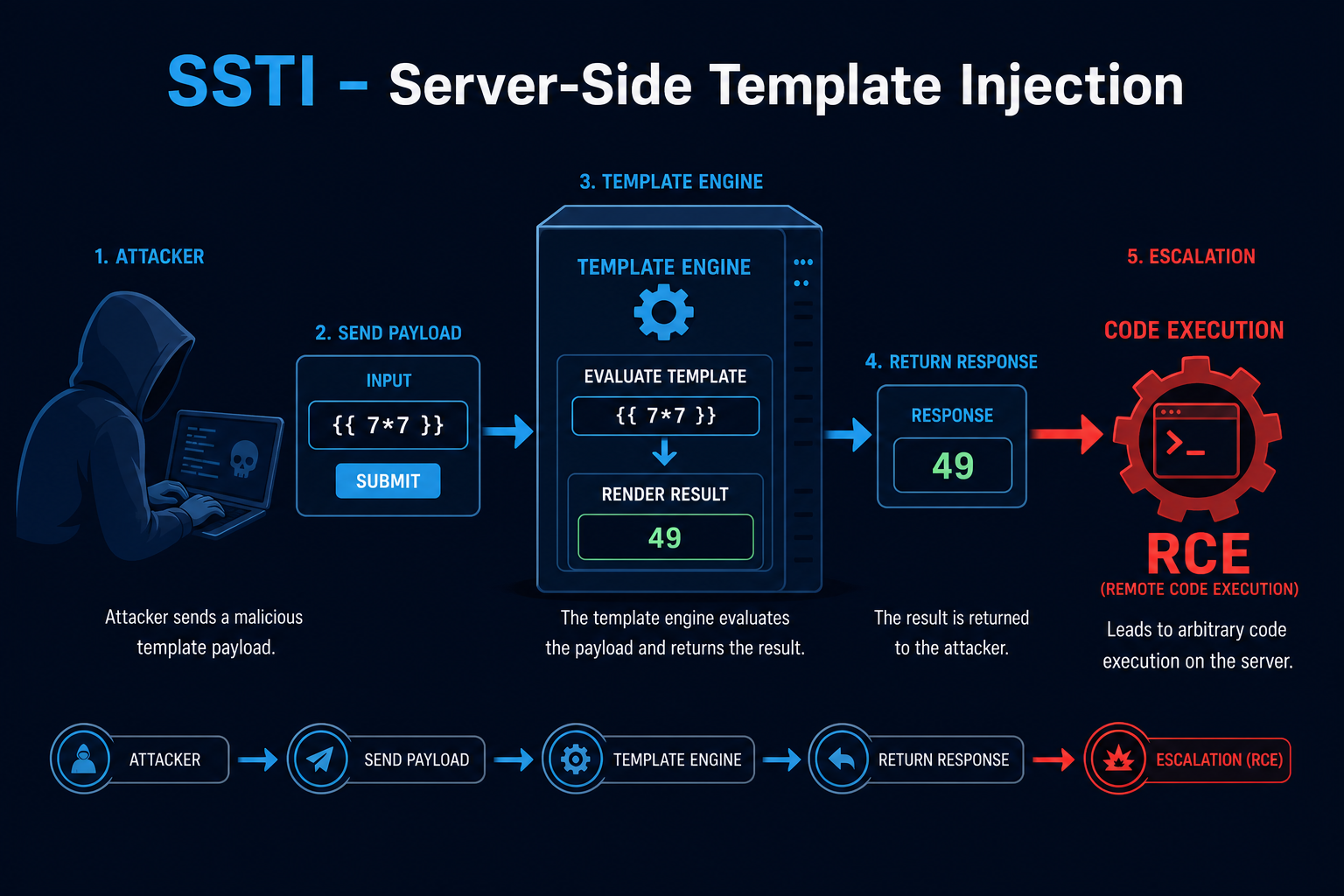
Imagine an app that greets users with a template like Hello {{ name }}. If the app builds that template by concatenating your name into it, sending {{ 7*7 }} returns Hello 49. That tells an attacker the engine is evaluating their input, and from there many engines allow access to objects that lead to code execution.
How does SSTI work?
SSTI follows a clear path from a reflected expression to code execution:
- User Input In a Template
- The application concatenates user input into a template string rather than passing it as data to a pre-compiled template.
- Engine Evaluates the Input
- The template engine parses the attacker's syntax (for example {{ }} or ${ }) and evaluates it on the server.
- Confirming the Flaw
- A simple math payload like {{ 7*7 }} returning 49 confirms the input is being evaluated.
- Reaching Dangerous Objects
- The attacker walks the engine's object model to reach built-in functions, configuration, or OS access.
- Code Execution
- With access to the right objects, the attacker runs arbitrary commands on the server.
So SSTI is the engine treating your data as code. The moment user input becomes part of the template itself rather than a value passed into it, the door to RCE opens.
Tools and Techniques for SSTI Testing
SSTI testing starts with simple probes and quickly moves to engine-specific exploitation.
Manual Testing Methodologies
- Polyglot Probing - Inject test strings like {{7*7}}, ${7*7}, and <%= 7*7 %> and watch for evaluated results.
- Engine Fingerprinting - Use differential payloads to identify the engine (Jinja2, Twig, Freemarker, Velocity, ERB), since exploitation differs per engine.
- Object Traversal - Once confirmed, explore the engine's accessible objects to find paths to OS commands.
- Context Analysis - Determine whether input lands in a plaintext or expression context to pick the right breakout.
Automated Scanning Tools
- tplmap - Automates SSTI detection and exploitation across many engines.
- SSTImap - A modern fork that detects and exploits SSTI, including code execution.
- Burp Suite Scanner - Flags template injection during scanning.
- Nuclei - Templates detect common SSTI patterns at scale.
SSTI Protection Mechanisms
Best Practices for Secure Coding
- Never Build Templates From Input
- Description: Pass user input as data to a pre-defined template, never concatenate it into template source.
- Benefits: Removes the root cause of SSTI.
- Implementation Tip: Use render(template, name=user_input), not render("Hello " + user_input).
- Use Logic-less or Sandboxed Engines
- Description: Prefer engines that limit expression power or run in a sandbox.
- Benefits: Reduces what an attacker can do even if injection occurs.
- Implementation Tip: Enable sandbox modes and disable dangerous globals.
- Validate and Encode Output
- Description: Validate input and apply contextual output encoding.
- Benefits: Limits abuse and catches malformed input early.
- Implementation Tip: Treat all user input as untrusted text, not markup.
Best Practices for Organizations
- Secure Defaults
- Provide a vetted rendering helper that never accepts dynamic template source.
- Ban string-built templates in code review.
- Least Privilege
- Run rendering services with minimal privileges so SSTI to RCE gains little.
- Sandbox or containerize template rendering.
- Testing
- Add SSTI probes to DAST.
- Review any feature that renders user-influenced content.
Top SSTI payloads used by Security Researchers
As a security researcher, knowing the most common payloads helps you detect and prevent these attacks. Use this knowledge ethically and only on systems you are authorized to test. Some sample payloads are shown below.
// Generic detection probes
{{7*7}}
${7*7}
<%= 7*7 %>
#{7*7}
// Jinja2 (Python) - reaching code execution
{{ ''.__class__.__mro__[1].__subclasses__() }}
{{ config.__class__.__init__.__globals__['os'].popen('id').read() }}// Freemarker (Java)
<#assign ex="freemarker.template.utility.Execute"?new()>${ ex("id") }// Twig (PHP)
{{ _self.env.registerUndefinedFilterCallback("system") }}{{ _self.env.getFilter("id") }}Real-World Example: From {{7*7}} to a Shell
A marketing tool let users design email templates with placeholders and previewed them server side using Jinja2. The preview built the template by concatenating the user's content into the template string.
A tester entered {{7*7}} and the preview showed 49. Recognizing Jinja2, they walked the object model to reach Python's os module and ran a command that returned the contents of /etc/passwd, then a reverse shell.
The fix passed user content strictly as data into a fixed template and enabled the sandboxed environment. SSTI is a vivid reminder that the line between data and code must never blur.
Vulnerable and secure code of SSTI
The following example shows the contrast between vulnerable and secure code for SSTI. It helps you see how the flaw creeps into real code and the changes that shut it down.
🥺 Vulnerable Code:
# Vulnerable: user input concatenated into the template source
from jinja2 import Template

@app.route("/hello")
def hello():
    name = request.args.get("name", "")
    # The input becomes part of the template and is evaluated
    template = Template("Hello " + name + "!")
return template.render()- User input is concatenated into the template string, so {{ }} expressions are evaluated.
- An attacker can reach Python internals and execute commands on the server.
😎 Secure Code:
# Secure: input is passed as data to a fixed template
from jinja2 import Template

TEMPLATE = Template("Hello {{ name }}!")

@app.route("/hello")
def hello():
    name = request.args.get("name", "")
    # name is rendered as a value, never as template syntax
return TEMPLATE.render(name=name)- The template is fixed; user input is supplied as the name variable.
- Even {{7*7}} is printed literally because it is treated as data, not code.
Conclusion
Server-Side Template Injection is dangerous precisely because templating engines are so powerful. The defense is simple to state and easy to follow: never build template source from user input - pass input as data into a pre-defined template, prefer sandboxed or logic-less engines, and run rendering with least privilege. Keep data and code on opposite sides of the line and SSTI never gets started.