
Welcome to another Vulnerability Explain breakdown. Today we look at Local File Inclusion and the closely related Path Traversal flaw. Both let an attacker reach files the application never meant to expose, and in the worst cases they lead all the way to code execution. We will explain how they work, how to test for them, and how to keep your file handling tight.
What is LFI?
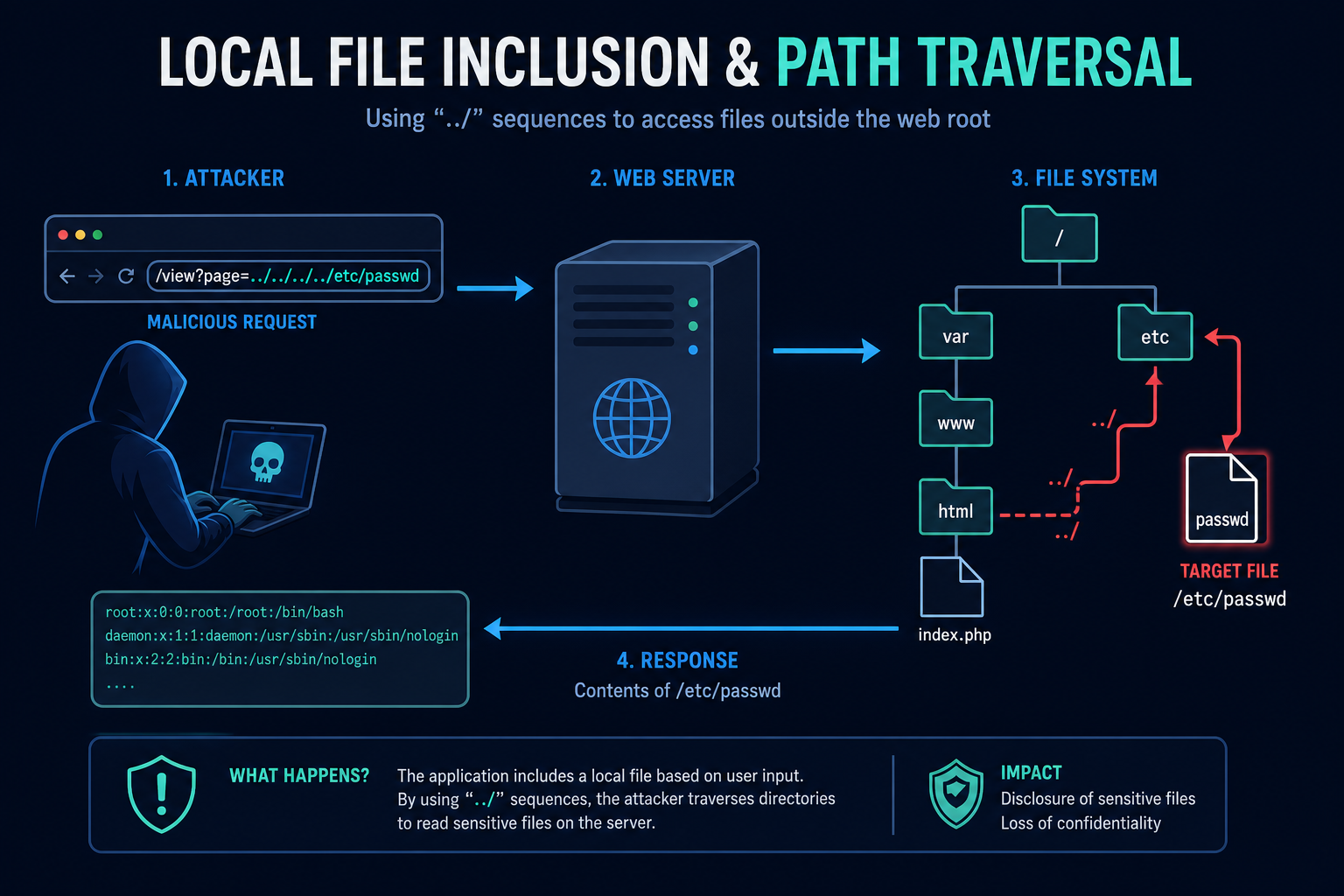
Path Traversal happens when an application builds a file path from user input without restriction, letting an attacker use sequences like ../ to climb out of the intended directory and read arbitrary files. Local File Inclusion is the stronger variant where the included file is also executed or interpreted by the application.
Imagine a page that loads templates with /view?page=home.php. If the code simply includes the value you supply, sending ../../../../etc/passwd walks up the directory tree and reads a system file. On platforms that execute included files, the attacker may even run code.
How does LFI work?
These flaws come from trusting user input when locating or including a file. The exploitation flow is usually:
- Filename Taken From Input
- A parameter, header, or cookie controls which file the application reads or includes.
- No Canonicalization or Allowlist
- The app does not normalize the path or restrict it to a safe base directory.
- Traversal Payload
- The attacker injects ../ sequences, absolute paths, or encoded variants to escape the intended folder.
- File Disclosure
- Sensitive files such as configuration, source code, or credentials are returned in the response.
- Escalation to Code Execution
- With LFI, attackers may include log files, session files, or uploads poisoned with code, or abuse wrappers to achieve execution.
The core issue is letting the user decide which file to open. Once you constrain that decision to a known-safe set, both path traversal and LFI lose their teeth.
Tools and Techniques for LFI Testing
Testing for LFI and traversal is mostly about systematic payload variation and encoding, with fuzzers to speed up the search.
Manual Testing Methodologies
- Dot-Dot-Slash Sequences - Add varying depths of ../ to reach known files like /etc/passwd or Windows\win.ini.
- Encoding Bypasses - Try URL encoding, double encoding, and overlong UTF-8 such as %2e%2e%2f and ..%252f to defeat naive filters.
- Null Byte and Extension Tricks - On older stacks, test truncation and forced extensions to read files the app appends a suffix to.
- PHP Wrappers - On PHP targets, probe php://filter and data:// wrappers to read source or execute code.
Automated Scanning Tools
- LFISuite - Automates LFI discovery and exploitation, including log poisoning.
- ffuf - Fuzzes path parameters with traversal wordlists at high speed.
- Nuclei - Community templates cover many traversal and LFI patterns.
- Burp Suite Scanner - Detects path traversal and helps replay encoded payloads.
LFI Protection Mechanisms
Best Practices for Secure Coding
- Never Build Paths From Raw Input
- Description: Map user choices to fixed, server-side file references instead of accepting filenames directly.
- Benefits: The user can only ever select from a known-good list.
- Implementation Tip: Use a lookup table such as {"home": "home.html"}.
- Canonicalize and Confine
- Description: Resolve the final absolute path and verify it stays within an allowed base directory.
- Benefits: Blocks ../ escapes even when encoded.
- Implementation Tip: Reject the request if the resolved path does not start with your base directory.
- Restrict Wrappers and Permissions
- Description: Disable dangerous stream wrappers and run with least-privilege file permissions.
- Benefits: Limits both disclosure and the jump to code execution.
- Implementation Tip: In PHP disable allow_url_include and limit open_basedir.
Best Practices for Organizations
- Harden the Filesystem
- Store application files separately from user-writable directories.
- Apply strict permissions so the web user can only read what it needs.
- WAF and Monitoring
- Deploy rules that flag traversal sequences in requests.
- Alert on access to sensitive files like /etc/passwd or configuration files.
- Secure SDLC
- Add traversal and LFI checks to SAST and DAST stages.
- Review every feature that reads or serves files.
Top LFI payloads used by Security Researchers
As a security researcher, knowing the most common payloads helps you detect and prevent these attacks. Use this knowledge ethically and only on systems you are authorized to test. Some sample payloads are shown below.
// Basic traversal to read system files
/view?page=../../../../etc/passwd
/view?page=..\\..\\..\\windows\\win.ini
// Encoded bypasses
/view?page=%2e%2e%2f%2e%2e%2fetc%2fpasswd
/view?page=..%252f..%252fetc%252fpasswd// PHP wrapper to read source code
/view?page=php://filter/convert.base64-encode/resource=config.php// LFI to RCE via log poisoning (concept)
/view?page=/var/log/apache2/access.log
// after injecting PHP into the User-Agent headerReal-World Example: Source Code Leak via Template Parameter
A content site rendered pages with /index.php?template=about. The template name was passed straight into a PHP include with no validation.
A researcher tried template=php://filter/convert.base64-encode/resource=config and received the base64-encoded source of the configuration file, which contained the database password. With those credentials and a writable log file, escalating to code execution was only a few steps away.
The team fixed it by mapping template names to a fixed allowlist and disabling URL include wrappers. Path traversal and LFI both come down to one rule: the user picks from your list, the user never names the file.
Vulnerable and secure code of LFI
The following example shows the contrast between vulnerable and secure code for LFI. It helps you see how the flaw creeps into real code and the changes that shut it down.
🥺 Vulnerable Code:
<?php
// Vulnerable: includes a file named directly by the user
$page = $_GET['page'];
// page=../../../../etc/passwd  ->  reads arbitrary files
// page=php://filter/...        ->  may leak source or execute code
include($page . ".php");
?>- The user fully controls the path, so ../ sequences escape the intended directory.
- On PHP, wrappers like php://filter can leak source code or lead to execution.
😎 Secure Code:
<?php
// Secure: map user choice to a fixed allowlist of files
$pages = [
    "home"    => "home.php",
    "about"   => "about.php",
    "contact" => "contact.php",
];
$page = $_GET['page'] ?? "home";
if (!array_key_exists($page, $pages)) {
    http_response_code(404);
    exit("Not found");
}
include(__DIR__ . "/templates/" . $pages[$page]);
?>- The user can only select a key from a known-good list, never name a file directly.
- The final path is anchored to a fixed templates directory, so traversal is impossible.
Conclusion
Local File Inclusion and Path Traversal both stem from a single mistake: letting the user decide which file to open. Once you map choices to a server-side allowlist, canonicalize and confine every path to a safe base directory, and disable dangerous stream wrappers, the attack has nowhere to go. The rule is easy to remember and hard to get wrong if you follow it - the user picks from your list, the user never names the file.