
This Vulnerability Explain entry covers Open Redirection - a flaw that looks minor on its own but becomes a powerful tool in phishing, OAuth token theft, and chained attacks. We will break down what it is, how attackers weaponize it, how to test for it, and how to stop your application from sending users wherever an attacker wants.
What is Open Redirection?
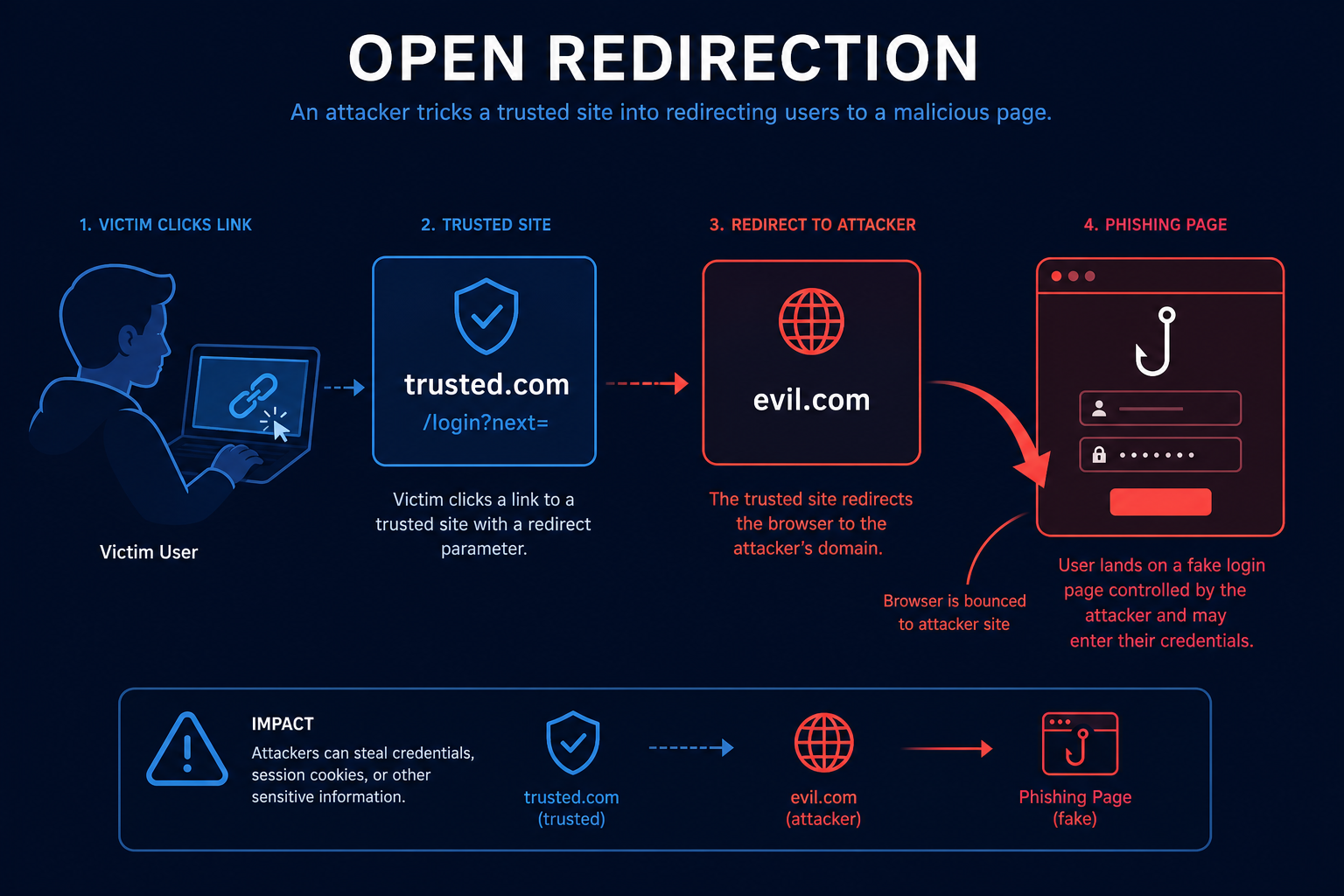
Open Redirection happens when an application takes a URL or path from user input and redirects the browser to it without validating the destination. Because the redirect comes from a trusted domain, victims and security filters tend to trust it.
Picture a login flow with a link like /login?next=/dashboard. After signing in the app sends you to whatever next points to. If it does not check that value, an attacker can craft /login?next=https://evil.com so that your own trusted site bounces the victim to a malicious page.
How does Open Redirection work?
The flaw is all about trusting a redirect target supplied by the user. The attack usually plays out like this:
- Redirect Parameter Exists
- An endpoint accepts a destination via a parameter such as next, url, return, or redirect.
- No Destination Validation
- The application redirects to that value without confirming it points to an allowed host.
- Crafted Link Distributed
- The attacker builds a link on the trusted domain that ultimately points to their own site and shares it via email or chat.
- Victim Trusts the Domain
- Because the link starts with the legitimate domain, the victim and email filters let it through.
- Payoff
- The victim lands on a convincing phishing page, or in OAuth flows the attacker captures tokens or authorization codes sent to the redirect.
So open redirect borrows your domain's good reputation to launch attacks. It is rarely the final goal, but it is a reliable stepping stone, especially against OAuth and SSO.
Tools and Techniques for Open Redirection Testing
Testing for open redirects is quick - the trick is trying enough bypass variations, since many apps apply weak filtering rather than real validation.
Manual Testing Methodologies
- Parameter Hunting - Look for redirect-style parameters in login, logout, OAuth, and tracking links, then point them at an external domain.
- Filter Bypass Variations - Try protocol-relative //evil.com, backslashes, @-tricks, whitelisted-host prefixes, and encoded characters.
- OAuth Redirect Testing - Check whether redirect_uri validation can be loosened with extra paths, subdomains, or open-redirect chaining.
- Header-Based Redirects - Inspect Location responses and meta-refresh or JavaScript redirects, not just server-side 302s.
Automated Scanning Tools
- Oralyzer - Scans for open redirection and CRLF issues at scale.
- OpenRedireX - A fuzzer dedicated to finding open redirects with many bypass payloads.
- Nuclei - Templates detect common open-redirect parameters and patterns.
- Burp Suite Scanner - Flags redirects that follow user-controlled input.
Open Redirection Protection Mechanisms
Best Practices for Secure Coding
- Avoid User-Supplied Redirect Targets
- Description: Where possible, do not let the user dictate the destination at all.
- Benefits: No untrusted target means no open redirect.
- Implementation Tip: Redirect to fixed server-side routes after key actions like login.
- Use an Allowlist
- Description: Validate the target against a list of approved hosts or relative paths.
- Benefits: Blocks redirects to any external attacker domain.
- Implementation Tip: Accept only relative paths that begin with a single / and reject // and absolute URLs.
- Map Indirect Tokens to URLs
- Description: Let the client pass a short key that the server maps to a known destination.
- Benefits: The raw URL is never user controlled.
- Implementation Tip: For OAuth, register and exact-match every redirect_uri.
Best Practices for Organizations
- Standardize Redirect Handling
- Provide a single safe-redirect helper that every team uses.
- Ban direct redirects to raw request parameters in code review.
- Protect OAuth and SSO
- Enforce strict, exact-match redirect URI registration.
- Treat open redirects on auth domains as high severity, not informational.
- User Awareness and Monitoring
- Educate users about checking the final destination of links.
- Monitor redirect endpoints for spikes in external targets.
Top Open Redirection payloads used by Security Researchers
As a security researcher, knowing the most common payloads helps you detect and prevent these attacks. Use this knowledge ethically and only on systems you are authorized to test. Some sample payloads are shown below.
// Basic external redirect
https://trusted.com/login?next=https://evil.com
// Protocol-relative and backslash bypasses
https://trusted.com/redirect?url=//evil.com
https://trusted.com/redirect?url=/\evil.com// Whitelist and @ tricks
https://trusted.com/redirect?url=https://trusted.com@evil.com
https://trusted.com/redirect?url=https://evil.com#trusted.com// OAuth redirect_uri abuse (concept)
https://auth.trusted.com/authorize?...&redirect_uri=https://evil.com/callbackReal-World Example: Phishing Through a Trusted Login Link
A popular service used /signin?returnUrl=… to send users back where they came from after logging in. The returnUrl value was never validated.
An attacker sent customers an email containing a link to the real, trusted signin page with returnUrl set to a look-alike phishing site. Victims saw the genuine domain, logged in, and were then bounced to the fake page that asked them to log in again, harvesting their credentials.
The fix restricted returnUrl to relative paths only. Open redirection rarely makes headlines on its own, but as this shows, it is the quiet enabler behind a lot of convincing phishing and token-theft attacks.
Vulnerable and secure code of Open Redirection
The following example shows the contrast between vulnerable and secure code for Open Redirection. It helps you see how the flaw creeps into real code and the changes that shut it down.
🥺 Vulnerable Code:
// Vulnerable: redirects to whatever the user supplies
app.get("/signin", (req, res) => {
  authenticate(req);
  // next=https://evil.com  ->  the trusted site bounces the victim away
  res.redirect(req.query.next);
});- The redirect target is taken straight from user input with no validation.
- Attackers craft trusted-domain links that send victims to phishing or token-theft pages.
😎 Secure Code:
// Secure: only allow safe relative paths
app.get("/signin", (req, res) => {
  authenticate(req);
  const next = req.query.next || "/dashboard";
  // Reject absolute URLs and protocol-relative //evil.com
  const isSafe = next.startsWith("/") && !next.startsWith("//");
  res.redirect(isSafe ? next : "/dashboard");
});- Only single-leading-slash relative paths are accepted, so external hosts are blocked.
- The // case is explicitly rejected to stop protocol-relative redirect bypasses.
Conclusion
Open Redirection rarely makes headlines on its own, but it is a dependable building block for phishing and OAuth token theft because it borrows your domain's good reputation. Avoid user-supplied redirect targets where you can, validate against an allowlist of approved hosts or relative paths when you cannot, and enforce exact-match redirect URIs in OAuth flows. Treat redirect bugs on authentication domains as high severity, not as a harmless informational finding.