
This Vulnerability Explain post covers Clickjacking, a UI-based attack that tricks users into clicking something different from what they perceive. By layering an invisible frame of a real site over a decoy, attackers hijack clicks to perform unintended actions. Let's see how it works.
What is Clickjacking?
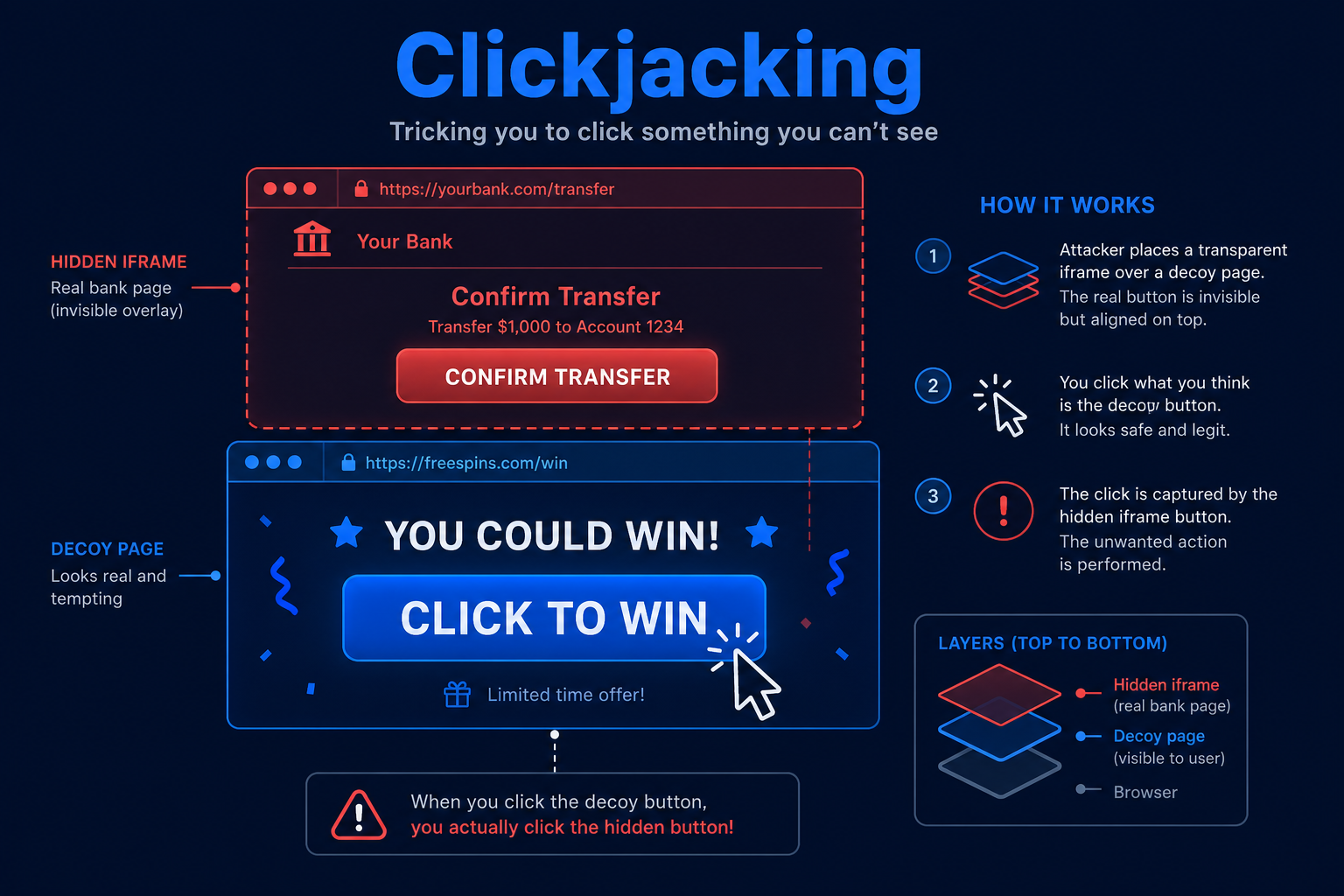
Clickjacking (UI redress) is an attack where a malicious page loads a legitimate site in a transparent or disguised frame and overlays it on decoy content. The victim thinks they are clicking the decoy, but their clicks actually land on the hidden real site.
Imagine a fun "click to win" button on an attacker's page. Invisibly framed on top is your bank's transfer-confirm button, aligned so the victim's click confirms a transfer. The victim sees a game; the browser sees clicks on the bank.
How does Clickjacking work?
Clickjacking relies on framing and visual deception:
- Target Allows Framing
- The victim site can be loaded inside an iframe because it lacks framing protections.
- Attacker Builds a Decoy
- The attacker creates a page with enticing decoy content.
- Transparent Overlay
- The real site is framed on top of the decoy with near-zero opacity and precise positioning.
- Victim Clicks
- The victim interacts with what looks like the decoy but actually clicks the hidden site.
- Unintended Action
- The click performs a sensitive action - confirming a payment, changing settings, or granting access.
Clickjacking does not break the server; it abuses the browser's willingness to frame and overlay content. The defense is telling browsers not to frame your site.
Tools and Techniques for Clickjacking Testing
Testing is largely about whether a site can be framed and whether sensitive actions are reachable.
Manual Testing Methodologies
- Framing Test - Try loading the target inside an iframe on a test page and see if it renders.
- Header Inspection - Check for X-Frame-Options and the frame-ancestors CSP directive.
- Overlay Proof of Concept - Build a simple transparent overlay to confirm clicks reach the framed site.
- Sensitive Action Mapping - Identify one-click actions that would be valuable to hijack.
Automated Scanning Tools
- Burp Suite Scanner - Flags missing framing protections.
- Nuclei - Templates check for X-Frame-Options and CSP frame-ancestors.
- Mozilla Observatory - Reports on framing and other security headers.
- OWASP ZAP - Detects missing anti-framing headers.
Clickjacking Protection Mechanisms
Best Practices for Secure Coding
- Set frame-ancestors in CSP
- Description: Use the Content-Security-Policy frame-ancestors directive to control who may frame your site.
- Benefits: The modern, flexible defense against framing.
- Implementation Tip: Use frame-ancestors 'self' or an explicit allowlist.
- Send X-Frame-Options
- Description: Add X-Frame-Options for older browser coverage.
- Benefits: Defense in depth alongside CSP.
- Implementation Tip: Use DENY or SAMEORIGIN as appropriate.
- Confirm Sensitive Actions
- Description: Require explicit confirmation or re-authentication for high-impact actions.
- Benefits: A single hijacked click is not enough.
- Implementation Tip: Add re-auth or a CSRF-protected confirmation step.
Best Practices for Organizations
- Default Headers
- Apply anti-framing headers across all apps by default.
- Bake them into the standard web server configuration.
- Header Monitoring
- Continuously verify security headers in production.
- Alert when protections are missing.
- Testing
- Include framing tests in security reviews.
- Re-check after front-end or CDN changes.
Top Clickjacking payloads used by Security Researchers
As a security researcher, knowing the most common payloads helps you detect and prevent these attacks. Use this knowledge ethically and only on systems you are authorized to test. Some sample payloads are shown below.
<!-- Basic clickjacking proof of concept -->
<style>iframe{opacity:0.0001;position:absolute;top:0;left:0;width:100%;height:100%}</style>
<button>Click to win!</button>
<iframe src="https://target.com/account/delete"></iframe>
// Defense: Content-Security-Policy header
Content-Security-Policy: frame-ancestors 'self'// Defense: X-Frame-Options header
X-Frame-Options: DENY// Quick framing test
<iframe src="https://target.com" width=800 height=600></iframe>Real-World Example: One-Click Account Action Hijack
A web app exposed a one-click "delete account" confirmation and sent no anti-framing headers.
An attacker built a page with a tempting button and framed the app's delete-confirm page invisibly on top. Victims who clicked the decoy unknowingly confirmed deletion of their own accounts.
The fix added Content-Security-Policy: frame-ancestors 'self' and X-Frame-Options: DENY, plus a re-authentication step for destructive actions. Clickjacking is cheap to launch and cheap to prevent - the headers cost nothing and stop it cold.
Vulnerable and secure code of Clickjacking
The following example shows the contrast between vulnerable and secure code for Clickjacking. It helps you see how the flaw creeps into real code and the changes that shut it down.
🥺 Vulnerable Code:
# Vulnerable: no anti-framing headers, so the page can be framed
HTTP/1.1 200 OK
Content-Type: text/html
# (no X-Frame-Options, no CSP frame-ancestors)

# Attacker page overlays this site invisibly:
<style>iframe{opacity:0.0001;position:absolute;top:0;left:0;
  width:100%;height:100%}</style>
<button>Claim your prize</button>
<iframe src="https://bank.com/transfer/confirm"></iframe>- Without framing protection, any site can load the page in a transparent iframe.
- Clicks on the decoy are delivered to the hidden, real confirmation button.
😎 Secure Code:
# Secure: send anti-framing headers on every response
HTTP/1.1 200 OK
Content-Type: text/html
Content-Security-Policy: frame-ancestors 'self'
X-Frame-Options: DENY

# Express example:
app.use((req, res, next) => {
  res.setHeader("Content-Security-Policy", "frame-ancestors 'self'");
  res.setHeader("X-Frame-Options", "DENY");
  next();
});- frame-ancestors 'self' stops other origins from framing the site.
- X-Frame-Options: DENY adds coverage for older browsers.
Conclusion
Clickjacking turns the browser's own framing features against your users, but the defense is refreshingly simple. Send frame-ancestors via Content-Security-Policy and X-Frame-Options on every response, and require explicit confirmation or re-authentication for high-impact actions. A few headers, applied by default across all your apps, take this entire attack off the table.